Messages 101: How to Enable & Disable Read Receipts for iMessages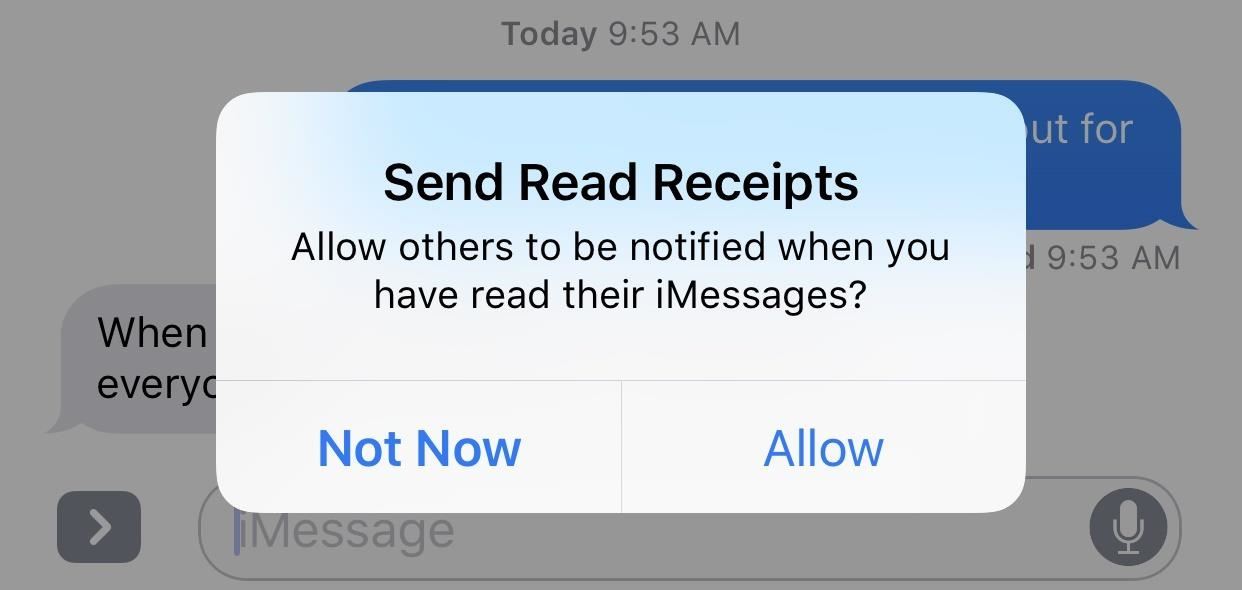
If you've accidentally turned on "Read Receipts" for all of your iMessages, there's an easy way to disable it so that no one knows when you're actually reading their incoming messages. You could also pick and choose which conversations can see that you've read their messages if you don't want to kill the feature entirely.Read Receipts has been a feature for iPad, iPhone, and iPod touch ever since iOS 5 when the iMessage platform was first introduced. It has always been an opt-in setting, so you never really had to worry about people being notified that you've read their iMessages. However, it's very easy to enable this setting and forget it.If you have not already opted into Read Receipts, Apple will give you prompts occasionally to turn it on. It's very easy to tap "Allow" on this if you're in a hurry, without thinking twice about what it means. With it on, every time you read somebody's iMessage in the Messages app, they will receive a "Read" notification underneath what they sent you on their end. Also, while they won't get a "Read" stamp when you read their iMessage on a lock screen preview or in your Notifications View (Recent Notifications in iOS 11), if you use 3D Touch to expand the messages, they will know that you've read it. Opening an iMessage using 3D Touch on your lock screen (left, middle) will show as "Read" in their Messages app (right). Truthfully, when you think about it more in depth, Read Receipts aren't all that bad. Carrie Dennis of Thrillist is actually a strong supporter of Read Receipts because she believes they keep you honest and accountable. They also can cut down on all that time you spend overthinking your responses and reassure the recipient that you're not totally ignoring them. Still, for most of us, privacy will reign supreme and we'll want to opt out of this feature asap.Don't Miss: Everything You Need to Disable on Your iPhone for Maximum Security
How to Opt In/Out of Read Receipts for All iMessagesEnabling or disabling this option is easy. Just go to "Messages" in your Settings app, then toggle on or off "Send Read Receipts." If you don't see this option, it's probably because you don't even have "iMessage" turned on at the top of this page and are strictly messaging with SMS instead, which is not supported. In that case, you have nothing to worry about (except the fact that you're not using iMessage!).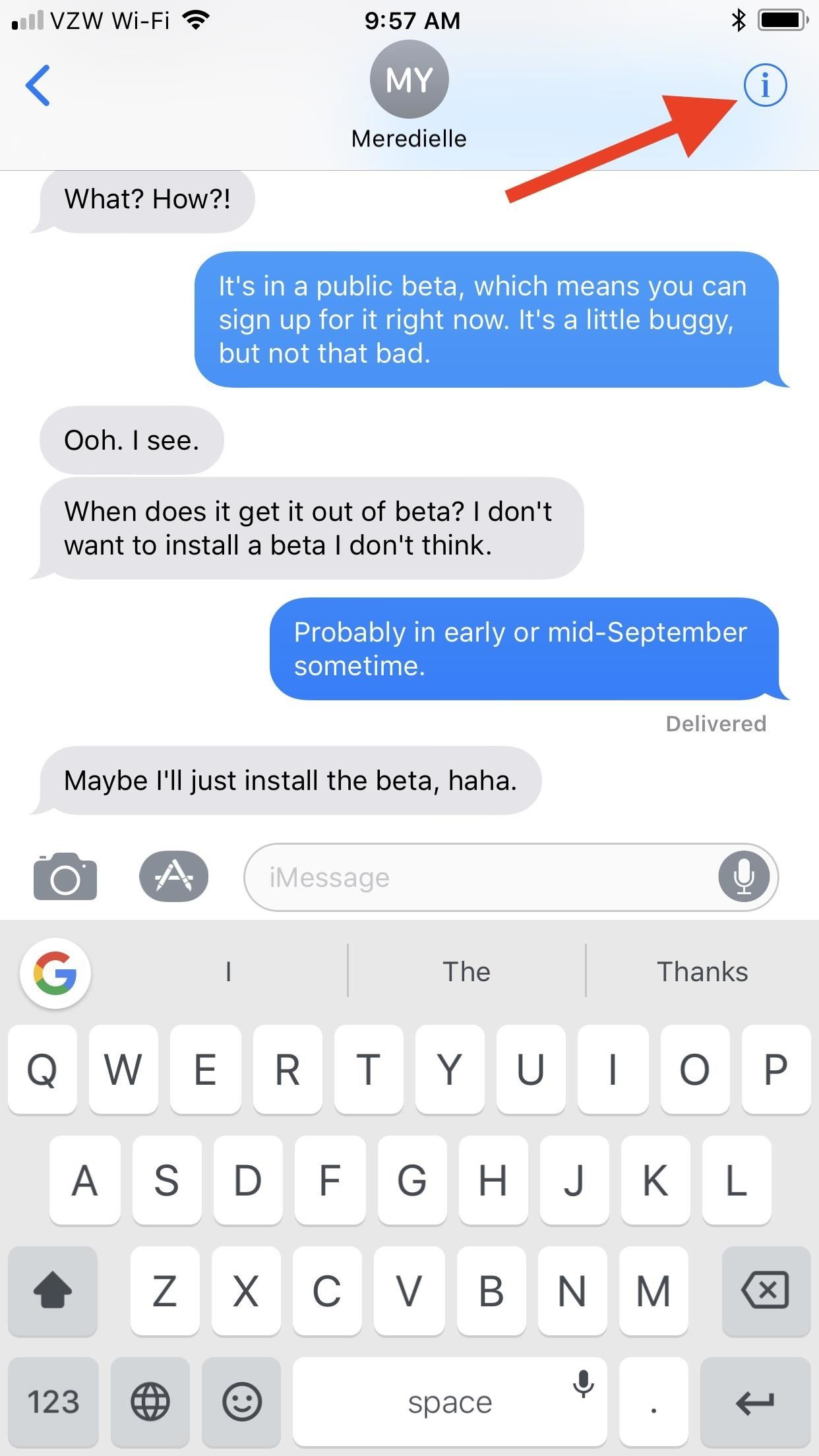
How to Enable/Disable Read Receipts IndividuallyTurning Read Receipts on or off completely has worked the same ever since iOS 5, but iOS 10 brought a new option that lets you turn Read Receipts on or off on a case-by-case basis. This way, you can turn it off across the board but go back and select people that you actually want to see that you've read their messages. Or, you can turn it on for everyone and disable it for individual contacts.To do this, in the Messages app, select a conversation thread, then tap on the "i" (info) button in the top right. Next, toggle on "Send Read Receipts" and hit "Done."More Information: How to Turn iMessage Read Receipts On/Off Per Person If you don't see this option, it's either because it's an SMS thread, not an iMessage thread, or because it's a group chat, which also doesn't support Read Receipts.Note that if you turn on Read Receipts for individual contacts, then go into your main Messages settings and toggle "Send Read Receipts" on for everybody, then decide to turn it off again, Messages won't remember your individual contact settings, so you'll have to redo them all. Likewise, if you've turned off individual contacts when the main setting is on, then go back and turn off Read Receipts for everyone and turn it back on, it won't remember individuals you wanted it off for.Don't Miss: 8 Great New Messages Features in iOS 11 for iPhoneFollow Gadget Hacks on Facebook, Twitter, Google+, YouTube, and Instagram Follow WonderHowTo on Facebook, Twitter, Pinterest, and Google+
Cover photo and screenshots by Justin Meyers/Gadget Hacks
Your iPhone's Lock Screen Is Getting Better Widgets
How to Make a Clothespin Gun. Making a simple, ordinary household clothespin into a miniature weapon is easy, quick and fun. With the help of just a few supplies, you can create a gun that launches toothpicks or matchsticks with
How to Make a Mini Gun - (Clothespin Pistol) - video dailymotion
محول الصوت Razer Phone هو جهاز DAC 24 بت معتمد من THX يقيس ما يصل إلى 300 أوم (كلما كانت مقاومة أعلى ، زادت الطاقة المطلوبة بواسطة الهاتف الذكي لتوفير مستويات صوتية أعلى وعادة ما توجد في سماعات أذن أفضل).
2018 Gift Guide: Must-Have Phone Accessories for Audiophiles
How to Lock an iPhone Touch Screen During Phone Calls by Todd Bowerman The iPhone's touch screen is designed to react to the lightest touch of your finger, which is great when you're navigating apps but not quite as useful when you're trying to talk on the phone.
How to Lock Your iPhone or iPad During FaceTime
Click Order Status > Check Order Status. Follow the on-screen instructions to check order status or track shipping. Check your order from the T-Mobile App Open the app. If you don't have it, download it now. Scroll to and tap Track shipment to get the latest update on the location of the package.
iPhone X Now Shipping - Here's How To Get Tracking Info Early
A computer running Windows, macOS or Linux; Ad-hoc Wifi network created by your computer/laptop or a portable router; Enable Hotspot tethering on iPhone without your carrier knowing Installation. Step 1 Connect your iPhone to your computer or laptop. Step 2 Open Cydia Impactor and ensure it recognizes your device.
Download Redsnow to Jailbreak iPhone, iPad and iPod. Progeeks has made this webpage dedicated for Redsnow and latest step-by-step tutorials to jailbreak your iPhone, iPad or iPod touch using Redsn0w. This will help you to directly download the jailbreak application to your PC along with the user guide to safely jailbreak your iOS device.
RedSn0w Jailbreak Tool Guide For iPhone, iPad, iPod Touch
How To: 10 Ways to Trick Your Android Phone into Using Less Data How To: Find Your Missing Android Phone, Wipe It Clean, Disable USB, Capture Thief Selfies, & More Android Basics: How to Prevent Going Over Your Monthly Data Limit
Find, Lock, & Wipe Your Missing Android Phone with Theftie
The 5 Best Phones for Social Media Addicts « Smartphones
Install and Configure a Subtitle Viewer for Kodi. Most Korean shows and movies featured in Kodi add-ons come with subtitles built into the video. You won't have to worry about the text falling out of alignment or not displaying on certain devices, just start the stream and enjoy.
In this video tutorial, viewers learn how to sync contacts between a Mac and Windows mobile device. Users will need to download and install the program, Sync Mate 2. Begin by opening the program and connecting the device to the computer. Under Synchronization in Plug ins, check the Contacts box
How to Sync Your Data Across Multiple Devices
Android Mods; How to Convert a Micro SIM Card to a Nano SIM Card (Template Available) How to easily cut down your Micro SIM card to fit in a Nano SIM card slot on the Nexus 6 or any other Nano SIM device (3FF to 4FF).
How to Convert your SIM card to ANY Size - YouTube
If you would like to make the stock AccuWeather widget transparent on your Samsung Galaxy S4, you can simply do that with the transparent AccuWeather widget created by an XAD a developer Reverepats.
Get the Note 4's Weather Widgets on Your Galaxy S5 « Samsung
How to Install a Custom ROM on Your HTC One for a Completely
WiFi Prank: Use the iOS Exploit to Keep iPhone Users Off the Internet How To: Everything You Need to Know About Apple's New iOS 7.1 Beta 5 for iPad, iPhone, & iPod Touch How To: Get iOS 5 for Your Apple iPad, iPhone or iPod Touch
How to Keep Comcast from Using Your Router as a Wi-Fi Hotspot


0 comments:
Post a Comment