How To: Get a Real System-Wide Dark Mode on Your iPhone for Less Battery Drain & More Night-Friendly Views
A universal dark theme has long been one of the most sought-after features we've been urging Apple to introduce for iOS. While this wish went unfulfilled with iOS 12, there's renewed hope that it'll finally touch down with iOS 13's arrival. The jailbreak community, however, has had this functionality available for quite some time, and you can too if you're running the right iOS version.Dark mode tweaks like Guillermo Moran's venerable Eclipse series of apps have been around since at least iOS 7. And thanks to constant updates, Eclipse supports iOS 12.x versions and fully works on OLED-based devices, meaning the iPhone X, XS, and XS Max. Since the Eclipse tweak has overgone years or hard work, it does cost $1.49, which helps support future enhancements.Granted, you can forgo buying Eclipse 12 — the latest version of Eclipse — and take advantage of Smart Invert to mimic a dark mode on your iPhone instead, but the feature can invert colors that shouldn't be for a less-than-desirable look. Or you can wait for a system-wide dark mode to officially arrive when the next major iOS iteration touches down — if it even happens.Don't Miss: Jailbreak iOS 12 to iOS 12.1.2 on Your iPhone For now, using a tweak like Eclipse 12 is the best option you have in terms of getting a battery-saving dark theme on your iPhone. Since OLED displays use up less energy by turning off pixels where black appears or by using less of the RGB spectrum for grays, it's easy to see how this could save power. But this tweak could also help save a little bit of energy on LCD models like the iPhone XR or iPhone 8.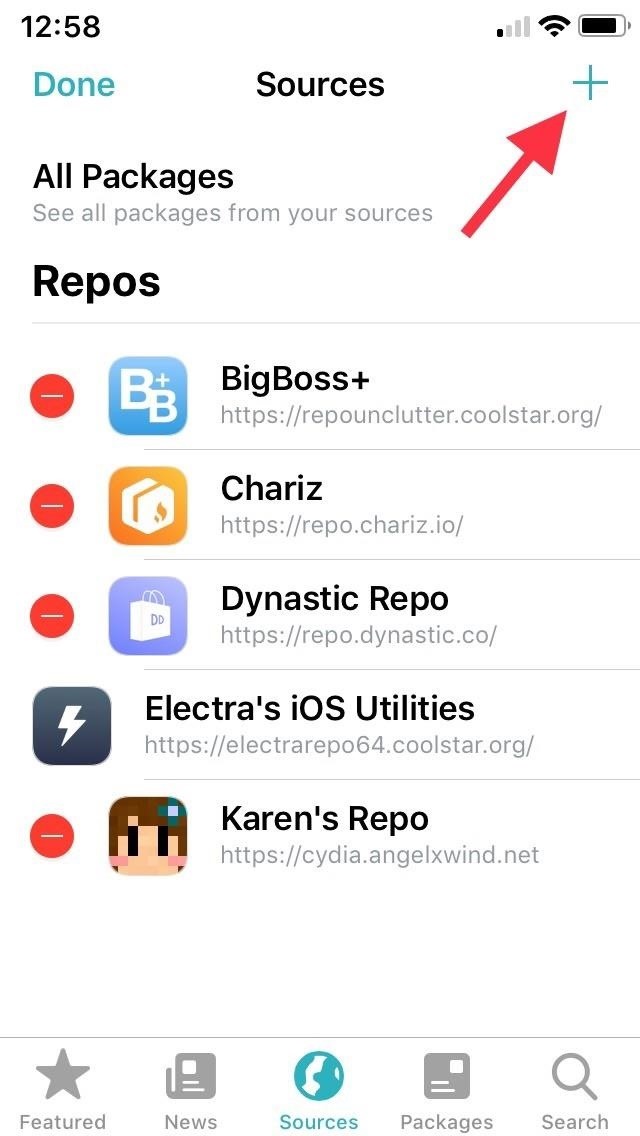
Step 1: Add the Packix RepoEclipse 12 is not located natively in either Cydia or Sileo, so you need to connect its external repository. To do so, add repo.packix.com to your list of "Sources" in either app. If you need more help, we have more detailed instructions for adding repos:More Details: How to Add Outside Repos to Cydia More Details: How to Add Outside Repos to Sileo If you install the repo in Cydia, it won't automatically show up in Sileo, and vice versa. You'll need to manually add to both if you both regularly. Adding a repo in Sileo. The process is basically the same for Cydia.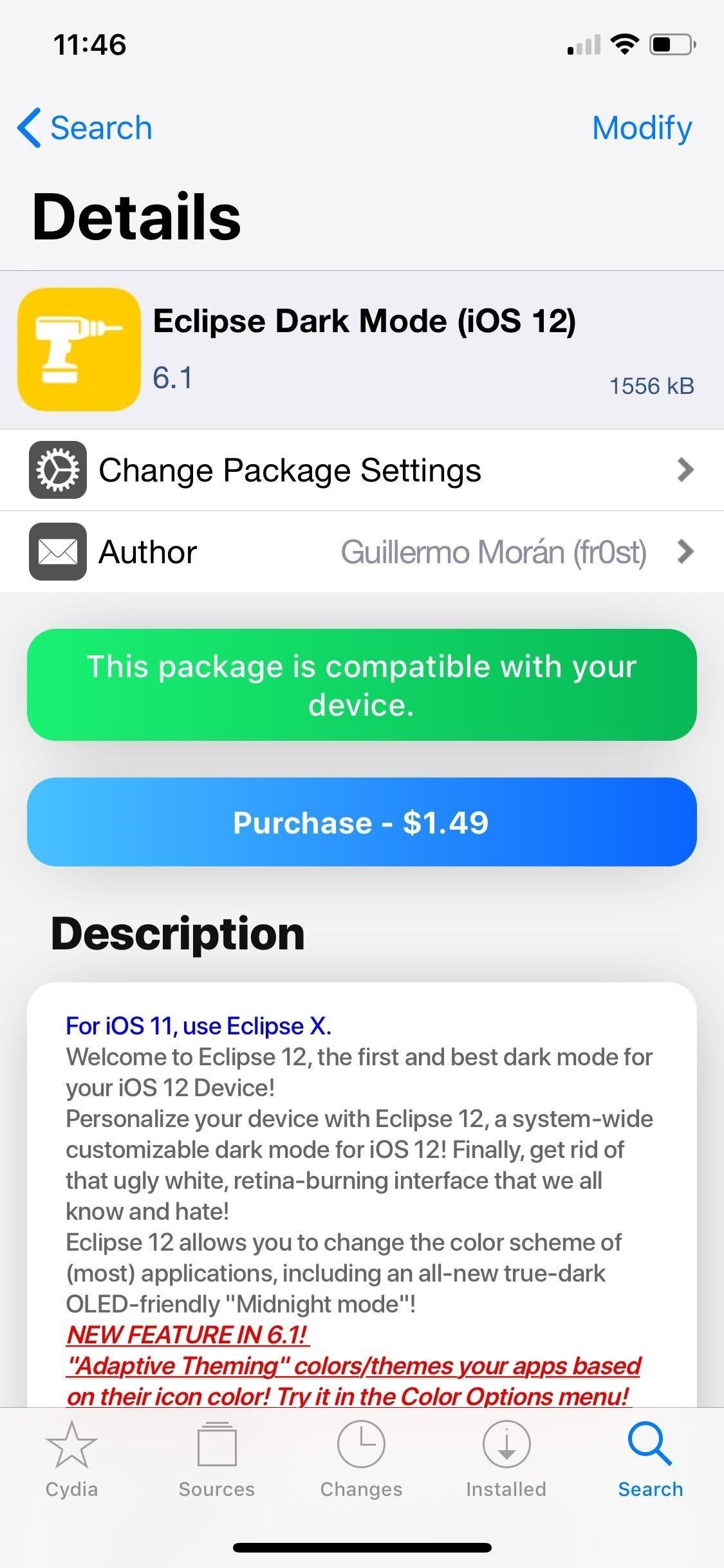
Step 2: Purchase Eclipse 12Now, search for and select Eclipse 12 in Cydia or Sileo, whichever you added it to. On Eclipse 12's details, tap on the blue "Purchase" button, and follow the prompts in the in-app browser to pay using PayPal. To learn more about buying tweaks from inside Cydia or Sileo, we have more detailed instructions:More Details: How to Purchase Tweaks in Cydia More Details: How to Purchase Tweaks in Sileo Once you've successfully paid for Eclipse 12, you'll be automatically transferred back to the Packix webpage to complete an additional step.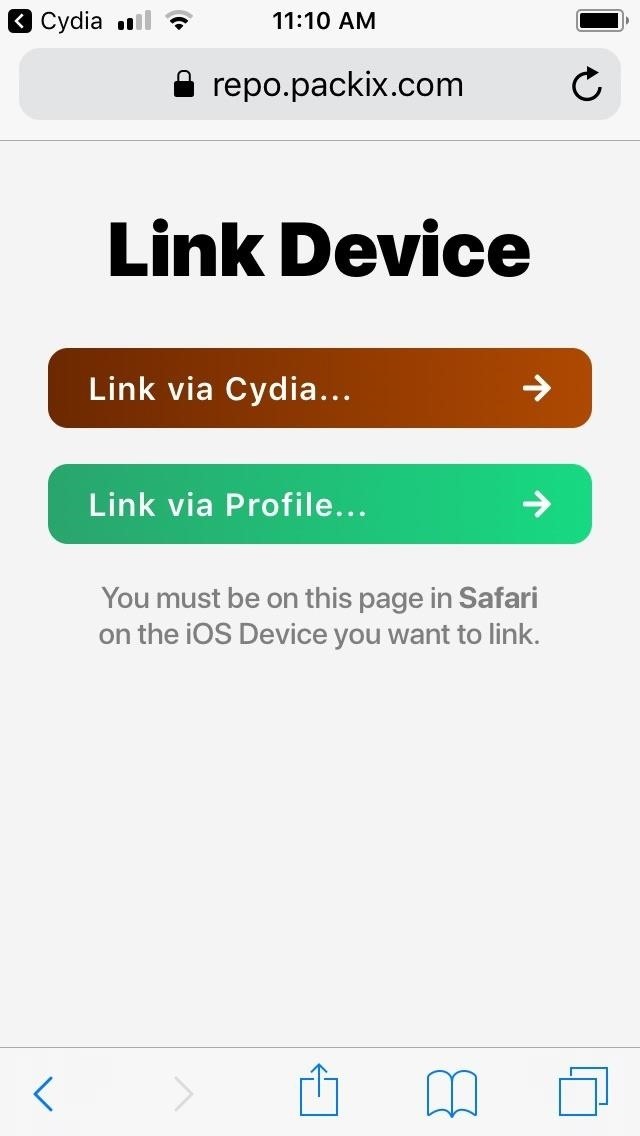
Step 3: Register & Link Your iPhoneYou'll need to verify your recent purchase and link your iPhone with Cydia or Sileo in order to install Eclipse 12. On the Packix webpage, select the green "Link via Profile" button, and tap on "Allow" from the confirmation prompt to begin installing a configuration profile. You'll be redirected you to the Settings app. Tap on "Install" in the upper right, then tap on it again on the following page to confirm. Afterward, you'll be taken to Packix's webpage for one last time to verify your device's linked status to the tweak you just bought.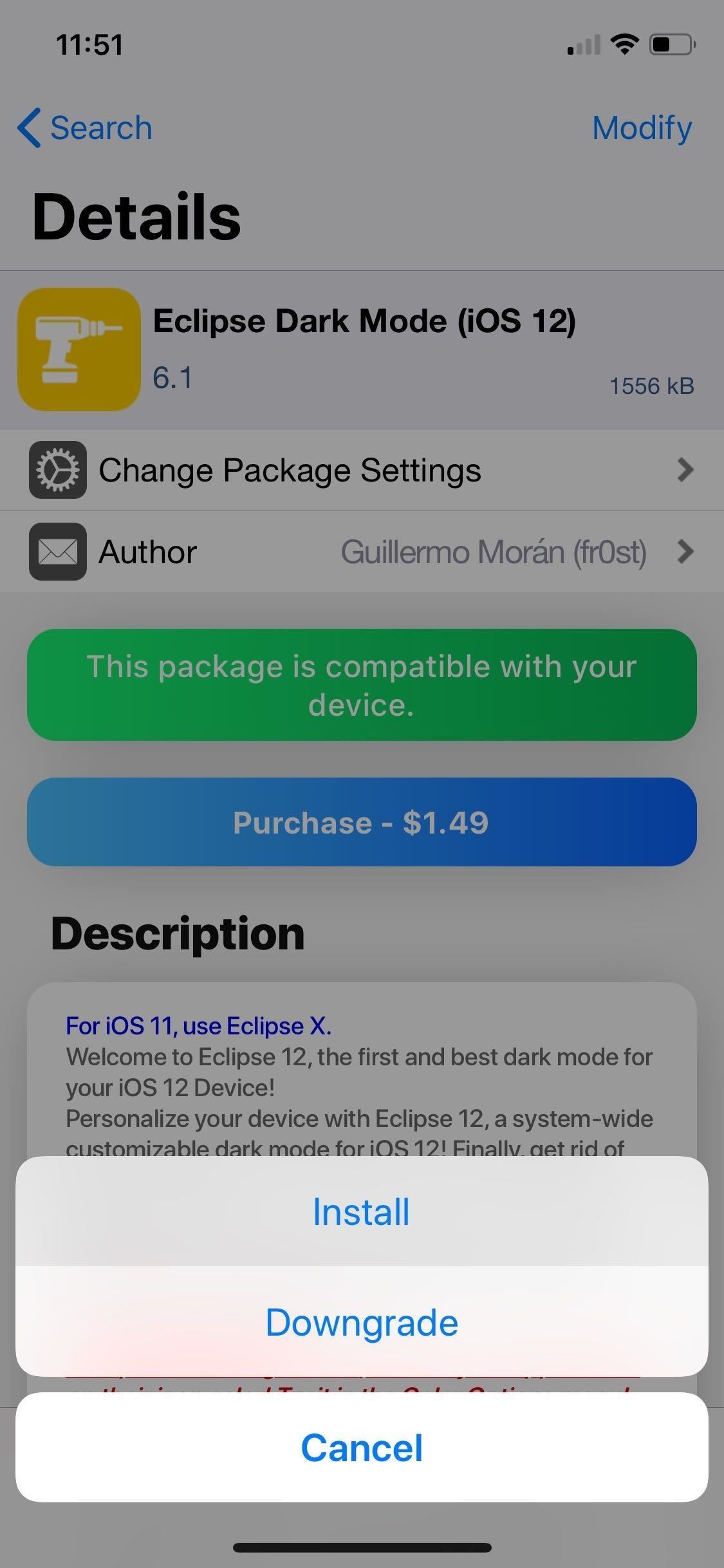
Step 4: Install Eclipse 12With Eclipse 12 paid for and verified, you're now free to go back to the tweak's details page within either Cydia or Sileo and proceed with the installation. Hit "Modify" (Cydia) or "Get" (Sileo), and tap on either "Install" on the menu that appears in Cydia or "Confirm" after revealing the "Queued" card in Sileo. Allow the tweak a minute or two to install, then hit "Restart SpringBoard" to wrap up.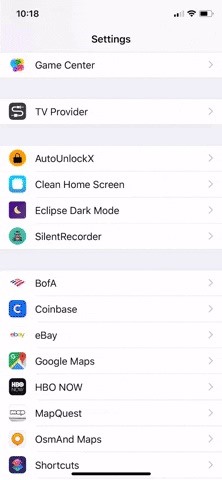
Step 5: Use Eclipse 12 for Standard Dark ModeOnce your iPhone resprings, you'll find that Eclipse 12 isn't on by default. To turn the tweak on, you'll need to tap on "Eclipse Dark Mode" within the Settings app, then turn on the toggle next to "Enable Eclipse." From there, select "Applications" and choose which apps you want with a dark theme by enabling their corresponding toggles. Next, select "Back" and tap on "Reload Springboard" to respring your iPhone and apply the changes.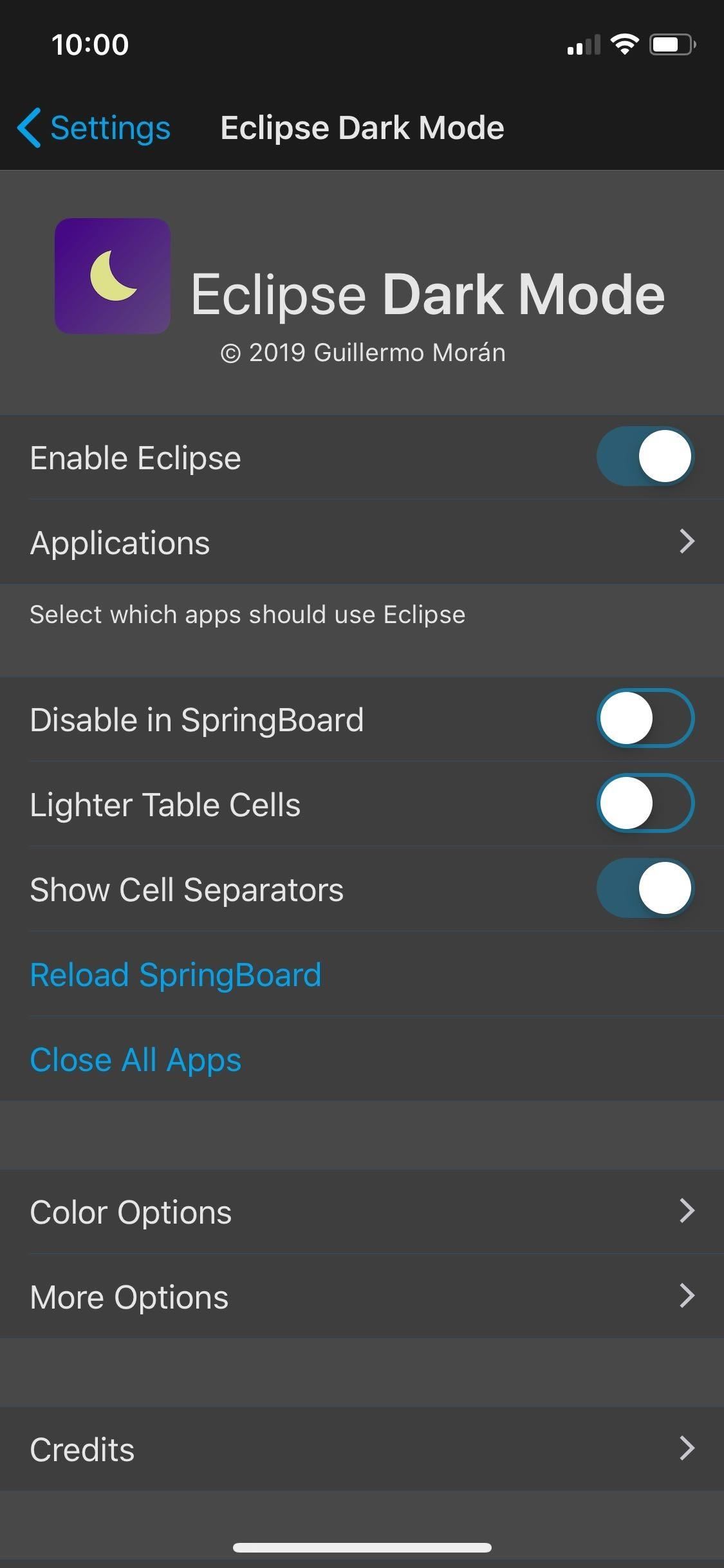
Step 6: Customize Eclipse 12 (Optional)If you want to dig a little deeper and further customize your iPhone's appearance, however, Eclipse 12 also provides a slew of options to make your iPhone truly stand out. For one, the tweak gives your around 18 varieties of dark themes to choose from, such as Graphite, Crimson, and Dusk, to name just a few. (1) Graphite. (2) Crimson. (3) Dusk. If those weren't enough, you could go inside the tweak's "Color Settings" page to customize various UI elements like "NavBar Color," "Statusbar Color," and more. Beyond those, Eclipse 12 also features "Adaptive Theming" which colorizes apps to reflect their icon's colors, while providing various shades of gray for apps that have white as their predominant color. Adaptive Theming applied to Messages, App Store, and Calendar. In all, there's a wide array of options that you can play with to completely personalize the look of your iPhone's interface. You can even apply a dark theme to websites by toggling "Website Dark Mode" on within the "More Options" page, though, the feature is still in its beta stages and can vary in effectiveness from site to site. Don't Miss: More Cydia Tips & Tricks for All Your Jailbreaking NeedsFollow Gadget Hacks on Pinterest, Reddit, Twitter, YouTube, and Flipboard Sign up for Gadget Hacks' daily newsletter or weekly Android and iOS updates Follow WonderHowTo on Facebook, Twitter, Pinterest, and Flipboard
Cover image, screenshots, and GIFs by Amboy Manalo/Gadget Hacks
News: The Real Reason Android Phones with Notches Have a Chin News: T-Mobile Galaxy S8 Update Breaks SafetyNet & Android Pay News: Nexus 6P Bootloop Nightmare Turns Your Phone into a Fancy Paperweight How To: Just Got a New Android Phone? Here's All the Apps & Info You Need to Get Started
How to Wake the Screen on Your Nexus 6P with a Double-Tap
Canadian mobile phone maker Research In Motion has recently announced the launch of its BlackBerry Pearl 3G smartphone in India. and media keys. At the same time, it includes a 3.2-megapixel
BlackBerry Pearl 8100 Smartphone - The Gadgeteer
This feature is great if you have your phone in a dock while you work at a desk, or if the Pixel is just in your peripheral view at any given time. This feature is enabled by default, but you do have the option to go in and disable it if you find it annoying and/or you want to save a bit of battery life. Pixel Ambient Display
How to turn on Ambient Display on Google Pixel 3 XL [Guide]
Top Gray Hat SEO Techniques to Uplift Your Website Rankings; Black Hat SEO techniques to Avoid at All Cost in 2019; Final thoughts about white hat SEO techniques in 2019. If you want to increase your search traffic, using White hat SEO techniques can really help.
White Hat SEO: The Definitive Guide (2019) - Backlinko
Safari gets quite an upgrade in iOS 11. There are visual changes, new useful features for reading articles and underlying technology changes. Here's how you can use all the new features in Safari in iOS 11.
The 10 most exciting hidden iPhone features in iOS 13 - BGR
Lookup IP Address Location. If you can find out the IPv4 or IPv6 address of an Internet user, you can get an idea what part of the country or world they're in by using our IP Lookup tool. What to do: Enter the IP address you're curious about in the box below, then click "Get IP Details." Read the information below for an explanation.
How to Track the Original Location of an Email via its IP Address
In late-2017, Snapchat debuted Lens Studio, a way for anyone to create their own augmented reality "world lenses" that can be shared to anyone with a Snapchat account.If you don't mind spending money, you can even create custom face lenses and basic overlay filters for special events.
Create Your Own Filters & Lenses • Snapchat
2019 Gift Guide: Must-Have Phone Accessories for Photographers . By Justin Meyers; Smartphones; Photography; 2019 Gift Guides; With smartphone cameras and software getting better and better every year, more and more users are getting passionate about photography.
2018 Gift Guide: Must-Have Phone Accessories for Audiophiles
In this Electronics video tutorial you will learn how to add music from your computer to your Droid. Connect the USB cord to the device and connect the other end to your computer. Now go to the top and scroll down the notifications and click on ‘USB connected’. It will ask you whether
How to Transfer Ringtones to Samsung Android Phones?
Apple released the third public beta for iOS 12.4 on the afternoon of May 28. The update arrives roughly three hours after Apple published 12.4's third developer beta, and eight days after 12.4 public beta 2.
iOS 12.1 beta arrives with ChargeGate fix, dual-SIM support
How to charge Apple Watch without charger? Except the charging cable comes with the Apple Watch, people also found other ways to charge their watch without this charger. Slide off the Apple Watch's bottom band, peek into the connection slot and you'll find there is a hidden port that Apple doesn't acknowledge to public. One accessory
Use Nightstand mode on your Apple Watch - Apple Support


0 comments:
Post a Comment