How To: Re-Enable Copy & Paste on Annoying Sites That Block It

How To: Re-Enable Copy & Paste on Annoying Sites That Block It
Copy and paste keyboard shortcuts are beautiful gifts from the gods, and any website that blocks such an offering can burn in hell. But really, Cmd+C and Cmd+V (Ctrl+C and Ctrl+V for Windows folks) are second nature to most of us, so it's very frustrating when sites like PayPal don't let us use them.Thankfully, if you're a Firefox user, you can permanently enable copy/paste and never have to deal with this inconvenience again.

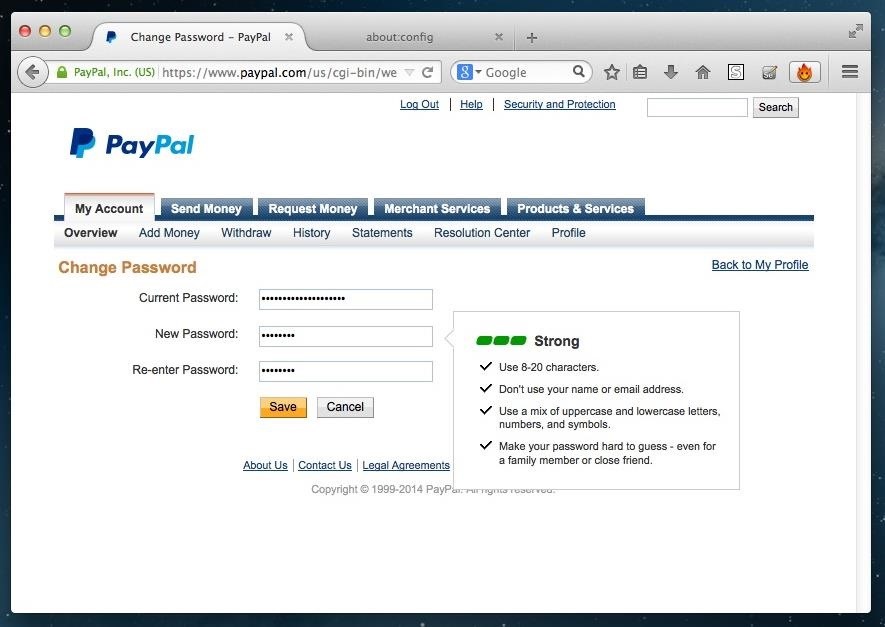
Why Block Copy & Paste Anyway?For security purposes, many financial and banking sites block your ability to copy/paste. For example, when I change my password on PayPal and try to paste my new password into the "re-enter" box, PayPal flashes a warning saying, "Please retype your password. Don't copy and paste it." Cool, I get it. PayPal wants us to be absolutely positive we know our password. However, if you're creating strong unbreakable passwords or entering long strings of numbers, it can get really annoying—really fast.

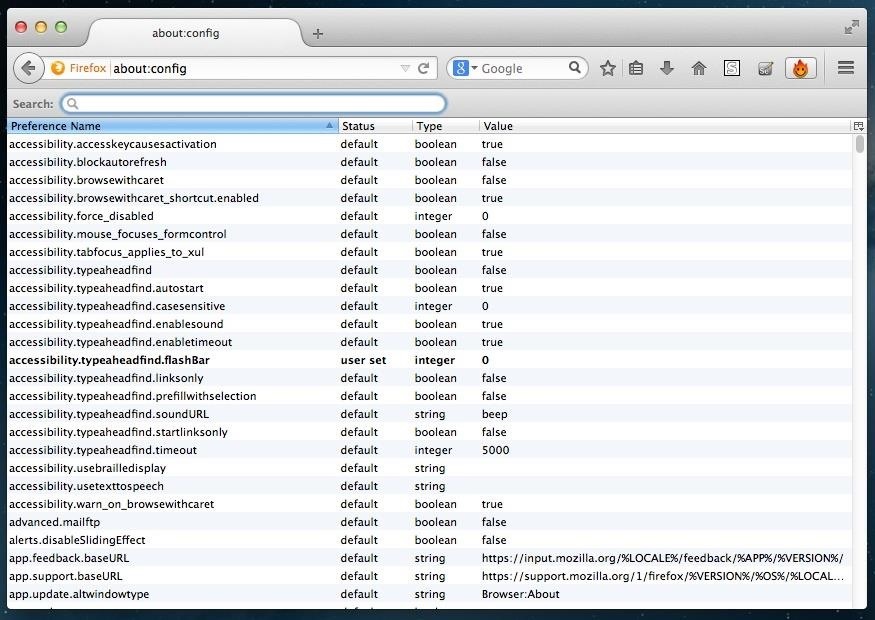
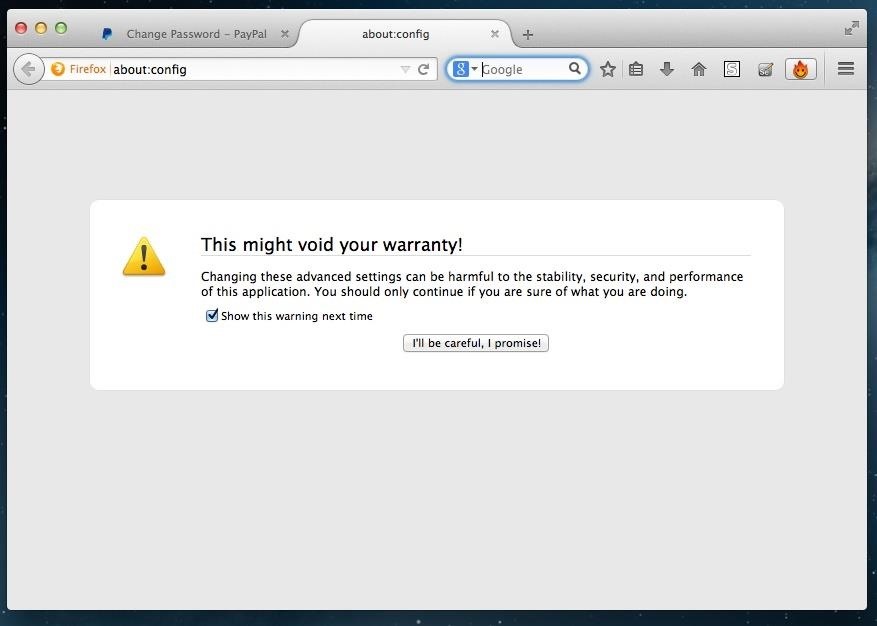
Step 1: Access Firefox's "About:Config" FeatureThere are a number of "secret" Firefox application settings that aren't available to you under Options or Preferences. Although they're held in the prefs.js and user.js files of Firefox's package contents, you can easily view them on your browser by typing about:config into the address bar. Since modifying these advanced configuration settings could potentially jack up your browser, Firefox flashes a little warning asking you to promise to be careful. Just proceed—I know what I'm doing.

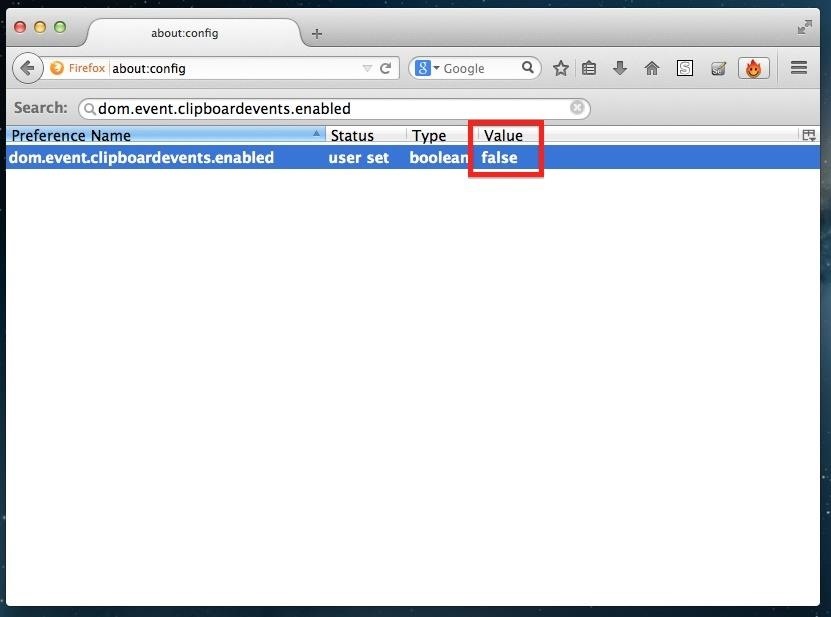
Step 2: Find the Clipboard PreferenceWhen you first enter the about:config settings, you'll notice a list of hundreds of preferences. Don't risk messing anything up and go straight to the target by searching for dom.event.clipboardevents.enabled in the preferences search bar.

Step 3: Turn the Value to FALSEOnce you've located dom.event.clipboardevents.enabled, simply double-click it and you will see its value change from "true" to "false." By making this value false, you are essentially disabling an enabled line of code that allows sites to mess with your clipboard and block the copy/paste functionality.

Thats All! Now Copy/Paste Away!As long as that value remains "false," you should never have any issue copying and pasting long passwords, addresses, account numbers, or anything else that we all hate typing out. You can even use this to copy/paste quotes from some our your favorite blogs and news sites that block you from doing so.
Cover image via Shutterstock

How do you recover or reset your admin password? - Joomla


wikiHow is a "wiki," similar to Wikipedia, which means that many of our articles are co-written by multiple authors. To create this article, 42 people, some anonymous, worked to edit and improve it over time.

Everything You Need to Disable in Windows 10 - Gadget Hacks


Rounded rectangle icons are so 2007. Sure iOS 7 tweaked them a bit, but with the clean new approach to design that software is taking today, they're starting to look dated. Today I'm going to show you how to go full circle with your iPhone's icons, and the results are actually pretty awesome. After
Get Circular App Icons & Folders on Your iPhone's Home Screen


iOS 13 Beta. iOS 13 Beta: Early (Developer) and Late (Public) June 2019. For those daring enough to test unfinished versions of iOS, Apple makes beta versions available to developers on the same day as the keynote (which require a Developer Account, which costs $99). Apple has been offering public betas, which are slightly more stable, since 2016.
Neurable Releases Limited Beta SDK for Brain Control


Learning how to edit your Facebook profile can be tricky because the social network keeps changing the layout and options for entering and displaying each user's personal information. Your profile area on the network has a lot of different components.
Add and Edit Your Profile Info | Facebook Help Center | Facebook


How to Split a Large PDF File. You can break up a large PDF into smaller files in a couple different ways. The easiest way is to simply print ranges of pages in your PDF. In our case we split the file up into two 65 page documents (see Figure 7).
Splitting Zip files - WinZip
kb.winzip.com/help/HELP_SPLITDLG.htm
Splitting Zip files. WinZip ® makes it easy to create Zip files (.zip or .zipx) that are split into smaller pieces of a size that you specify. There are several reasons why you might want to do this, such as: To assist with large downloads. Some users may have difficulty downloading very large Zip files from web sites, FTP sites, etc.
How to Send Large Files Over Email

How to Set a Ringtone for an Android Contact: 8 Steps


News: Thanks to Google, iPhone Users Can Finally Pick a New Frame for Their Live Photos How To: Auto-Change Keyboards on Your Samsung Galaxy Note 2 Based on the S Pen's Position News: Samsung Jumps to Head of Mobile AR Class with Galaxy S10 5G & 3D Depth Sensor, Shows Off AR Concept Video
Create "Frame Within a Frame" Photo Effects on Android

How to Take Screenshots on Android Without Pressing Any


The next time you upload photos or videos to your story they will be automatically added to the archive. You can view the archive stories in the same way we viewed archived posts above. Archived stories don't take up space on your phone as the photos and videos are stored on Instagram's server.
How to automatically save your Instagram Stories forever

Convert Slo-Mo Videos to Regular Speed Directly on Your


How To: Make a cheap lightsaber prop from Star Wars How To: Build a perfect replica of a lightsaber for cheap or expensive How To: Build a double bladed Darth Maul lightsaber using hardware store parts for $15 How To: Build a lightsaber prop for film making
How to Make a DIY Lightsaber Lamp - WonderHowTo


Sempre que você quiser conferir a nova interface do Netflix, basta ir até Apps no painel do Xbox e clicar no Netflix. Você também pode usar o Quickplay no painel. Mas a única maneira de visitar a versão antiga do Netflix é indo ao Guia Xbox, Jogos, Quickplay, na guia Todos e clicando na versão "filmstrip".
Kembalikan ke Aplikasi Netflix Lama di Pembaruan Xbox 360

How To: Set custom wallpapers and ringtones on a Motorola Droid 2 smartphone

How To: Set custom wallpapers and ringtones on a Motorola Droid 2 smartphone
Want to know how to set a custom wallpaper or ringtone on a Droid 2? Whether you're a proud owner of the Moto Droid 2 Google Android smartphone or are merely considering picking one up, you're sure to benefit from this video tutorial, which also takes a look at the Swype typing feature. For more information, including detailed, step-by-step instructions, take a look. Please enable JavaScript to watch this video.


How to Hide "Active Now" on Facebook Messenger. This wikiHow teaches you how to hide the fact that you are online in Facebook Messenger, as well as how to hide the list of your contacts that are currently online.


How to Share & Scan PayPal QR Codes for Faster Transactions When Receiving or Sending Money There are many ways to send and receive money on PayPal. You can use an email address, a phone number, or a PayPal.Me link, but if you're standing right next to the person you're trying to pay or get digital cash from, the easiest way, by far, is to
How to Scan QR Codes in Your Pixel's Camera App « Android


Go to your profile and tap your profile picture or video. Tap Take New Profile Video to take a new profile video or tap Select Profile Picture or Video to choose a video from your phone. Tap Edit to edit your video. Tap Trim to make your video shorter, tap Sound to choose if the sound is on or off or tap Cover to choose a thumbnail for your video.
How to Set a Looping Video as Your Facebook Profile Picture

Skip navigation
How to enable the hidden Dark Mode on Facebook Messenger


Android Oreo Adaptive Icons on Any Marshmallow phone. Following these simple steps, you can get Adaptive Icons on any Android smartphone. All you have to do is choose your preferred type of adaptive icon and you are good to go.
How To Get Android 8.0 Oreo Adaptive Icons Feature On Any Android


How to Transfer Photos from PC to iPad. This wikiHow teaches you how to sync or upload photos from your computer to an iPad using iTunes for Windows. Open iTunes on your PC. You'll usually find it in the Start menu sometimes in a folder
How to use the Photos app on the iPad | Know Your Mobile


In the relatively recent past, a Finnish "miracle" of mobile devices, the Nokia brand, has released a touchscreen smartphone N8. However, how would soundly neither was done, the phone still comes the moment when a user asks how to disassemble "Nokia N8".
Nokia 6 Teardown Repair Guide - Fixez.com - YouTube


The Always Up-to-Date List How To: Get Back the Camera's Missing HDR Button on Your iPhone 8 or 8 iphone camera hack zoom PlusReuse your old iPhone - Smart home controllerSamsung Galaxy Note 8 How To: Which Stores Accept Apple Pay?
Re: Which Stores Accept Apple Pay? The Always Up-to-Date List


To really personalize your HTC 10, you'll need to be rooted — but that can't happen unless you unlock your bootloader. Thankfully, HTC has made it relatively easy to unlock the bootloader on their 2016 flagship. Unlocking your bootloader will make it a breeze to install TWRP, which can then be
How to Unlock HTC One M9 Bootloader - android.gs


Seven different statistical tests and a process by which you can decide which to use. The tests are: Test for a mean, test for a proportion, difference of proportions, difference of two means
How to Choose a Cell Phone | Buying Guide and Tips | Digital


Here is how to easily update and install iOS 10 on your iPhone, iPad, or iPod Touch. Before you update to iOS 10 make sure to backup your device either with iCloud or iTunes.
How to get iOS 9 on iPod touch 4g and iPhone 3GS and iPad 1

How to Install TWRP Recovery on OnePlus 6 • Android Jungles


Stripping your photos of EXIF metadata is one easy way you can protect your privacy online, and this tool makes it easy for you to do just that on your Android device. If you know other apps or techniques that help to remove identifiable information while sharing photos online, do share them with us in the comments section.
How To Scrub GPS Data From Your Photos; Or - Popular Science

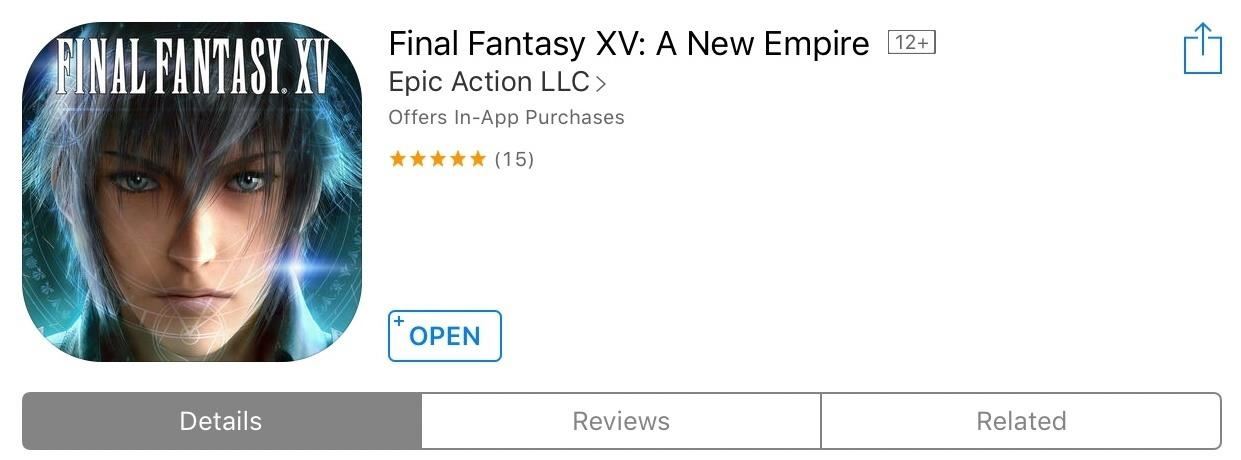
Gaming: Play 'Final Fantasy XV: A New Empire' on Your iPhone or Android Before It's Officially Out

Gaming: Play 'Final Fantasy XV: A New Empire' on Your iPhone or Android Before It's Officially Out

Final Fantasy XV, the latest release in the long-running Final Fantasy franchise, has been a massive success, shipping around 6 million copies worldwide in less than two months. Final Fantasy XV: A New Empire is a mobile game based off this popular console iteration, and has surfaced in New Zealand for download.Until now, mobile-based Final Fantasy games had always been direct ports of their console counterparts, like Final Fantasy VI, VII, and Final Fantasy Tactics, to name a few. Final Fantasy XV: A New Empire completely breaks this mold in that it's the first in the franchise to focus on empire building, which brings it more in line with the very popular Clash series of multiplayer conquest games for Android and iOS. There's no word yet from Epic Action, the game's developer, as to when Final Fantasy XV: A New Empire will be released globally, but we'll keep you updated if we hear anything. In the meantime, if you want to get an early start on building up your kingdom before anyone else, here's how to install Final Fantasy XV: A New Empire on your iOS or Android device regardless of where you're located.

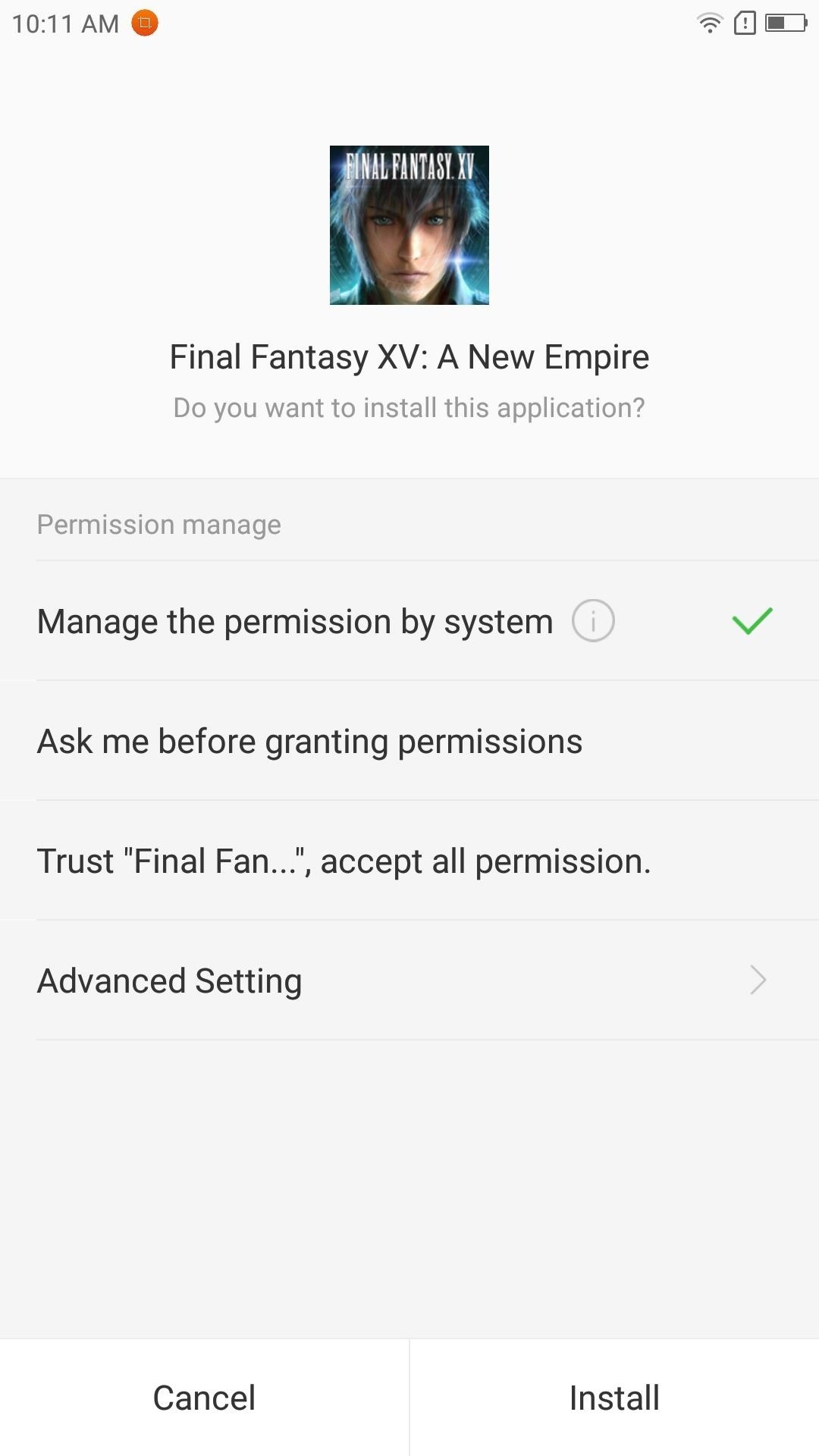
Install the Game on AndroidFinal Fantasy XV requires Android 4.4 or higher, but aside from that, installing the game on Android is pretty straightforward. First, make sure "Unknown sources" is enabled in Settings, then grab the APK installer file from the following link. From there, just tap the Download complete notification, then press "Install" when prompted, and you'll be ready to try it out.Download Final Fantasy XV: A New Empire for Android (.apk)

Install the Game on iOSYour iPad, iPhone, or iPod touch will need to be running at least iOS 9 to support Final Fantasy XV: A New Empire. On top of that, the App Store's region restrictions will need to be bypassed in order to download the game. To do this, you'll need to create an Apple ID with an address based in either Australia or New Zealand, since these are the countries where the game has been soft launched already.Once you've created an Apple ID with a realistic home address in one of the above countries, you'll need to sign into that new account on your iOS device before you can download the game from that country's version of the App Store. If you'd like more help with that entire process, just head to the following link.Don't Miss: Change Your App Store Country to Download Region-Locked Apps & Games on Your iPhoneAfter you've set all that up, you'll be free to download and install Final Fantasy XV: A New Empire just like you would any other app or game. Simply do a search for the game in the App Store, or just head to one of the following links to download it.Install Final Fantasy XV: A New Empire from the iOS App Store (New Zealand) Install Final Fantasy XV: A New Empire from the iOS App Store (Australia) Remember that Final Fantasy XV: A New Empire is still in beta, so you may experience some minor issues while playing. In our testing, the game ran perfectly fine on an iPad Pro running iOS 10.3, and a Lenovo Zuk Z2 Pro running Android Marshmallow, but stayed frozen when opened on an iPad Mini 1st generation on iOS 9.3.5. As always, feel free to post your comments down below and let us know what you think of Final Fantasy XV: A New Empire.Don't Miss: The 3 Best Gaming Phones RankedFollow Gadget Hacks on Facebook, Twitter, Google+, and YouTube Follow Android Hacks on Facebook, Twitter, and Pinterest Follow Apple Hacks on Facebook, Twitter, and Pinterest Follow WonderHowTo on Facebook, Twitter, Pinterest, and Google+
Cover image and screenshots by Amboy Manalo/Gadget Hacks

Gear 360 VR Camera Set to Accompany Galaxy S7; Announcement


How To: Limit the Volume Level on Your iPad, iPhone, or iPod touch How To: Shut Down & Restart the iPhone X How To: Auto-Lower Music Volume Gradually on Android to Drift Off to Sleep More Peacefully How To: Enter DFU Mode on an iPhone X S, iPhone X S Max, or iPhone X R in iTunes
Increase Your iPhone's Volume by 14 dB with This DIY


In today's video, we're showing you how to completely reformat your Mac back to factory settings without the need for a recovery disk or drive. Check out the video above to see how!
How to Reformat / Reinstall OS X without Recovery Disk or DVD


RUU stands for ROM Update Utility. It is basically the executable file on your PC that flashes the OEM (Sprint/HTC) version of Android 2.1 onto your Sprint HTC Hero. Even after you have rooted your handset you can run the RUU and get the stock Android 2.1 back like a clean slate.
How to Root Your HTC Hero for Sprint - Sprint Community


News: OnePlus 3T Isn't Much of an Upgrade, OnePlus 5T Comes with Bezel-Less Display, Face Unlock, Upgraded Install ColorOS's Camera on Your OnePlus One for
OnePlus 5T top features you should know: Face Unlock, Gaming


Este é para qualquer um que ama piadas práticas ou Halloween, que é todo mundo, certo? A premissa desse susto digital é muito simples e usa apenas dois recursos de uma máquina Windows: arquivos em lote e agendamento de tarefas. Muito do sucesso disso dependerá da sua criatividade e / ou da sua capacidade de desenhar imagens em ASCII.
The Rocket Box's Profile « Wonder How To


People who are very new to Jailbreaking, they might or might not heard of Installous which is one of the best app that you can install using Cydia and it will let you download all the official iOS apps (Paid or free) for completely free. In this tutorial, we will look into a complete guide on How to install Installous using cydia.
How to Install Installous (with Pictures) - wikiHow


Instagram Stories FAQ: How to Add, Archive, See, and Other Questions Answered you record a video that automatically zooms in on an object and plays a dramatic your pick from archived
How to Add Song Lyrics to Playing Music in Your Instagram


How to Disable Heads-up Notification without Root Brian Umoh HeadsOff will disable all Lollipop Heads-up notifications on your phone. How to stop pop up ads on Android How To PC Advisor
How to disable "heads up" (popup) notifications in Lollipop


For lighting effects, you'll want to use only the filters in the White Balance category, but you can get to know all the filters in Photoshop Express in of my previous tutorial. After you've worked with your Magi on the lighting issues, do not forget to save your photo when you're done, and share it if you want.
How to Fix Lighting Issues Using Photoshop Express for More


If you don't want someone to see your profile, add you as a friend or send you a message, you can block them. If the person you want to unfriend has deactivated their Facebook account, go to your profile and click Friends , then search for the person's name.
Removing Friends | Facebook Help Center | Facebook


The headphone jack seems to be on its way out, but there are still a lot of phones that sport this much loved, yet seemingly doomed piece of tech. Here's our list.


Add Shortcuts on Your Lock Screen. Tired of having to unlock your Samsung Galaxy S4 to access your favorite apps? Then you'll want to add your favorite app shortcuts to the S4's home screen.
How to Rearrange Apps on Your CarPlay Screen for Quicker


In a classic case of one step forward, two steps back, Apple has eliminated the ability to use multiple iCloud accounts for FaceTime and Messages in iOS 11, meaning the primary Apple ID on the account is the only one allowed. As inconvenient as this omission is, there's still a way to use alternate
Sign in to iCloud - Apple


New features available with iOS 12. iOS 12 is designed to make your iPhone and iPad experience even faster, more responsive, and more delightful.
iOS 11 brings new features to iPhone and iPad this fall - Apple

TWRP 101: How to Install a Custom ROM

TWRP 101: How to Install a Custom ROM
Since Android is an open source operating system, that means anyone with a little know-how can download, view, and even alter its underlying code base. Manufacturers do it all the time, which is how we end up with skins like TouchWiz and Sense. But when Android's awesome third-party development community gets their hands on this code, we end up with custom ROMs like LineageOS and MIUI.Using TWRP, custom ROMs can be installed in place of a device's stock firmware to bring in new features and customization options — but as you would imagine, this can be a dangerous process if everything isn't done just right. So to help ensure that your custom ROM install goes off without a hitch, I'll go over the entire process in great detail below.Don't Miss: How to Install TWRP — The Best Custom Recovery for Android
RequirementsTWRP Custom Recovery installed Any important data backed up to a separate storage device
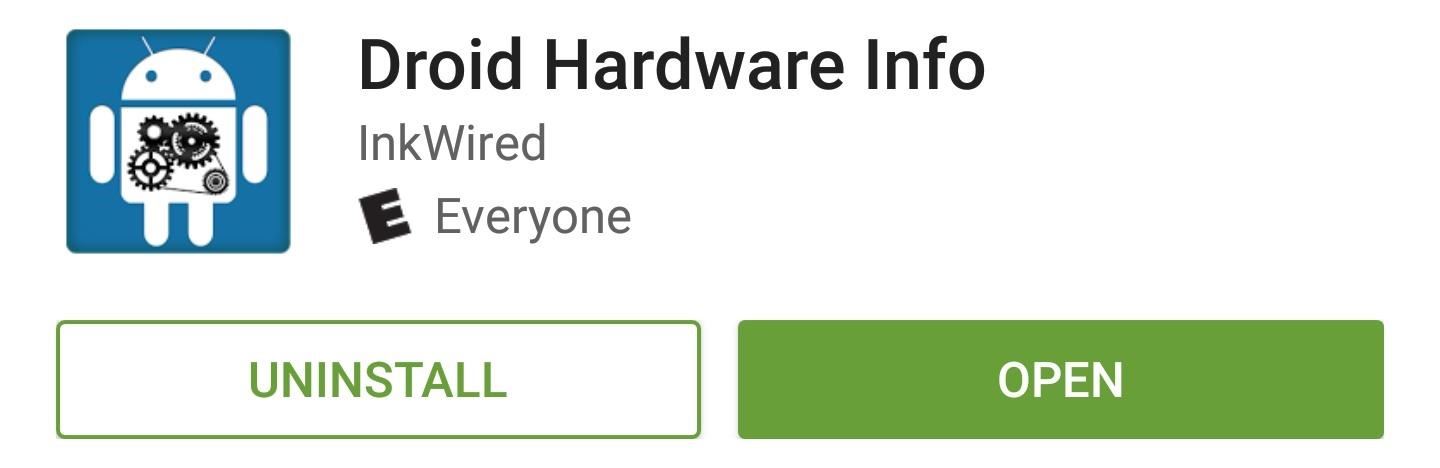
Step 1: Find Your Model Number & CPU TypeWhen flashing a custom ROM, you need to be absolutely certain that you're downloading the right files for your particular device and model number. For this reason, I'd recommend installing an app called Droid Hardware Info to learn some basic information about your device's hardware.Install Droid Hardware Info for free from the Google Play Store Once you've installed the app, simply run it and head to the Device tab, then make note of the "Model" entry. This information will be used to make sure you're downloading the proper ROM for your particular device.Next, you'll need to know your device's processor type, and with modern Android devices, there are only three options—ARM, ARM64, and x86. So in the System tab, take note of two fields—"CPU Architecture" and "Instruction Sets." From there, match up the information shown in these categories with the list below to find your device's processor type:ARM: ARMv7 or armeabi ARM64: AArch64 or arm64 x86: x86 or x86abi
Step 2: Download the Necessary FilesNow that you know your device's name, model, and CPU type, it should be relatively easy to download the right ROM files for your phone or tablet. When downloading the following files, make sure that they're all saved on your device's internal storage or SD card before moving on to the next step.
Custom ROM (Required)First up, you'll need to download a copy of the custom ROM that you'd like to install. When downloading the ROM, make sure any model number or device name listed on the download page match up with the information you found in Droid Info. Beyond that, you may want to know of some good places to find custom ROMs, so I'll list some common resources below:XDA Developers forum LineageOS download page (formerly CyanogenMod) MIUI download page SlimROM download page
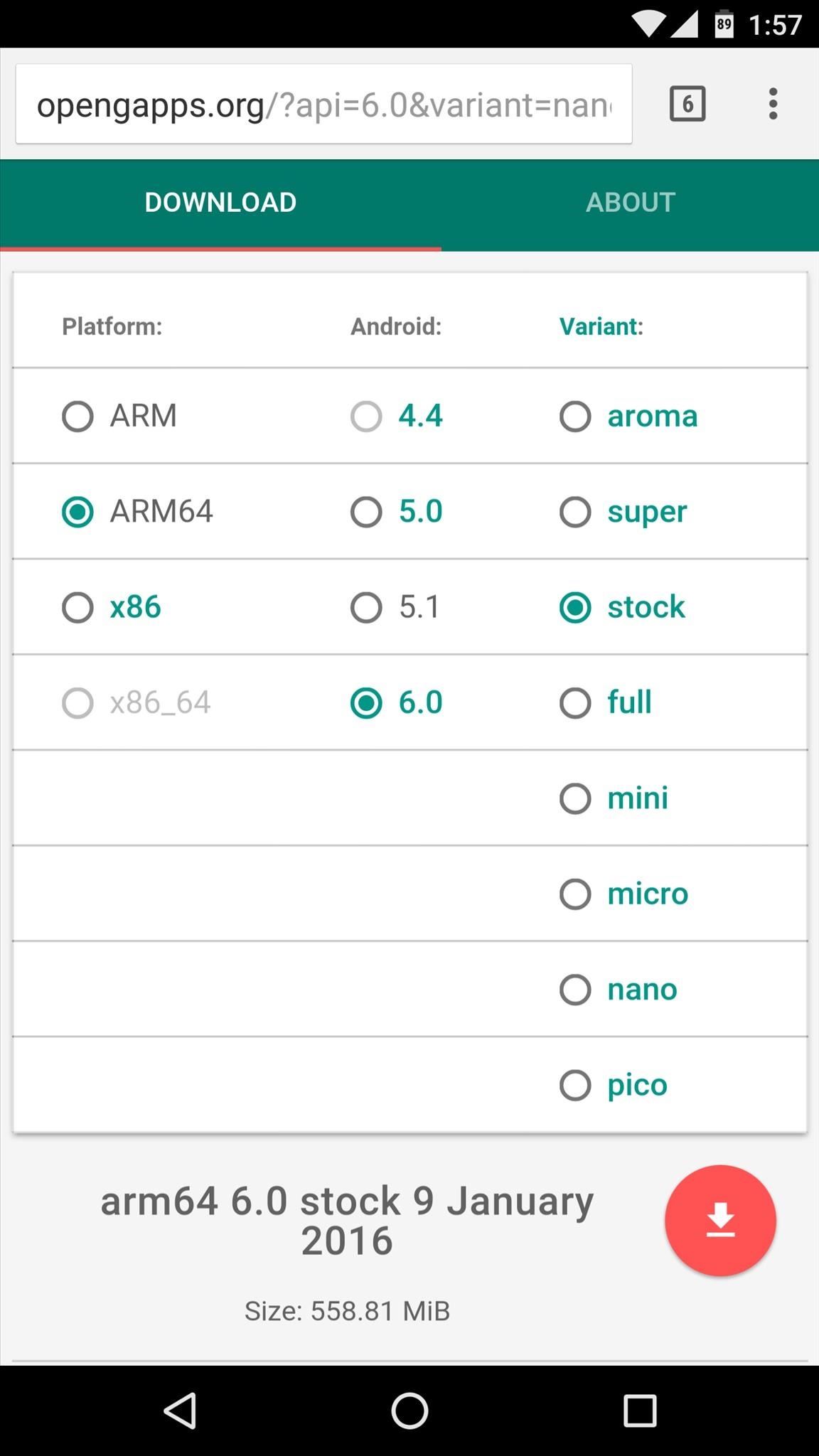
Gapps (Recommended)The vast majority of custom ROMs will not include all of Google's apps and services by default. This means that if you'd like to continue using the Google Play Store and other similar services, you'll also have to download and install an addon package called Gapps.Getting the right Gapps package can be tricky, but a new project called Open Gapps can help quite a bit. Simply head to the link below, then select your processor type from the list and choose the Android version for your custom ROM. From there, you can opt to download one of several different Gapps packages, but if you're not sure about this part, I'd suggest that you simply download the "Stock" Gapps package.Download a Gapps package from Open Gapps
Custom Kernel (Optional)While you're in the process of flashing stuff, you may also want to install a custom kernel. Custom kernels can bring added features like the ability to overclock your processor, tweak your display coloring, or enable double-tap-to-wake functionality.Custom kernels can generally be found under the "Android Development" section of your device's XDA Developers forum, but read carefully before downloading, because some custom kernels are not compatible with certain custom ROMs.
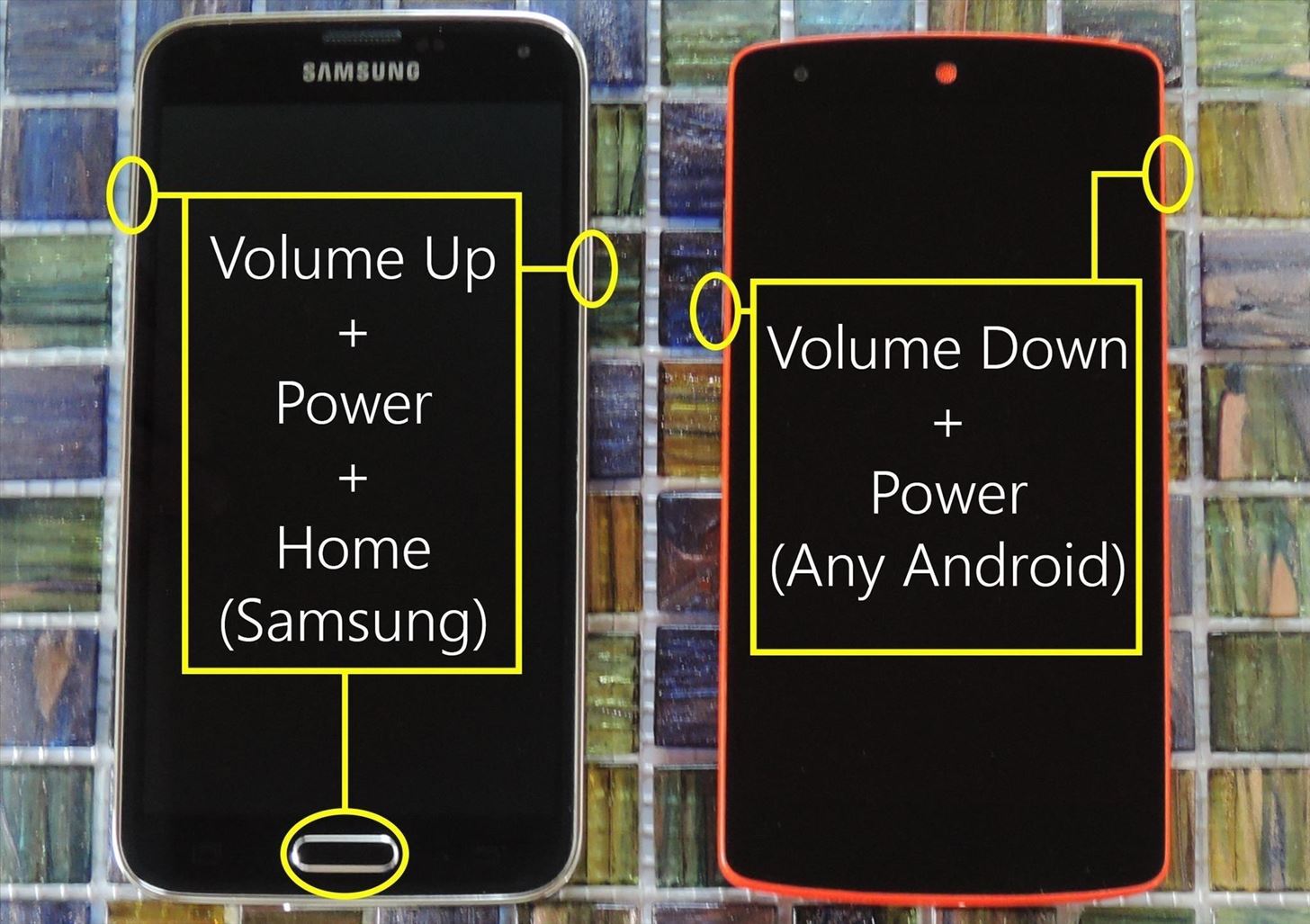
Step 3: Boot into Custom RecoveryOnce you've got all of the necessary files saved to your device's internal storage or SD card, the next thing you'll need to do is boot into custom recovery. So to start, power your device completely off.From here, if you're using a Samsung device, press and hold the volume down, power, and home buttons simultaneously, then your device will boot directly into custom recovery. Otherwise, for most other Android devices, press and hold the volume down and power buttons simultaneously. Next, if you're using a non-Samsung device, you'll see Android's bootloader menu. From here, press the volume down button twice to highlight the "Recovery mode" option, then press the power button to select it.
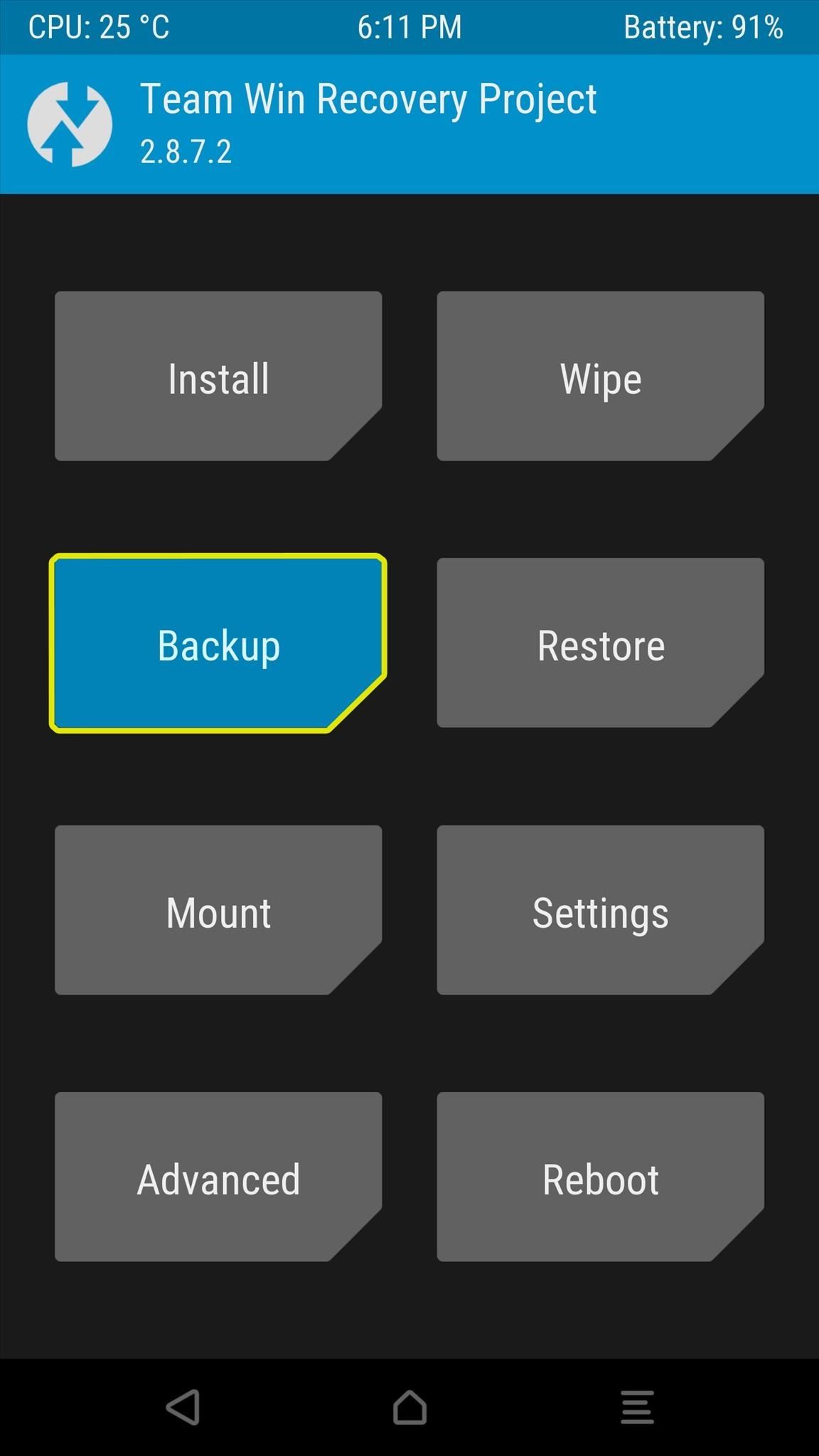
Step 4: Make a NANDroid BackupOnce you've made it into custom recovery, the first thing you should do is create a NANDroid backup, which will ensure that you have a carbon copy of your current operating system as a fallback plan in case anything goes wrong with your custom ROM.So from TWRP's main menu, tap the "Backup" button, then leave everything selected exactly as it is, and swipe the slider at the bottom of the screen to create a NANDroid backup. The process will take up to 15 minutes, but when it's finished, tap the home button at the bottom of the screen to head back out to the main menu.
Things to Look Out for in Step 4If you've altered the default selections in the past, make sure "System," "Boot," and "Data" are selected at the very least. NANDroid backups require a lot of storage space, so you may need to delete files to make room.
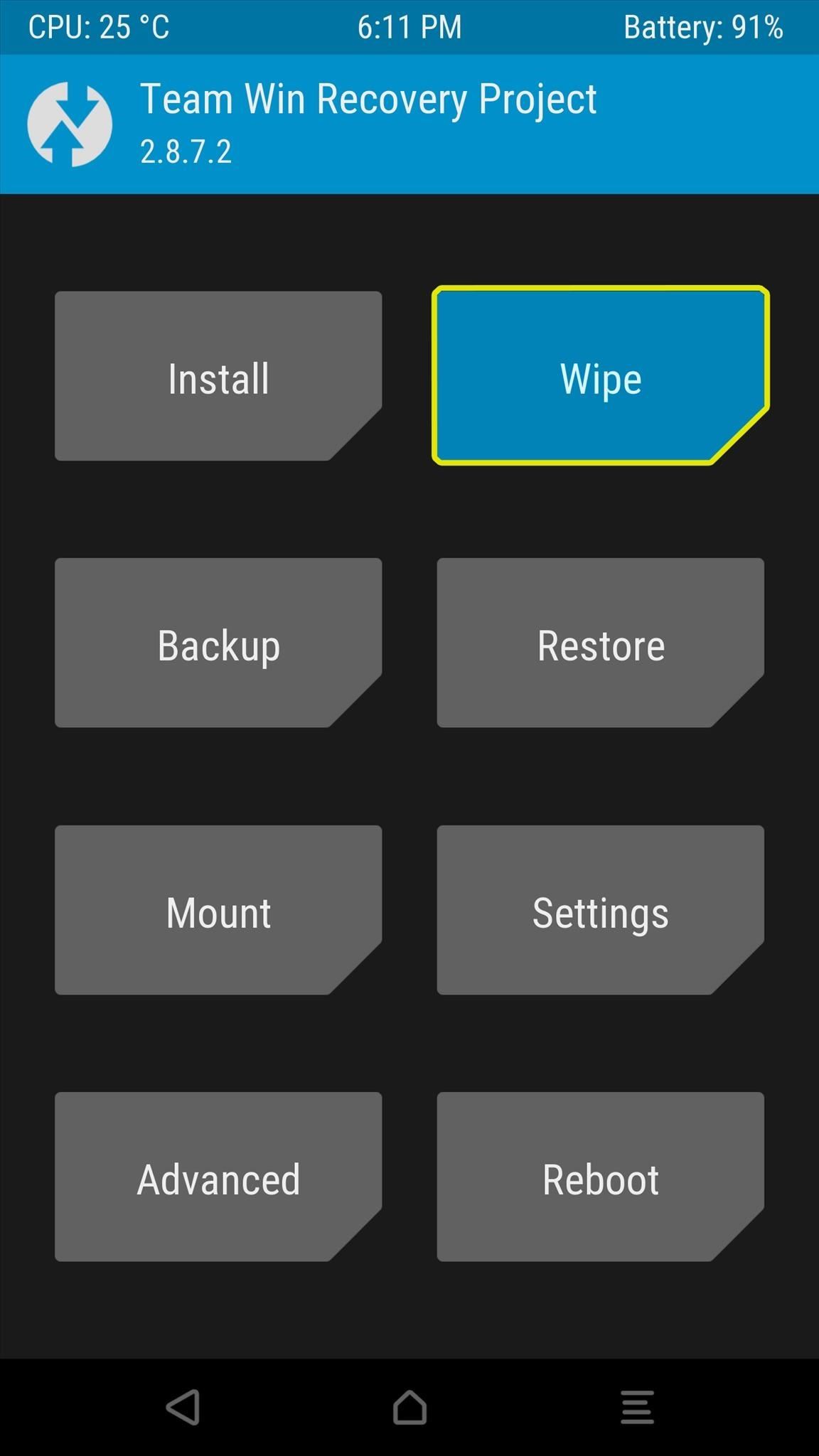
Step 5: Perform a Full System WipeNext, you'll need to completely remove your existing operating system and all of its files to make sure that there are no conflicts with the new custom ROM you're about to install.From TWRP's main menu, tap the "Wipe" button, then select "Advanced Wipe" from the following screen. From here, tick the boxes next to the Dalvik Cache, System, Data, and Cache options, then swipe the slider at the bottom of the screen. Once this process is finished, tap the home button at the bottom of the screen to head back out to the main menu.
Things to Look Out for in Step 5Don't wipe your device unless you're sure you made a successful NANDroid backup beforehand. DO NOT select "SD Card" or "Internal Storage" from the Advanced Wipe menu, as this will delete your ROM file and leave you without an OS.
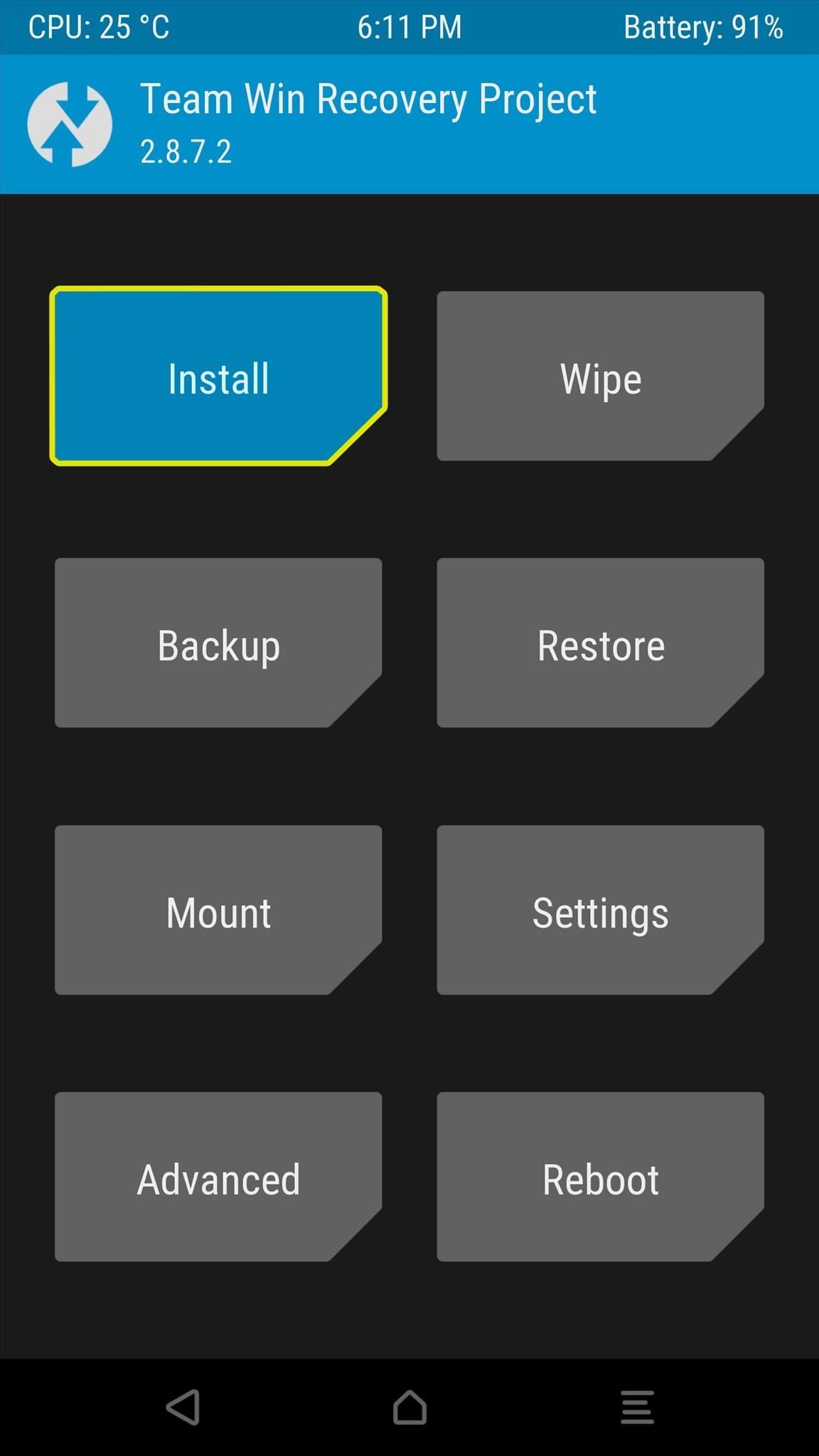
Step 6: Install the ROMAt this point, you're finally ready to flash the custom ROM. From TWRP's main menu, tap the "Install" button, then navigate to your device's Download folder and select the ROM file that you downloaded earlier. Next, simply swipe the slider at the bottom of the screen to initiate the ROM installation. At this point, if your ROM includes an Aroma Installer interface, you'll see a graphical, touch-based UI that guides you the process of customizing certain options. Otherwise, you'll see a wall of text scrolling by as TWRP installs your custom ROM.When the process is finished, you have two options. If you're only installing a custom ROM and do not plan on flashing a Gapps package or custom kernel, you can simply tap the "Reboot System" button and skip ahead to Step 9. Otherwise, if you're flashing any additional ZIPs today, simply tap the back button to head out to TWRP's "Install Zip" menu and read on below.
Things to Look Out for in Step 6To be on the safe side, either connect your phone to a charger or verify that it has at least 20% battery life remaining before flashing a ROM. ROM file names can be tricky, so read carefully and make sure you're flashing the right ZIP. Make sure to flash the base ROM file before flashing any addons like Gapps or a custom kernel (see Steps 7 and 8 below). If you'd like to save some time, you can use the "Add More ZIPs" function to select the Gapps and kernel ZIPs (in any order), but only do this after you've selected the initial ROM file.
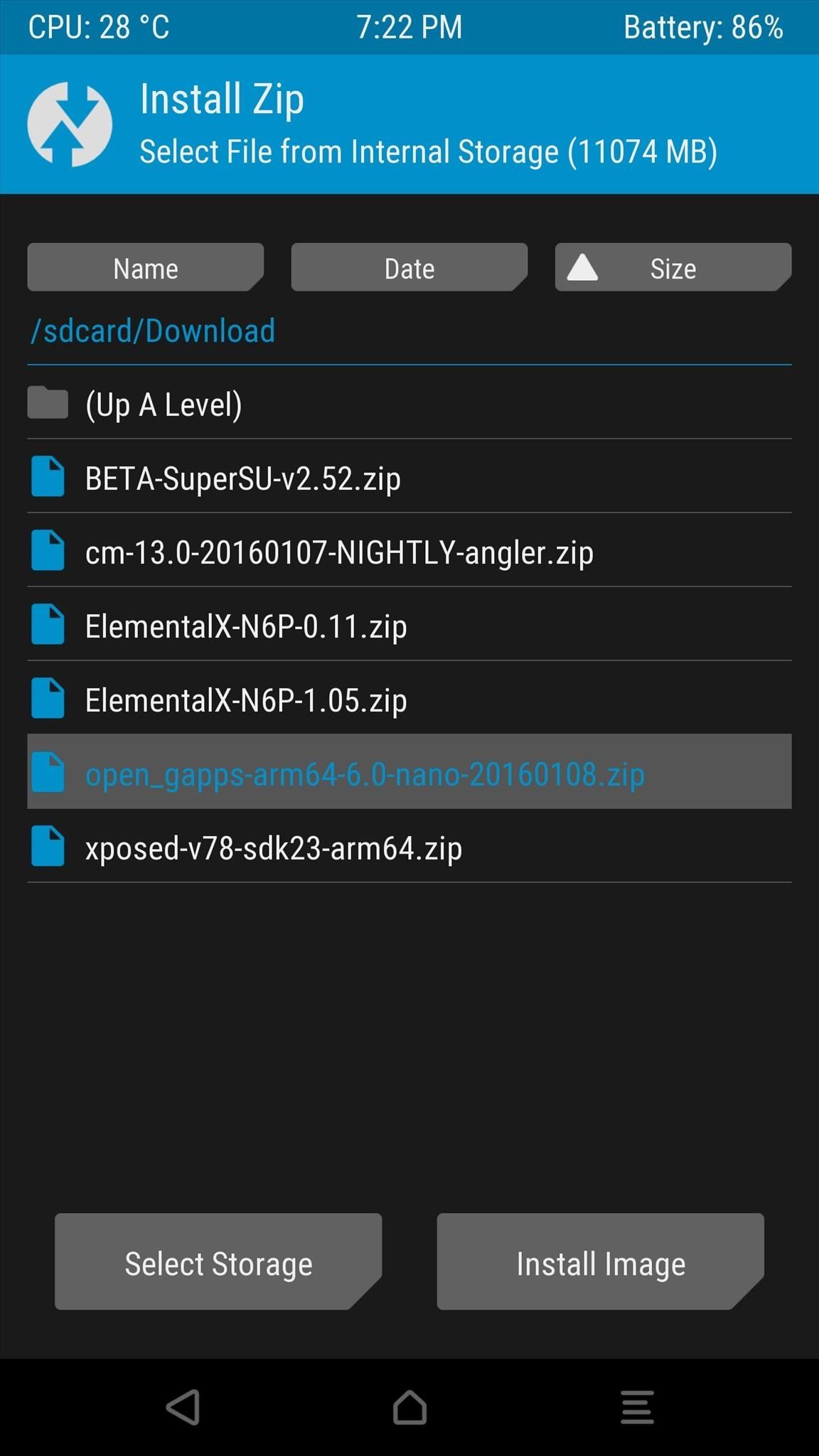
Step 7: Install the Proper Gapps Package (Recommended)If you opted to download a Gapps package to get all of Google's services and apps, now is the time to flash it. From the "Install Zip" menu, simply select your Gapps package, then swipe the slider at the bottom of the screen.From here, if you opted to download a custom kernel, tap the back button at the bottom of your screen. Otherwise, if you're simply flashing the ROM and Gapps packages, tap the "Reboot System" button at this time and skip ahead to Step 9 below.
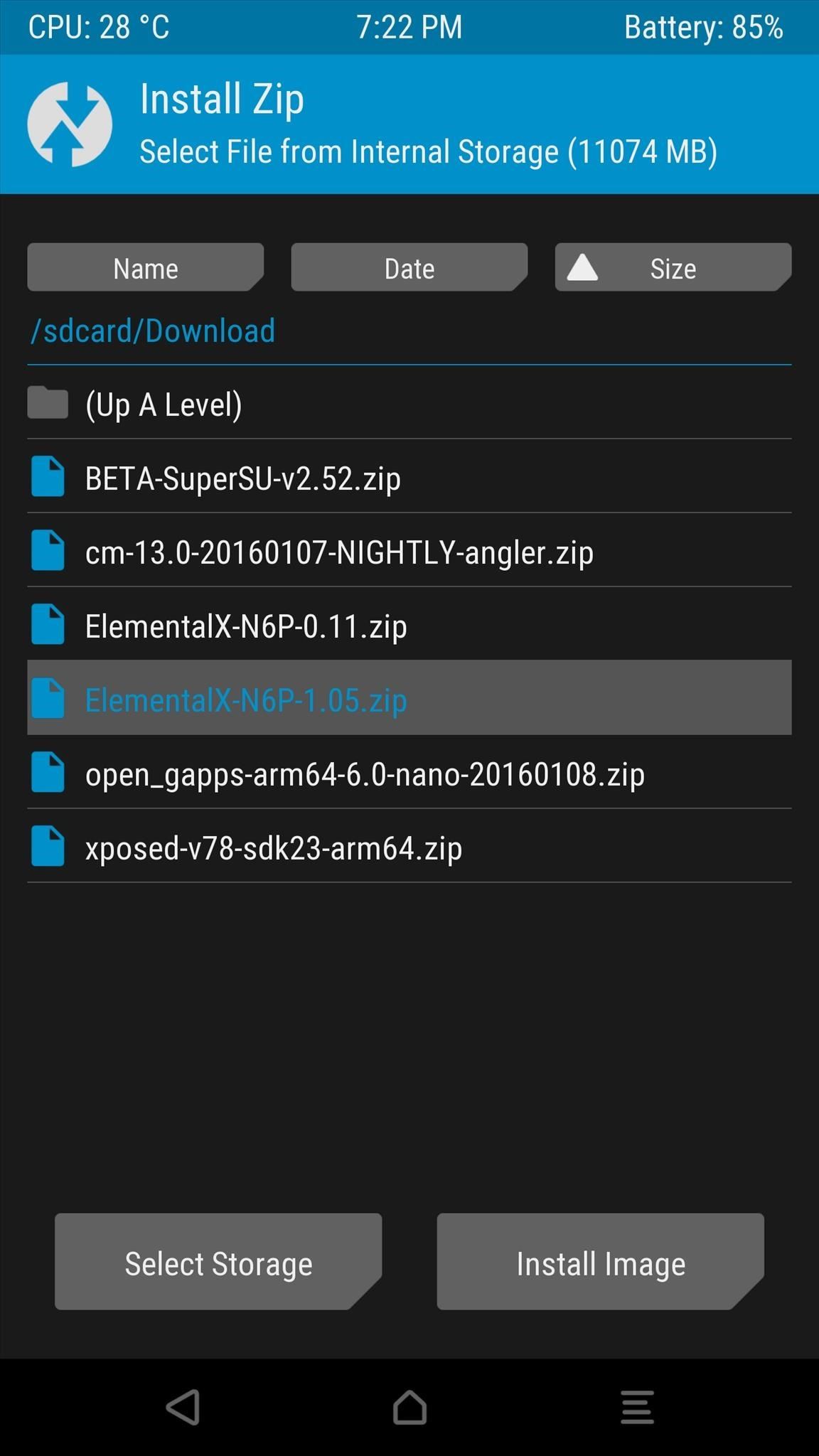
Step 8: Install a Custom Kernel (Optional)Finally, if you're installing a custom kernel today, simply select the ZIP file from TWRP's "Install Zip" menu. From here, swipe the slider at the bottom of the screen to install your custom kernel, then tap the "Reboot System" button when that's finished.
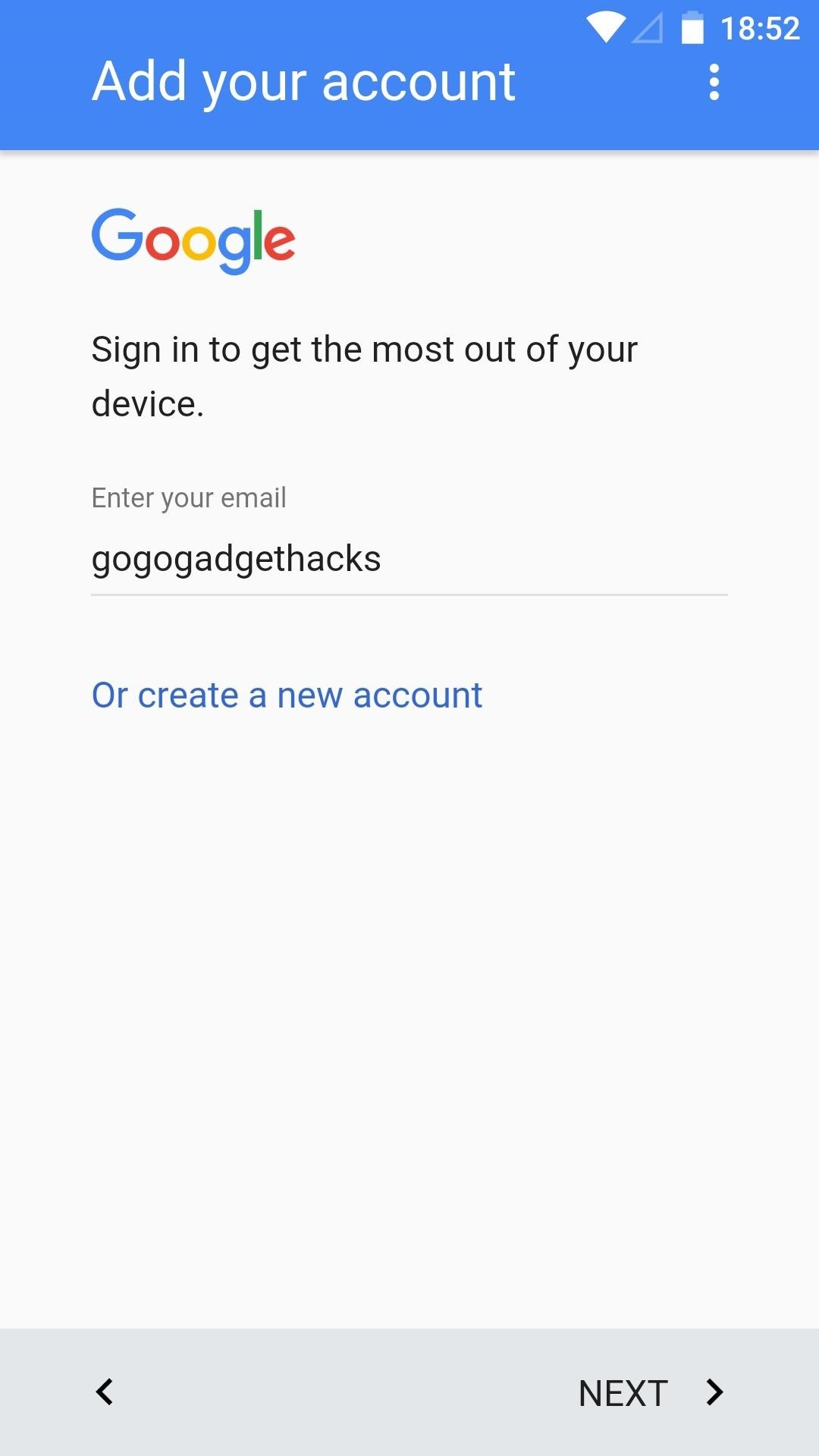
Step 9: Reboot & Enjoy Your ROMAfter flashing the custom ROM and any additional packages, your phone or tablet will take a lot longer than usual to boot up. This only applies to the first boot after installing a ROM, so don't worry about this being an ongoing issue, but know that it could take up to 15 minutes this first time.Once the device finishes booting, you'll be prompted to log into your Wi-Fi network and run through an initial setup process. But once you're done with that, you will be greeted by your new custom ROM. Almost all custom ROMs will come pre-rooted, so at this point, all that's left to do is explore the various settings menus and enjoy your new operating system. (1) CyanogenMod 13: Setup screen. (2) Home screen. What custom ROM did you go with? Did you flash the Gapps package and a custom kernel as well? Let us know in the comment section below.Don't Miss: More TWRP 101 Tutorials for All of Your Custom Recovery NeedsFollow Gadget Hacks on Facebook, Twitter, Google+, YouTube, and Instagram Follow WonderHowTo on Facebook, Twitter, Pinterest, and Google+
Cover image and screenshots by Dallas Thomas/Gadget Hacks


How to Install Transparent S4 Widget. Here are the simple steps that you have to follow to install the transparent AccuWeather Widget on your Galaxy S4: Download the CWM flashable zip from the link above and copy the zip file to your phone's internal or external SD card storage. Turn off your Galaxy S4 and boot it into recovery mode.
How to Make the Stock Weather Widget Transparent on Your


Step 2: Install the Xposed Framework. Now that the Installer app is on your device, open it up to install the actual Framework on your system. Head to Framework, hit OK at the warning, then select Install/Update and grant it Superuser permissions.
Instale o Xposed Framework no seu Nexus 7 para personalização


Runaway from the album Hybrid Theory - the debut album by the American band Linkin Park, released on October 24, 2000 through Warner Bros. Records.
How to Remove solder bridges on gull wing components « Hacks

How to Use Google Buzz on your Android phone - Gadget Hacks


With this app came lot of information and tutorials because Apple Music was new for all users. We have recently listed some quick help for users to make the most of playlists in Apple Music app. In spite of much has been written on this wonderful app, users keep asking questions on Apple Music in general and "shuffling songs" in particular.
iOS 8.4 Apple Music App: How to shuffle all songs by an artist?


xda-developers Nexus 6 Nexus 6 General [HOW-TO] The Nexus 6 All-In-One Beginner's Guide by xBeerdroiDx XDA Developers was founded by developers, for developers. It is now a valuable resource for people who want to make the most of their mobile devices, from customizing the look and feel to adding new functionality.
How to Flash the TWRP Recovery Environment to Your Android Phone

The Best HDMI Adapters to Turn Your Galaxy Note 9 into a DeX


How do I Quit IRB from the command line? (Using terminal on mac) tagged ruby-on-rails terminal irb or ask new Terminal Tab from command line (Mac OS X) 660.


With the speed of this update, Essential is the third phone to run Android 8.1 Oreo officially, behind Pixel devices and the Nokia 8. Even the recently launched Samsung Galaxy S9 isn't running Android 8.1 Oreo. What do you think of the new update? Are you excited about the new features? Let us know in the comments below.
Essential Releases Oreo Beta 2 Update - Gadget Hacks


Today, we take a quick look at how you could turn your old or spare android phone or android tablet into an IP webcam/network security camera. What You Need to Turn Your Android Phone & Tablet into a Security Camera • One Android phone or tablet with camera • Charging cables • Security camera apps for android
Turn Your Webcam Into A Security Camera - Laptop Mag


Remove Cydia and revert back to the stock iOS! IT SHOULD WORK ON iOS 11- 11.4.1 ! How to Delete Cydia and Electra Jailbreak on iOS 11 - 11.4.1 TheJailbreaker. This Link Can Crash Your
2 Easy Ways to Remove Cydia (with Pictures) - wikiHow
How To: Build a ghost phone out of an old rotary phone and headphones

How To: Build a ghost phone out of an old rotary phone and headphones
Here's a creepy weekend project! Take an old analog rotary phone (which you can easily find in an antique or vintage store). Unscrew the earpiece and then alter the parts according to the tutorial so you can start 'talking to ghosts'. Please enable JavaScript to watch this video.


How to Create an Untraceable Messaging Device With an Old Phone. Alan Henry. 10/28/15 11:30am. Check out our evil week tag page. we're building a "ghost phone." A device you can use
Rotary Phone: how do I set up? - AT&T Community


The title of this post is lie number one of a litany of lies to be found on the Internet. You are NOT going to learn how to rewire a vintage phone. You are not. I know this from experience. But I'm getting a bit ahead of myself as I am want to do when I'm in fits. I have a number of oddities
How to Create an Untraceable Messaging Device With an Old Phone


Unscrew the phone's headset to reveal the mic and speaker. Remove the existing pieces. My phone had little metal clasps, which made this very easy. I used the mic from an old earbud set and soldered it into place where the analog mic used to be. The wires in the headphones are teeny tiny, but don't panic.
How to Rewire a Vintage Phone so it works Today! | The Art of


Re: Rotary Phone: how do I set up? Rotary dial phones are analog, Uverse voice is digital so the rotary dial won't work. If you really want to use the old rotary dial phone to make calls, you can purchase an analog to digital converter.
एक पुराने रोटरी फोन और हेडफ़ोन से भूत फोन का निर्माण करें


How To: Build a ghost phone out of an old rotary phone and headphones How To: Make a Lady Gaga caution tape costume from Telephone How To: Recreate Lady Gaga's soda can hairstyle from Telephone How To: Dial with iPhone Visual Dial (HQ) How To: Do rotary calf exercises
What can you do with an old phone - YouTube


Here's a creepy weekend project! Take an old analog rotary phone (which you can easily find in an antique or vintage store). Unscrew the earpiece and then alter the parts according to the tutorial so you can start 'talking to ghosts'.
How to Dismantle a Rotary Diesel Pump - WonderHowTo

How to Build a ghost phone out of an old rotary phone and


You can make a security device with an old phone How To Make Thermite Out Of Batteries - Duration: How To Turn Your Phones Into WiFi Security Cameras - Duration:
RotaryX: How to Hack a Rotary Phone: 9 Steps


यहाँ एक डरावना सप्ताहांत परियोजना है! एक पुराना एनालॉग रोटरी फोन लें (जिसे आप आसानी से एंटीक या विंटेज स्टोर में पा सकते हैं)। ईयरपीस को हटा दें और फिर
Convert a Rotary Phone to VOIP using Raspberry Pi | Hackaday


How To: Use a rotary cutter How To: Build a ghost phone out of an old rotary phone and headphones How To: Do rotary calf exercises How To: Cut fabric using a rotary cutter for sewing beginners How To: Make a PVC Hand Pump to Move Water, Compress Air, & Create Vacuum
How to Use and dial the rotary telephone in 1927 « Home


There's something so nostalgic about the rotary phone that makes it a fun thing to hack and modernize. [Voidon] put his skills to the test and converted one to VoIP using a Raspberry Pi. He used

News: The Galaxy S10 Is IP68 Water-Resistant Here's What That Really Means

News: The Galaxy S10 Is IP68 Water-Resistant Here's What That Really Means
When it comes to resistance to the elements, Samsung seems to believe in the old saying "if it ain't broke, don't fix it." They've carried over the IP68 rating under IEC 60529 that was first found on the S8 all the way to their tenth-anniversary flagship, the Galaxy S10. While this certainly sounds great on paper, it's natural to want to dig a little deeper and find out what the rating means.For starters, IEC standard 60529 outlines a series of standardized tests put forth by the National Electrical Manufacturers Association, which assigns a device such as the S10 a corresponding IP rating based on how well it resists water and dirt. According to the standard:This standard describes a system for classifying the degrees of protection provided by enclosures of electrical equipment for two conditions: 1) the protection of persons against access to hazardous parts and protection of equipment against the ingress of solid foreign objects and 2) the ingress of water. The degree of protection against these two conditions is designated by an IP Code.
— National Electrical Manufacturers Association, IEC 60529Though more popularly known as "Ingress Protection," the "IP Code" actually stands for "International Protection Marking," and essentially translates to how well a smartphone is shielded against water and dirt. These two elements are further separated into two grades that show up as the numbers right next to "IP."Don't Miss: The Galaxy S10 Doesn't Have a Notification LED — Here's Why The first number denotes a device's resistance to dust or dirt, while the second records how well protected a device is from water seeping in and damaging sensitive electronic components inside. The Galaxy S10 line of flagships all have been certified IP68, which means the S10, S10+, and S10e can all survive exposure to water and dirt for a certain period of time. Here is a breakdown of the code to summarize.IP: The abbreviation of "Ingress Protection," the rating system for a device's resistance to dust and water. 6: The IP rating's first number represents a device's dust protection rating. Don't let the seemingly low number of "6" fool you, however, as it actually means that the S10 is completely shielded from dirt and debris. 8: Next up is the device's water resistance, which is denoted by the second number of the rating. A score of "8" means that the S10 will withstand being completely submerged in water up to 1.5 meters deep for up to 30 minutes and emerge unscathed. In comparison, the older S7's score of "7" meant it could survive a 30-minute dunk at a meter deep. When all is said and done, the S10's IP68 rating means that you're relatively well protected from water-related dangers, from getting caught in a downpour, accidental toilet drops, to beverage spilling directly onto your device. That said, it's worth noting that this rating isn't bulletproof, and you'll still need to take other factors such as chemicals and salt water into account, as these can still damage your S10.The IP Rating claims a certain level of protection against water and dust, but doesn't account for chemicals and particles like chlorine and flouride that are commonly dissolved in water. These impurities, along with saltwater, can be corrosive, and not only ruin your S10's finish but also damage the rubber gaskets that seal your device and give it its IP68 rating in the first place.So if you thought that this IP rating gives you license to carelessly leave your S10 in your pocket while you wade into the ocean, it doesn't. You should still be careful around such environments, especially when you consider that Samsung will void your warranty (which only covers manufacturer defects for a year and battery replacements for six months in the first place) if your S10 gets water damaged.On the other hand, your protection from water damage increases substantially if you choose to sign up for Samsung Premium Care. This monthly subscription plan is like health insurance for your S10, and gives you up to three damage claims in a 12 month period, water damage included.Don't Miss: Everything You Need to Know About the Galaxy S10 & S10+Follow Gadget Hacks on Pinterest, Reddit, Twitter, YouTube, and Flipboard Sign up for Gadget Hacks' daily newsletter or weekly Android and iOS updates Follow WonderHowTo on Facebook, Twitter, Pinterest, and Flipboard
Cover image via Engadget/YouTube


How to Repair an iPhone from Water Damage. This wikiHow teaches you how to attempt to dry out or repair a water-damaged iPhone. While these methods have been known to improve an iPhone's chances of working again, there is no way to
Brand New Fix Iphone Water Damage on eBay | Great deals on Fix Iphone Water Damage
AD


Deleting Facebook means you can never access your account again or retrieve any of your content or data.That means you need to take additional steps to remove traces of your Facebook data (as well
Deactivating or Deleting Your Account | Facebook Help Center


This app can cast embedded web videos from iPod/iPad browser to play in Chromecast TV. In addition to this, these Chromecast apps help to slideshow local photos from iPhone or iPad to big screen TV and let you control the slides with your iOS device. Here is the list of best iOS Apps to Stream Videos and Photos to Chromecast from iPhone and iPad.
Mirror iphone screen to tv through chromecast | Wirelessly


Rearrange: Tap the profile icon at the top of the main screen > tap the pencil icon or Edit Info > press, hold and drag photo you want to move Smart Photos When you enable the Smart Photos feature, Tinder tests your profile photos to make sure you're always leading with the ones most likely to be swiped right.
Why can't I reorder my photos anymore? : Tinder - reddit


In this video tutorial, viewers learn how to reveal hidden MySpace profile content using Mozilla Firefox. Begin by clicking on View, go to Page Style and select No Style. This will take out all the styles that are applied on the page, and reveal all of it's data.
How to Contact MySpace « Internet :: Gadget Hacks

How to unlock and enable Developer options on any Android


How to Store Vinyl Records. Vinyl records are a wonderful way to experience both retro and modern music. Typically preferred by audiophiles for their lossless analog sound, these records provide large, beautiful versions of albums from all
The best way to package vinyl records for shipping - a step


News: Apple Releases 'Second' iOS 12.4 Public Beta for iPhone to Software Testers. gadgethacks.com - Jake Peterson. Public beta testers, you're in luck. Apple just released the second iOS 12.4 public beta today, May 20. The update comes five days after the release …
Samsung Updates AR Emoji with Better Tracking & Facial


In this tutorial, learn all about your new Sony Dash and discover how to use it as a music player by accessing Pandora. In this clip, presented by Sony, you will receive a speedy walk-through so that you can set up Internet radio on your Dash and take it with you whereever you go!


Thanks to a tip from Jose Rodriguez, who previously discovered a trick to hide apps and folders without jailbreaking, we now have the easiest method yet for hiding any stock Apple app for devices running iOS 8.4 through 9.2.1. It will also work on non-stock apps, which means you can hide that app you don't want to uninstall but don't want
How to Hide Stock Apple Apps & Features on Your iPhone


How to stop apps from tracking you and accessing your data in Android using App Permissions, a new feature Google released in Android Marshmallow 6.0. Category Science & Technology
There is a Secretly Way to Track An Mobile Phone Without Them


Today we are pleased to announce the end to the Apple vs. Android war. About a year ago, our Gadget Hacks team started working on a top-secret project to dual-boot both Android and iOS on the same phone—and we couldn't be more proud to announce that we've finally succeeded! Your phone can now run
Hacker gets Android running on iPhone - Geek.com


Change Windows 10 title bar color. The good thing is that you can change the title bar color without the help of any third-party software. You just need to edit a file. Follow the given below instructions to change title bar color in Windows 10. Step 1: Open up File Explorer (Windows Explorer) and navigate to the following location.
Everything New in Windows 10's May 2019 Update, Available Now


How To: Share Albums in Google Photos How To: Add Email Accounts to Mail in iOS 11 on Your iPhone News: Use Android's Airdrop-Like Nearby Service to Share Things More Easily Google Photos: How to Transfer Pictures from Facebook, Dropbox, Instagram, Flickr, & More
How to Cast Podcasts with Podcast Addict for Android « Cord


How To: Get Emoji Suggestions with Any Android Keyboard How To: Get Your Regular Dock Icons Back on Android Pie's Multitasking Screen Quick Tip: Speed Up Gboard Performance on Android by Disabling These Two Settings How To: Easy DIY Nicki Minaj Costume from the "Anaconda" Music Video
Gboard 101 « Smartphones :: Gadget Hacks

How To: Enable Emoticons on Your iPhone (iOS 5+)

How To: Enable Emoticons on Your iPhone (iOS 5+)
The most recent version of the iPhone Software (iOS 5) has the ability to utilize emoticons by use of the native keyboard and software, no third-party app or jailbreak required. Just follow these simple steps for unlocking the emoticon keyboard:

Step 1: Open "Settings"From your iPhone's Springboard (or home screen) open the native settings app.

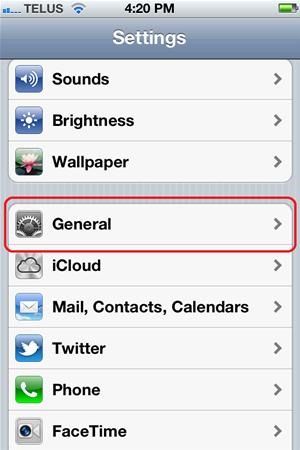
Step 2: GeneralFrom the main page (it should say "Settings" on the top bar), scroll down and select "General".

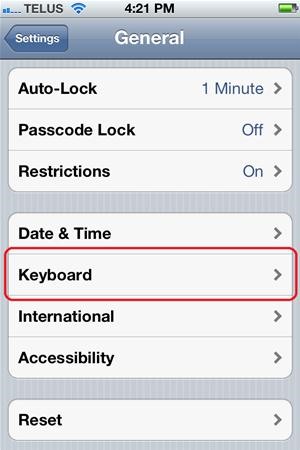
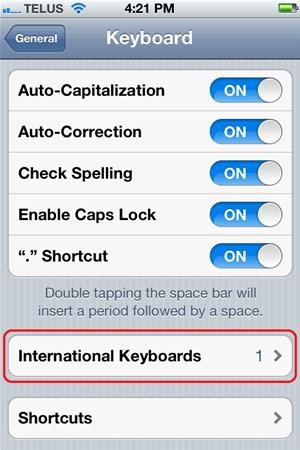
Step 3: KeyboardScroll down and select the "Keyboard" menu item.

Step 4: International KeyboardsSelect "International Keyboards" near the bottom of the screen.

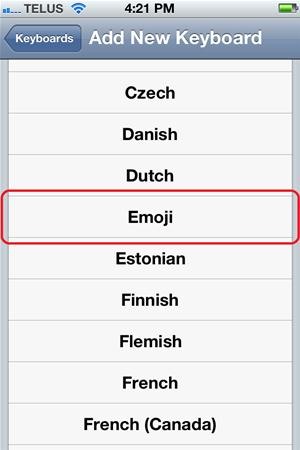
Step 5: Add New Keyboard...Selecting the "Add New Keyboard..." menu item will bring in a long list of available keyboard layouts in many languages.

Step 6: EmojiSelect "Emoji" from the list. After selecting, you will be brought back to the "Keyboard" menu. You can either navigate back to the main setting screen or just press your "Home" button to return to your springboard/home screen.

Using the Emoticon KeyboardIf you now navigate to an app that utilizes the keyboard (e.g. Messages), you will notice a new button on the keyboard in the lower left corner; it looks like a wire sphere. This button will be used to toggle between your standard keyboard and the Emoji keyboard.
TipsThe Emoji Keyboard has a tab selection along the bottom and pages within each tab. Tap the tab the you would like, then swipe to the right or left to view the emoticon available. Now you can easily show how you are feeling with that next message sent! :)


It's super fast for in-person transactions and requires no fumbling around to find a PayPal.Me link or anything. Plus, the default camera app on the iPhone or Android phone could be used to make the process even faster, if it supports QR code recognition. Share Your PayPal QR Code to Receive Money
How to Share and Scan PayPal QR Codes for Faster Transactions


When choosing a free email account, you want to look for a few characteristics to help you determine which one is best for you. The accounts will differ in how much email storage you get, what the interface looks like and how it can be customized, and what types of advanced features are included, like messaging, filters, and the ability to import other data.
17 free cloud storage options | Network World


In order to access any regional Netflix site you need to use a Proxy Provider to bypass country restrictions. We recommend Unblock-Us Smart VPN. The set up is easy and takes only minutes to configure your Router, TV, computer, and virtually any device you have.
How to Watch US Netflix in Canada - How to Watch


Step 4: Understanding Your CS540 Wireless Headset. Your CS540 wireless headset has two buttons. The first thing to understand is the Call Control Button. This is how you turn your headset on and off. This is also the button to press if you're using the HL10 Handset Lifter or EHS Cable to answer/hang-up calls remotely while away from your desk.
How to make your wired headphones wireless and Bluetooth


Vysor mirroring the Nexus 6. This is one of the easiest methods of mirroring your Android device on your desktop or laptop. It works with Windows, Mac, and Linux and the app is free to use.
7 ways to control your Android from a PC - Android Authority


As an iPhone/iPad user, you get notifications for most of the apps you use be it WhatsApp, Facebook Messenger, etc. or others. Most users like notifications on their devices while many users complain about it and above all, with iOS 11 the most complained feature is the new notification system.
[iOS 11 Feature] How to Disable Notification Previews for Apps


How to Turn Your Smartphone Into the Ultimate Spy Tool. Mobile Hidden Camera for Android is about as stealthy as it gets. The app lets you take pictures from a totally blank screen, or even
How To Turn Your Android Device Into A Security Camera


Report Ad
The Right Choice for Endless LED Solutions

How to Reduce noise on Twitter with DM opt out « Internet


How To: Change Font Size & Text Colors in Snapchat on Your Galaxy Note 2 How To: Use Any Photo or Video as a Self-Destructing Snapchat on Your Samsung Galaxy Note 2 How To: Automatically Save Snapchats onto Your Samsung Galaxy Note 2
How to Save Snapchats on Android Undetected (No Root Needed


Make your Android phone SUPER SMOOTH on Sliding, Zooming, List-scrolling 1. Magnificent screen sliding respond, easy sliding on screen and no longer delay. 2. Incredibly smooth on zooming web
Find the Google Play Store app - Google Play Help