Signal 101: How to Send Disappearing Messages for Ultimate Privacy
With Signal's class-leading end-to-end encryption, you can be sure your messages will remain secure as they travel to the recipient. However, once the message arrives, its privacy is completely dependent on the receiver, who could share it anywhere if they wanted. To patch this vulnerability, Signal added disappearing messaging.With disappearing messages, any text you send will expire after a pre-specified period of time. The recipient will be alerted to this timer, which will not begin until they have viewed the message. Once expired, the message is deleted from all devices (although screenshots are possible). Ultimately, it's one of the few ways that you can still send truly private messages.
Step 1: Make Sure Both Parties Are on SignalDisappearing messaging requires that both parties in the conversation are Signal users. An easy way to tell is by selecting a contact to begin messaging. There should be phone icon to the right of their name. If the contact is a Signal user, the phone should have a small padlock above it which indicates secure calling is available — therefore, they must be a Signal user.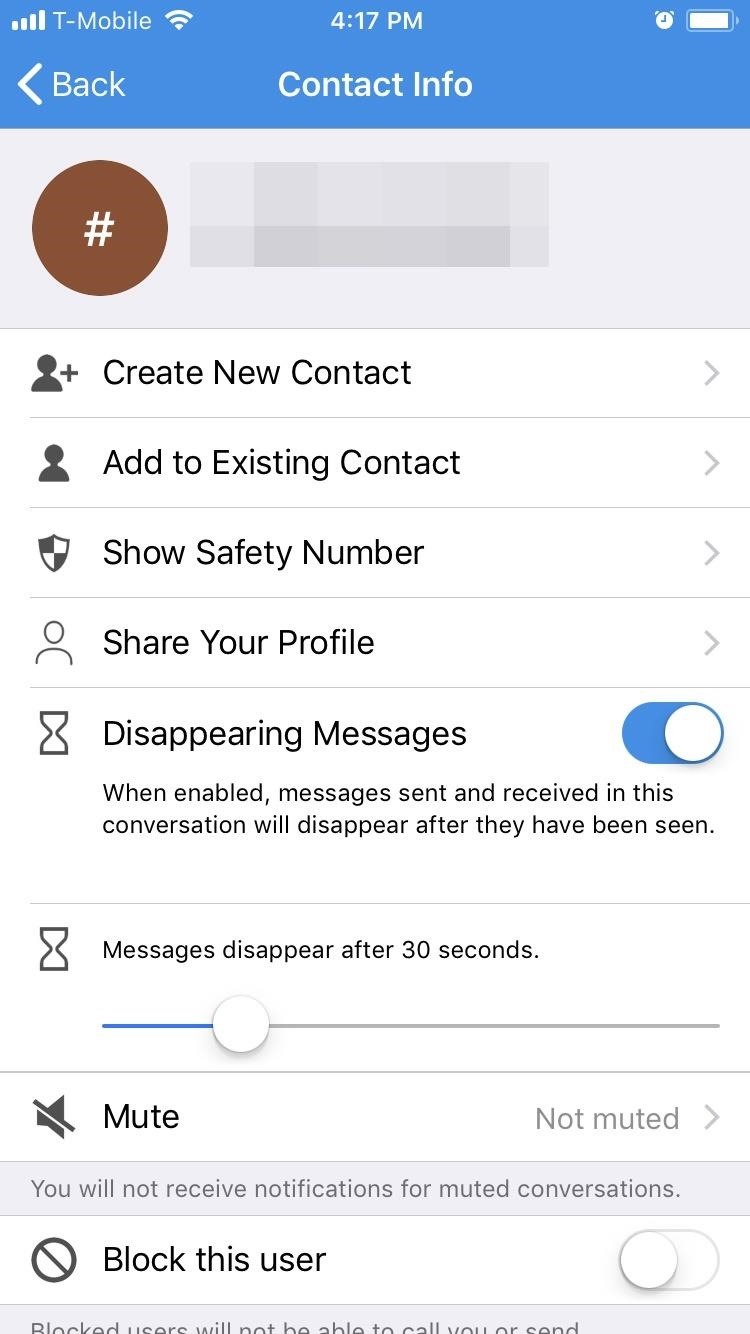
Step 2: Turn on Disappearing MessagingNext, open a conversation (either a previous one or a new one). From this point, the process is slightly different depending on whether you're using Android or an iPhone. For iOS users, select the recipient's number or name (where it says "Tap here for settings"). Enable the toggle next to "Disappearing Messages" and adjust the slider to a duration of your choosing. When done correctly, an hourglass will appear between the number (or name) and the phone icon. For Android users, tap the menu button in the top-right corner of any conversation and choose "Disappearing messages." Using the pop-up menu, scroll up to select the desired duration. When done correctly, a stopwatch will appear between the number and the phone icon in your conversation thread.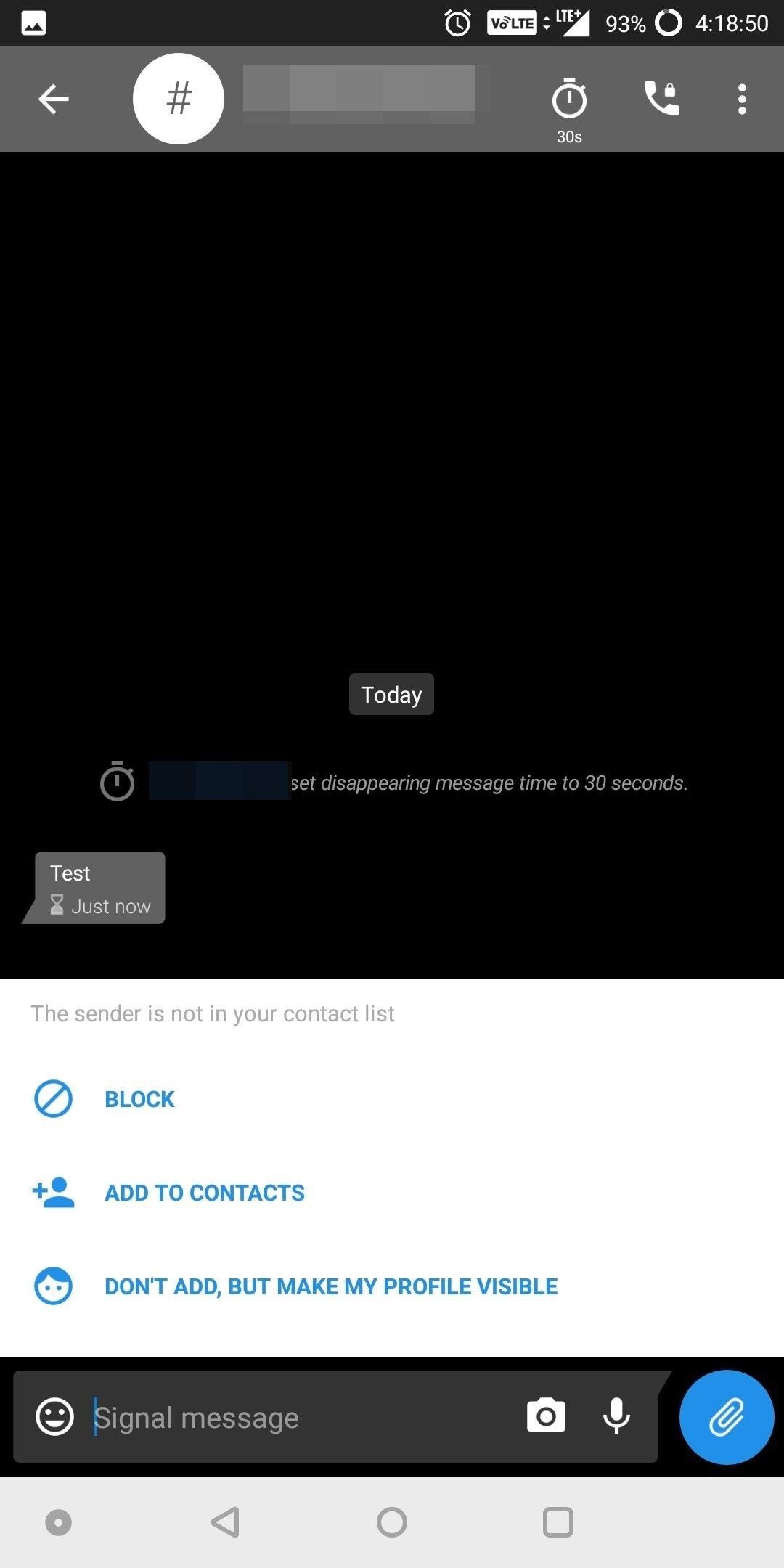
Step 3: Send a Disappearing MessageOnce enabled, send a message as normal. When the message is sent, the other person will receive a message indicating that the message will disappear after the predetermined duration. In addition, an hourglass will appear next to your message which will deplete at a rate matching the assigned duration. Once it depletes, the message will vanish. As previously mentioned, the message must be opened to begin the timer. Therefore, if you receive a notification but don't read the message until later, it will not disappear as long as you didn't open the message in the app. In addition, if Screen Security is disabled, the user will be able to take a screenshot of the message, preserving it. However, by default Screen Security is enabled, so this won't be possible in most cases.With Disappearing messages, you don't have to worry about a private message you send being shown to other people. After the duration expires, your message is gone. What do you think about disappearing messages? Will you be using this feature? Let us know in the comments below.Don't Miss: How to Quickly Delete All Your Signal Messages at OnceFollow Gadget Hacks on Facebook, Twitter, YouTube, and Flipboard Follow WonderHowTo on Facebook, Twitter, Pinterest, and Flipboard
Cover image and screenshots by Jon Knight/Gadget Hacks
News: Samsung's Amazing Music-Making Tool Soundcamp Is Coming to All Androids How To: Create drum sounds from scratch with Thor in Reason 5 How To: Route Reason's Kong drum designer as an external effect device How To: Use a Moeller stroke technique on the drums
Pre Settings for Guitar « GarageBand :: WonderHowTo
How to Make a Cantenna: 10 Steps (with Pictures) - wikiHow
If you've ever seen It Might Get Loud, you probably remember the part where Jack White makes a one-string guitar out of household scraps. This type of guitar is called a Diddley Bow, after Bo Diddley, and is about the simplest and easiest electric guitar you can make.
Phaedrus 1-String Electric Bass Guitar - YouTube
How to Disable Notification Previews for All Apps on iPhone and iPad in iOS 11 Posted by Khamosh Pathak on Sep 18, 2017 in How To , iOS 11 , Notification Center , Top Stories It's a bit ironic that we'll do everything to make sure our phone is as secure as possible, but leave out our Lock screen notifications for everyone to see.
How to Disable Lock Screen Notifications and Previews in iOS
If you're like me, you've either been ignoring that Gmail search bar at the top of your inbox or not utilizing its features. Maybe you didn't realize how helpful it could be. Maybe you thought it would take you back to Google web search.
How to Get Someone to Stop Ignoring You - wikiHow
Here's What's New in Samsung Experience 9.0 Beta: Android Oreo and Much More. In late October, we wrote about the beta rollout of Android 8.0 Oreo and Samsung Experience 9.0 on Galaxy S8 and
Here's everything that Samsung changed with Android 8.0 Oreo
Snapchat announced today that you can now design geofilters in-app, making it easier than ever to customize your snaps. This new feature incorporates a mobile creative studio, so you no longer have to use your computer to create your custom masterpiece.
How to Bypass Location Restrictions to Use Any Snapchat
The idea of translating in real-time has become quite popular recently, with Google's Pixel Buds integrating the feature. However, their implementation is audio-only. Until recently, you needed to download a frequently-unreliable third party app to translate text using your camera — but that all changes with the Galaxy S9 and Bixby Vision .
Samsung S9: How to Translate Languages in Real Time
Google notes that Location History allows for "benefits" like "personalized maps, recommendations based on places you've visited, help finding your phone, real-time traffic updates about
Geolocation: Displaying User or Device Position on Maps
How To Send A Text Message Using Gmail. There is a convenient method for the regular Gmail users to send text messages. Gmail has a dedicated Google Chrome extension that makes it possible to send the text messages via email quickly. The extension needs to add to the Chrome browser, and it will enable the text messaging via email.
How to Send a Text From Your Email Account with Any Carrier
Play the platforming game, Super Mario Bros 3, right in your browser and experience nostalgia! Join Mario and Luigi to save Princess Toadstool from the hands of Browser. Control the jumping plumbers Mario and Luigi as they embark on a quest to save Princess Toadstool. Battle Browser and all his Koopaling children.
Play Super Mario 64 for free online in browser - Business Insider
Play with your keyboard or a controller. Erik Ross The next time you're looking for a distraction, why not play a level of "Super Mario 64" right in your web browser?. It has been almost 20 years
Play Super Mario Brothers Free online in your web browser
So there you have it, our top 20 GNOME Extensions you should try right now. Which of these extensions do you particularly like? Which do you dislike? Let us know in the comments below and don't be afraid to say something if there is anything you think we missed.
How to Manually Update Your Chrome Extensions


0 comments:
Post a Comment