How To: Enable Bitmoji Integration in Gboard & Share Personalized Reactions Faster
Bitmoji are personalized emoji that look like you and can be used to make funny memes or snappy replies. Normally, you have to find one of these reaction emojis in the Bitmoji app, then use Android's share menu to send it to the app where you ultimately want to post it, but there's a much better way.Gboard added in-app support for Bitmoji back in 2017, which means you can skip the step of sifting through the Bitmoji app and share them directly from your keyboard instead. By the time we're done, you'll be able to use Bitmoji in any app that supports image pasting.You do need to have at least 5% internal storage space available to use Bitmoji for Gboard. You can check your available storage by going to your phone's Settings. Many devices have a specific settings page called "Storage." Some manufacturers, such as Samsung, place it within another menu called "Device Maintenance."Don't Miss: 20 Tips to Help You Master Gboard for Android
Step 1: Install or Update GboardSome phones come with Gboard as the default keyboard, but others don't. Either way, you'll need to install or update the app to enable Bitmoji integration, so head to Gboard's Play Store page to do just that.Play Store Link: Gboard (free) Next, if Gboard didn't come preinstalled on your phone — so basically, if you installed the app just now instead of updating it — you'll have to enable the keyboard. Tap "Open" on Gboard's Play Store page or simply open the app from your app drawer, then you'll be greeted by a setup tour.Tap "Enable in Settings," then enable Gboard on the following page. After that, tap "Select Input Method," then choose "Gboard" on the prompt. Finally, grant the permissions Gboard requests and you'll be ready to use it as your keyboard.
Step 2: Install the Bitmoji AppNow, you're ready to install Bitmoji if you haven't done so already. Head to the app's Play Store page below, then tap the "Install" button.Play Store Link: Bitmoji (free)
Step 3: Log in & Create Your BitmojiNext, open the Bitmoji app and either log in or sign up with your email address. Once you've done that, you'll be greeted by your Bitmojis if you've used the app before. If you haven't, you'll need to set up at least one type of Bitmoji at this point, so I'll link two helpful guides on that front below.Don't Miss: Create a Regular Bitmoji | Create a Bitmoji Deluxe Now, a prompt will explain that Bitmoji integration was automatically enabled in Gboard — just tap "Skip" here since I'll show you how it works below anyway.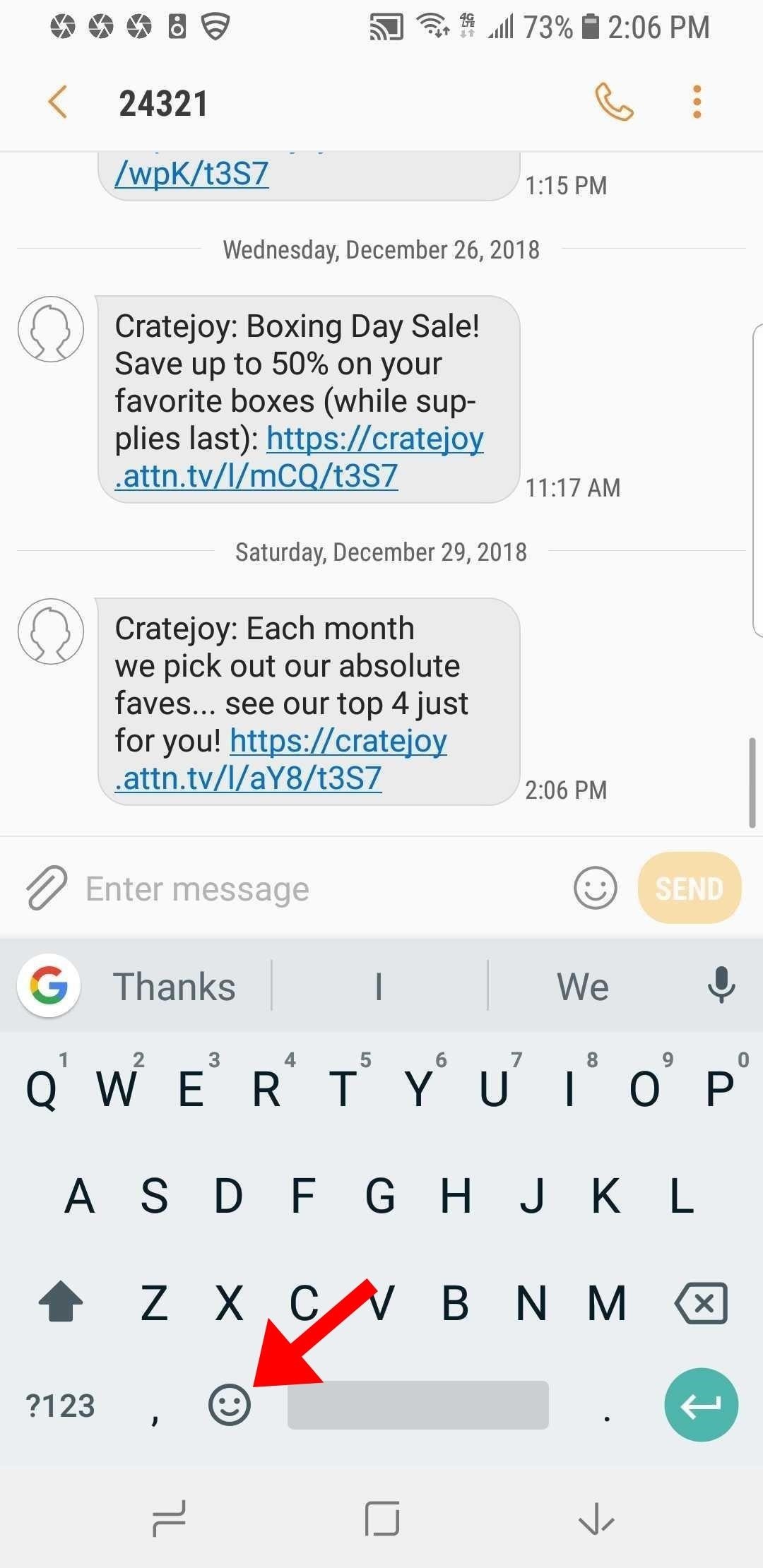
Step 4: Use Your Bitmojis in GboardFrom now on, when you want to send a Bitmoji, there's no need to open the Bitmoji app or use the Bitmoji keyboard. Just tap any text field to bring up Gboard, then hit the emoji key next to the space bar. If you don't see this button, long-press and release the comma button instead.From here, select the Bitmoji icon at the bottom of Gboard's interface — it'll be the fourth tab for most users. Now, you will see the option to select Bitmoji stickers and search for them. Tap on any Bitmoji to insert it directly. Common apps that support Gboard's Bitmoji include Facebook, Facebook Messenger, Hangouts, Google Allo, Android Messages, WhatsApp, Twitter, and, of course, Snapchat. However, this feature should work in just about any messenger app.Don't Miss: Create Mini Emoji-Style Stickers of Yourself in Gboard for Android & iOSFollow Gadget Hacks on Pinterest, Reddit, Twitter, YouTube, and Flipboard Sign up for Gadget Hacks' daily newsletter or weekly Android and iOS updates Follow WonderHowTo on Facebook, Twitter, Pinterest, and Flipboard
Cover image and screenshots by Delani Clatfelter/Gadget Hacks
Building an Electric Bass Guitar: Part 1 - Design Considerations by Lee Laird Click on any picture to see a larger version. For those who may not know, I've been playing musical instruments most of my life, with guitar as my primary instrument. For the non-guitar players, Bass guitar has the same note structure as the guitar.
3 Ways to Teach Yourself to Play Bass Guitar - wikiHow
How To: Upload, embed and watch 720p HD video on YouTube How To : Edit your videos with YouTube's TestTube video editor How To : Speed up Firefox when viewing a PDF
Watch Youtube Videos Without Adobe Flash in Firefox
Precautions to Unlock iPhone 3. It is really important to look for the unlocking process that's appropriate to your phone model. Thus, to unlock iPhone 3GS you definitely need to include this name in your order. Any other versions will not work. The method how to unlock iPhone 3 can be used even after you've gone through firmware updates.
Full iPhone Unlocker for IMEI | Fastest Unlock iPhone for $29
AD
iphonesunlockingpro.com
Report Ad
Official Unlock iPhone XS, MAX, XR, X, 8, 8 Plus, 7, 7 Plus, 6S, 6, 5S, SE, 5, 4S, 4G, 3G
How to Install and Setup the Google Chrome Browser Download Google Chrome and get the essentials up and running. Great if you need or want a new web browser. Please try again later.
Browser Settings Hijacked? How to Use Chrome's Reset Tool
How to Curate a Stunning Instagram Feed with - Later Blog
Much like the Pen Window feature in Air Command, Multi Window is extremely useful in its functionality, but bogged down by serious restrictions. While you can open and use two apps at the same time, you're limited to only a handful of apps that can utilize the feature, leaving all the other ones shit outta luck.
Galaxy Note 9: How to Use Multi-Window (aka Split-Screen)
iPhone / iOS 11 Users Still Need to Use a VPN can infect mobile devices and download malicious apps independently. That means that the user could technically not do anything wrong and their
Top 10 iPhone News Apps - Lifewire
The acid in lemons works like regular battery acid to create an electrolyte reaction with the metals that produces power. Simply make a positive and negative electrodes that connect to the lemon acid with a couple household items, and test. If you have a multimeter handy, you can visibly measure the lemon power output in this simple voltaic
How to Make a simple lemon battery - Gadget Hacks
News: Snapchat Adds Mobile Creative Studio So You Can Design Geofilters in-App News: Snapchat Is Making It Easier for Your Friends to Stalk You News: How to Create Your Own Geofilters on Snapchat How To: Spoof Your Location to Get Around MLB Blackouts on Your Android Phone News: If You Use Snapchat, Don't Jailbreak Your iPhone
How to Create Your Own Geofilters on Snapchat - Gadget Hacks
Top 5 PDF Search Engine Sites to Get Free PDF eBooks 1. Ebook3000 Ebook3000 is a nice PDF search engine for PDF files (ebooks, documents & forms). And it is a library of free ebook downloads with over 17 categories available. You can also type in the keywords in the search box, then all the related PDF files are displayed here.
How to Find Thousands of Free Ebooks Online
Originally Posted by Rashad83. Hi guys, i was searching for a way to hide the navigation bar without any app that will require you buying it or it consuming battery and after finding a couple of threads on the topic i thought of sharing my findings and also as a reference to go back to in case i forget how to.
How to Replace the Carrier Name in Your iPhone's Status Bar
The ASUS ZenFone 5Z Is Coming to the US with Legit Flagship


0 comments:
Post a Comment