How To: Miss the Charms Bar? Here's How to Access the Same Features on Windows 10
For all of the flak that Windows 8 received from desktop users, it certainly had some interesting and unique features. For instance, the "Charms" bar allowed you to easily access several key menus by simply hovering your mouse pointer in the top- or bottom-right corner of the screen.Alas, the Charms bar is no more in Windows 10, as it has been deprecated in favor of more discoverable menus. But luckily, these same features can still be accessed rather easily, and I'll show you their new locations below.
Accessing the Search MenuOne of Microsoft's main focuses when developing Windows 10 was to integrate its new virtual assistant, Cortana. As a result, the Search menu is now a lot more central than it was before, and it brings back all of the old functions, as well as a few more.By default, you'll find the new Cortana-enabled Search menu integrated directly into your task bar (though this can be disabled in Settings). Just click this Search box and type in your query, or click the microphone icon and dictate your search to Cortana on capable devices. Cortana can also be accessed with Windows key + S. Alternatively, you can simply press the Windows key by itself to access the Start menu, then immediately begin typing your search.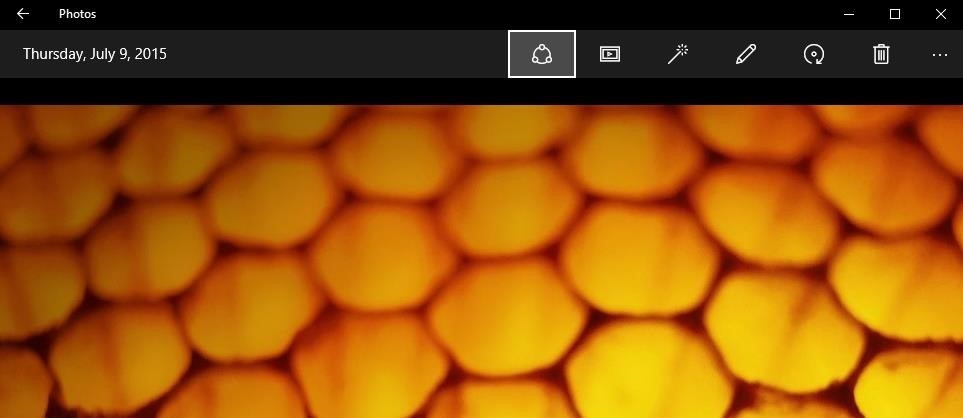
Accessing the Share MenuWith Windows 8, native apps required the Charms bar if you wanted to share content. For instance, when viewing a picture in the stock Photos app, you would simply bring up the Charms bar, then select the "Share" option to send your photo to a friend.In Windows 10, native apps now have an action bar at the top of the screen, which has the "Share" button baked right in (among other options). As a result, sharing content is even easier now, since this button is always one click away.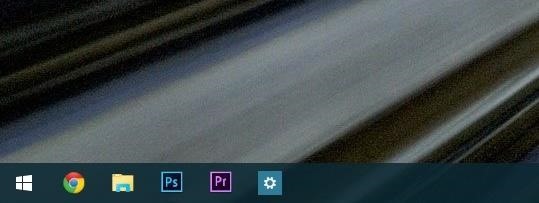
Accessing the Start MenuWell this one's pretty easy. Windows 10 finally brought back the desktop Start menu, and as a result, the Start button is back where it should be in the left side of the taskbar. And again, you can simply hit the Windows key to bring this up.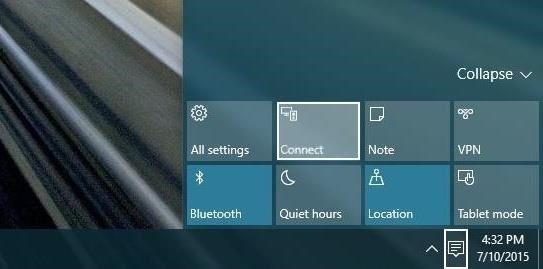
Accessing the Devices MenuPreviously, the "Devices" option in the Windows 8 Charms bar allowed you to send your screen's contents to attached devices such as a printer or a second monitor. With Windows 10, these same functions can be accessed through the quick actions menu.To give it a try, just click the Action Center icon in your notification area, then select the "Connect" option. Attached devices will show up in a list, and you can easily send your content from here.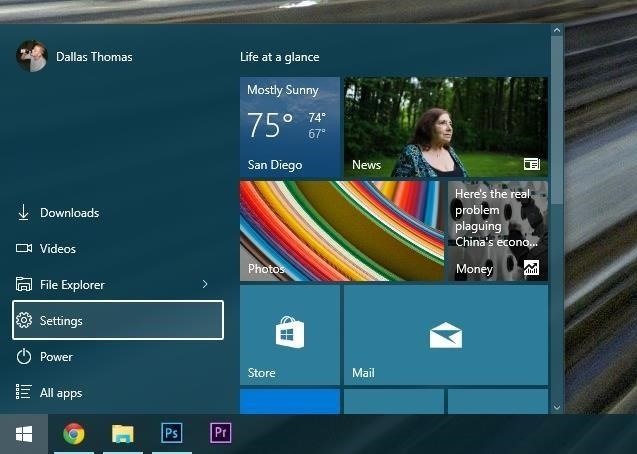
Accessing the Settings MenuWith Windows 10, you'll find the main Settings menu residing comfortably in your Start menu. This provides easy access to system settings no matter what screen you're on. Alternatively, the Settings menu can be accessed through the new quick actions menu—just click the Action Center icon in your notification area, then choose "All Settings." What are your thoughts on the new layout of Windows 10? Are the Charms bar options easier or harder to access after this update? Let us know in the comment section below, or drop us a line on Facebook, Google+, or Twitter.
How to Disable Heads-up Notification without Root Brian Umoh HeadsOff will disable all Lollipop Heads-up notifications on your phone. How to stop pop up ads on Android How To PC Advisor
How to disable "heads up" (popup) notifications in Lollipop
The easiest way to check past data usage is to log into the web portal of your cellular provider (or check your paper bills) and look at what your data usage is. If you're routinely coming in way under your data cap, you may wish to contact your provider and see if you can switch to a less expensive data plan.
How to Reduce Your Data Usage on Android or iPhone | Digital
Learn the secret of how to make your Furby evil and rude! Plus see other gifts Rhett & Link have gotten recently. Good Mythical Morning Episode 216! SUBSCRIB
3 Ways to Be A Good Owner For A Mute Furby - wikiHow
Into the future . According to UBI Research, Samsung's display division has an operating margin of 3.6 percent, while LG's, thanks to OLED, is 8.1 percent.It's a lot easier to make money with more
How to Adjust Contrast & Hue Levels on Your LG G3 for a More
The Always Up-to-Date List How To: Get Back the Camera's Missing HDR Button on Your iPhone 8 or 8 iphone camera hack zoom PlusReuse your old iPhone - Smart home controllerSamsung Galaxy Note 8 How To: Which Stores Accept Apple Pay?
Re: Which Stores Accept Apple Pay? The Always Up-to-Date List
Any ordinary mic will work for recording audio from the parabolic dish, but there are generally two types of microphones used with a parabolic dish. One option is a microphone with a directional cardioid pickup pattern, like a handheld mic, another is to use a small microphone, like a lavalier, with an omnidirectional pickup pattern.
How to Make a Parabolic Microphone - Stealthy Ninjas
An ISP is a company (such as Netcom or CompuServe) that gives you a phone number to dial when you want to connect to the Internet. You may be able to use the same ISP that you use to connect your desktop computer to the Internet. Just enter the same information in the Network Preferences program on your Palm device, and you're on your way.
Learn how to record your Android screen: The 2 best Android screen recording solutions for phones and tablets! *** FREE Guide to Filming Pro Videos with Andr
How to transfer photos from Android to PC for free - Apowersoft
Opera Mini is all about speed. It not only blocks browser ads on your Android device, but Opera Mini compresses content before it reaches you, so you get your content fast, no matter how heavy, even on a really slow connection.
How to Install Opera Mini: 5 Steps (with Pictures)
Categories (This one is great if you've got about 5 pages of Apps. I took 6 down to 2 with this.) Springboard Those are just random ones that I remember installing. I've got so many JB Apps, I'm not sure which Apps do what. You should probably get used to using a disk client so you can add themes that aren't on Icy/Winterboard.
3 Ways to Remove Cydia Apps - wikiHow
Best Android Apps To Stream and Download Movies and TV Shows For Free. While there are premium services like Netflix, iFlix and the rest that allows you stream and download movies for offline viewing, most of the android apps I'd be stating here, are completely free to use.
Top Best Apps To Stream Movies And TV Shows On Android
If you have recently moved into a new home or apartment and have to wait several days before cable or satellite can be installed, quickly fashion a homemade TV antenna so that you can still watch programs delivered from a local broadcasting station.
Homemade TV Antenna - instructables.com
Download Mozilla Firefox, a free Web browser. Firefox is created by a global non-profit dedicated to putting individuals in control online. Get Firefox for Windows, macOS, Linux, Android and iOS today!
Tin Can Table Lantern Planning a barbecue or an al fresco dinner party? These recycled tin can lanterns are an easy way to add some sparkle without stretching your decorating budget. The…
Use an Altoids Sours Tin to Create a Mini BBQ Grill


0 comments:
Post a Comment