How To: Make Drag & Drop Way More Useful on Your Mac
Managing files can be time consuming on your Mac, for the simple reason that keyboard shortcuts and right-clicks sometimes lack the effectiveness we need. But with a simple third-part app, you can expedite the process of sharing, moving, deleting, and overall managing files on your computer.With FilePane, from developer MyMixApps, you'll be able to drag any file and drop it into a small window, where you can then quickly choose what to do with it: share it via email, upload it to social media, convert and compress it, and much, much more.Don't Miss: 13 Terminal Commands Every Mac User Should Know 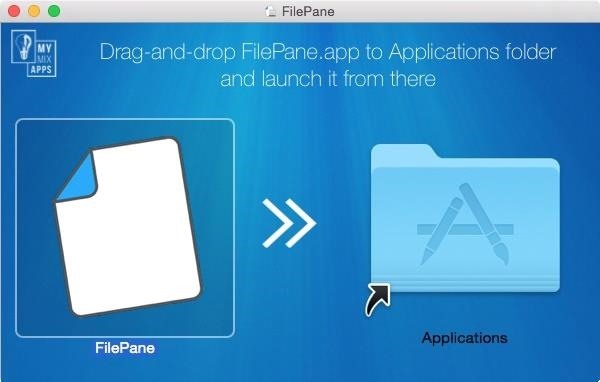
Step 1: Download and Install FilePaneFilePane is available through the Mac App Store for $4.99, but you can install a free 7-day trial version directly from their website using this link. Just download it, open up the DMG file, then drag and drop FilePane into your Applications folder. After opening up FilePane for the first time, allow FilePane to start on boot and grant it access to your files. Once that's set, click on "Start Trial" to begin using FilePane. You can also purchase the fully-licensed version from this popup. Note: If you have your security settings to only allow apps from the Mac App Store, you may have to adjust your Gatekeeper settings to open up FilePane for the first time.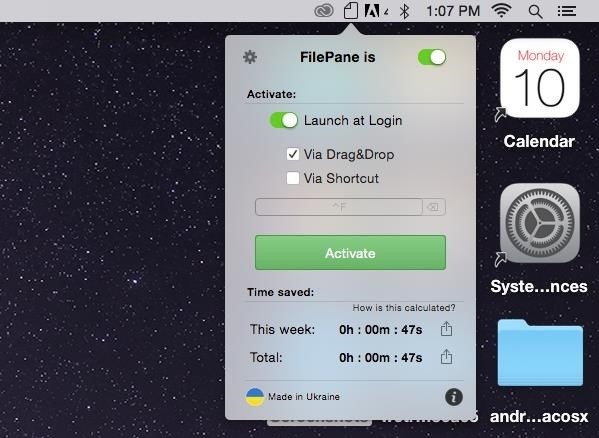
Step 2: Access Its SettingsFilePane will exist as a menu bar app, which you can use to disable the app, have it launch at login, purchase the license, and more.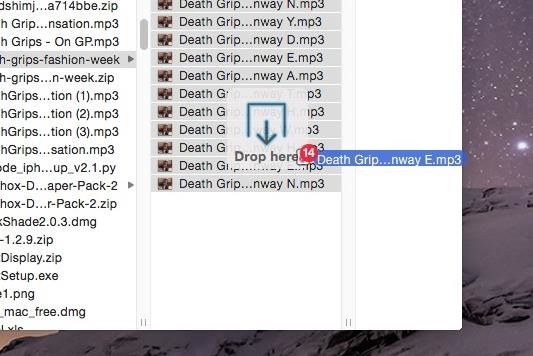
Step 3: Drag & Drop Using FilePaneNow, when you click on a file and drag it, a transparent and unobtrusive window that says "Drop here" will appear where you can drop the file(s). Depending on the type of file(s), different options will be available for you to choose from. For most files, including photos and videos, you'll be able to do such things as email, extract, share to a created folder, convert to another file type, upload to social media, set as your background (photos), delete, and move or copy to anywhere on your Mac. When I dragged a photo and selected the conversion option, I had the ability to convert it to a handful of alternatives, such as PNG and JPG, with the added option of compressing it to the percentage of my choice. Sharing files via social media was a breeze, with options to upload them to Twitter, Facebook, Flickr, Weibo, and AirDrop (which isn't social media, but allows you to quickly share files to other users on Mac OS X and iOS). My personal favorite option is the ability to move or copy a file to any destination on your computer. Simply use one of the preset options available, or select your own, and the file will be instantly transferred. This makes it extremely easy for me to place a file inside of a folder that itself is inside of two or three other folders. With a single drag, drop, and click, I can send a file from my Desktop to somewhere far from it. As I mentioned above, there are several other options for you to choose from, it just depends on the type of file you select.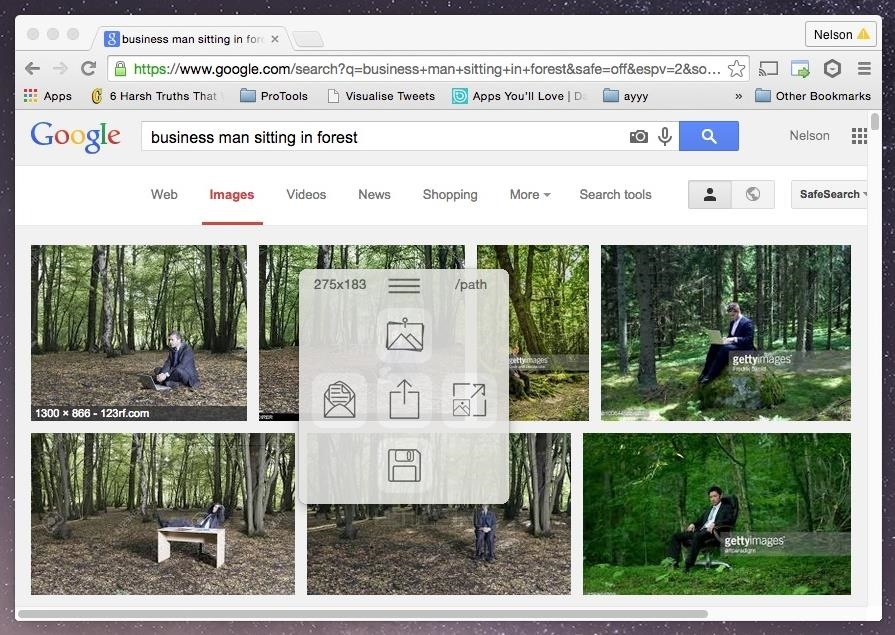
Step 4: Drag & Drop Content from the WebYou can also drag and drop files that are on Chrome, Safari, Evernote, and other apps. Dragging an image from a Google search on Chrome, I had the options to share the file, set it as my background, resize it, and save it to my desktop. I tried it out on Photoshop and it worked as well. Unfortunately, this only seems to work with photos, because whenever I tried dragging a PDF or video from the web, the hyperlink simply came along with no FilePane window in sight. Test out FilePane to manage all of your files and let us know how well it works for you.Follow Apple Hacks over on Facebook and Twitter, or Gadget Hacks over on Facebook, Google+, and Twitter, for more Apple tips.
Hi, Many of you curious about changing boot animation in samsung mobile. You know samsung uses qmg like boot animations. So it is complex to create own boot animation than creating zip boot animation.In this tutorial I have replaced the qmg files with zip boot animations. I have tested on my Samsung Galaxy Core Prime.
How to Change Your Boot Animation - XDATV - xda-developers
How To: Set up iChat to text, video or audio chat with friends How To: Install audio and video cards into a PC How To: Transfer files to/from iPod Touch/iPhone from PC How To: Restore audio devices on your computer How To: Convert Youtube videos to MP3
Rip (DOWNLOAD) audio and video from YouTube to ipod/iphone
How to Getting Started with the Samsung Galaxy Tab
How to Retweet. The retweet is one of the most commonly used tools on Twitter, and is a great way to pass on interesting tweets that you have read with your followers. Twitter offers two ways of retweeting, manual and automatic, each with
How to Use Hound on Android Without an Activation Code
It's always a good idea to have a pack of mints on hand, especially right after a cup of coffee or a lunch made with loads of garlic. Whether you're going on a date, to the dentist, or to an interview, bad breath is a major faux pas and totally avoidable.
Why this answer is accepted? While it sounds as a solution, it is pure fantasy! It is not possible to set locale on the per user basis, language for non-unicode programs is computer (not mere user) wide setting. And there is no such feature as 'run as some other local user', there is only 'run as administrator' option.
Automatically Translate Any Android App into Any Language
It has self destructive feature that will automatically delete picture and videos from snapchat application after few minutes once recipient read their message. In this article. We will show you how to save snapchats in Samsung Galaxy note 2 or any rooted android smartphone. For completing this process, you have to root your android smartphone.
How to Secretly Save Pics & Videos on - Samsung Galaxy Note 3
Passcode Exploit: How to Bypass an iPhone's Lock Screen Using Siri in iOS 7.0.2 to Send Messages Siri Exploited—Again: How to Bypass the Lock Screen in iOS 8 (& How to Protect Yourself) How To: Open ANY App Instantly & More Securely from the Lock Screen on a Samsung Galaxy Note 2
How to lock individual apps on your smartphone | AndroidPIT
Steps To Download Now's The Time - watch face for smart watches On PC Or Mac: Use/Play Now's The Time - watch face for smart watches directly on your PC or Mac.Just choose any of your favourite emulator from below links.Use your phone as a remote control when playing games.
How To Fix Battery Operated Clocks C - c.givxgifg.us
A new application in the Mac App Store, appropriately dubbed Snappy, allows you to send and receive Snapchats directly on your computer. Check out the guide below to learn how to go through all of your Snapchat stories, take and send photos with filters, and text just like you would on your mobile device.
How to Take Snapchat Photos Using Your Apple Watch « iOS
Of the probable hundreds of settings in Windows, there are only a handful that you may use on a daily a basis. Windows 10 makes it easier to get to those settings by putting them in the Action
Highly Useful Tips And Tricks To Control Windows 10
iPhone Widget Basics. First off, to get to your widgets Search screen, you swipe to the right. This motion opens up the leftmost lock screen. Here you see your widgets Search screen. It features a few of Apple default widgets such as Calendar, Siri App Suggestion, News, and Mail.
How to use Notification Center on iPhone and iPad | iMore
If your install has been successful, head to Google.com. You should see the Google LEGO Doodle showing up in place of the normal logo. If you're in a real rush, you can click on LEGO logo to
How to Change the Google Logo to Your Favorite Google Doodle


0 comments:
Post a Comment