How To: Prevent Accidental 911 Calls from Your Apple Watch (So Emergency Services Don't Show Up While You're Sleeping)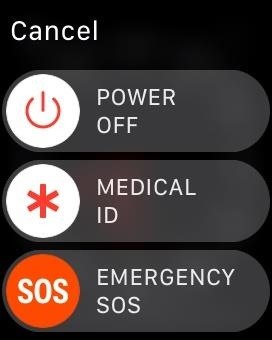
I've called 911 accidentally more than a few times on my iPhone using the Emergency SOS triggers, but it's also just as easy to trigger an unintentional call to emergency services using an Apple Watch. These accidental 911 calls can put a strain on local public-safety answering points, or call centers, as well as local authorities and emergency medical technicians.While this hasn't always been the case, Apple Watch models first received a feature called "Emergency SOS" when watchOS 3 rolled out in September 2016. This feature lets you either press and hold down the side button for about five seconds to trigger a call to 911 or long-press the side button, then swipe the "Emergency SOS" slider to make the call immediately.More Info: How to Call 911 from Your Apple Watch in Case of an Emergency When sleeping (or even changing Watch bands), it's far to easy to press and hold that side button for the amount of time required to initiate a 911 call over a cellular or Wi-Fi connection. When holding the button down, a countdown will begin, and the Apple Watch will vibrate and make emit a siren, but if you're sleeping, you may not notice the vibrations warning or audible alerts that you're about to call 911.In earlier versions of watchOS, when you long-pressed on the side button to bring up the power menu, the "Power Off" slider was right next to the "Emergency SOS" slider, making it all too easy to swipe the wrong one if you're in a hurry. If you had "Medical ID" information set, it would create a nice separation between the power and emergency sliders, but if not, the two would hug each other. Apple fixed this in a subsequent update, making that spot where the "Medical ID" slider goes blank space, to keep that separation when no Medical ID is present. The power menu, before (left) and after (right) the update. While you may not accidentally call 911 with the slider anymore, the press-and-hold method is still an issue when sleeping. Even if you're a light sleeper, the Watch may be buried beneath pillows, causing the siren to be muffled, and the vibration along may not be enough to wake you. To prevent this from happening:Open up the Watch app on your iPhone. Tap on the "My Watch" tab. Tap "General" from the list. Tap "Emergency SOS" from the list. Make sure "Hold to Auto Call" is toggled off. And that's all there is to it. If you're awake, it's a good idea to keep this setting on, just in case there is a real emergency that makes it hard to swipe on the screen or tell "Hey Siri" to call 911 for you. But before you go to bed at night, or even take a daytime nap, it's a good idea to keep this setting off unless you think the siren and vibrations will snap you out of your deep sleep in time.We tested an Apple Watch Series 3 (GPS + Cellular) model provided by Verizon Wireless, but all of the above applies to all Apple Watch models running the latest watchOS version with an iPhone running an up-to-date iOS version.Fun fact: In a local report in Elk Grove, California, which is in Sacremento County, there were roughly 1,600 accidental 911 calls from Apple's repair and refurbishment facility in Elk Grove over a four-month period. Apple acknowledged this, but that doesn't mean the issue is solved or contained to just one county in California.Don't Miss: How to Find Your Misplaced iPhone Using Your Apple WatchFollow Gadget Hacks on Facebook, Twitter, YouTube, and Flipboard Follow WonderHowTo on Facebook, Twitter, Pinterest, and Flipboard
Cover photo and screenshots by Justin Meyers/Gadget Hacks
How to Block and Unblock Internet Sites with Firefox. This wikiHow teaches you how to block a website on your computer's Firefox browser. While there isn't a built-in way to do this in Firefox's settings, you can use an add-on called
How to Block Any Website On Your Computer, Phone, or Network
How to Take Care of Your Furby. Furbies are fun, talking toys that will help to keep you happy all day long. There are countless Furbies to choose from, each being equally lovable.
Tips & Tricks to make your Furby Perform | Furby Manual
A demonstration of the tools and techniques used to make your own 1/4" instrument cable at home. How to Tin a Soldering Iron Tip or Re-tin an Old Soldering Iron Tip - Duration: 11:03.
How to Solder instrument cables « Hacks, Mods & Circuitry
If you are editing or viewing a Google drive file and suddenly internet connection is gone, you can still view and edit. This video will show you how to view and
How to Enable Google Docs Offline Edit Mode in Google Drive
LED Jelly Spike YoYo Balls-12 Pack Add all three to Cart Add all three to List. A few of them did not light up nearly as well as the others. Also the finger
No-Brainer Method | Let's Put LEDs in Things! | Adafruit
Wondering how to change your Facebook Page URL? It's pretty simple, though Facebook once said you can't. I checked all of the Pages I admin, and the option to change the Page URL was readily available. Here's how. UPDATED with new text and screenshots March 2019! Yes, this article is actually correct, unlike those others.
Steps to Make Facebook Private and Protect Your Info
If you haven't received the option to upgrade your OS and you're feeling impatient, here's how you can get Android Oreo right now. natch), a redesigned Settings menu,
How to Get Developer Options on Android | A Simple Guide
How to Turn on an HTC Phone. If your HTC phone is not powering on properly, there are several steps you can try to fix it. By pressing and hold the Power and Volume Up buttons, you may be able to reset the device.
Play Your Favorite SNES Games in Any Web Browser—No Emulator
- "The size of the message you are trying to send exceeds the global size limit of the server. The message was not sent; reduce the message size and try again". Maximum email size limit for Gmail, Outlook.com, Yahoo, AOL, etc. Here is the values list of the maximum email size limit for various email providers and email client applications.
How to Send Large Files Over Email
News: Always-Updated List of Phones That Will Get Android Pie How To: Watch Apple's WWDC 2018 Keynote for the New iOS, ARKit & Apple Watch Reveals News: The Latest Razer Phone 2 Leaks Suggest Project Linda Might Actually Happen
Gadget Hacks News — Page 5 of 55 « Gadget Hacks
I had been trying to improve my speed for months and I was not seeing much improvement. Once I slowed down and started being more accurate instead of trying to type faster I started seeing an increase in my typing speed. I feel more in control as well.
How to Boost Your Download Speed (with Pictures) - wikiHow
Mobile The secret to saving a wet phone or tablet. Rice? Hair dryer? Find out which reliable solution works, and how to prevent a phone or tablet from getting waterlogged in the future.
Your smartphone got wet. Here's what not to do first
If you really want your iPhone to look more like Android, Jailbreaking is really the only way you'll be able to do it properly. That being said, if you're willing to go to that length, then do it for this phone, but when it comes time to upgrade, just do yourself a favor and buy Android. Do you have an iPhone you wish was more like Android?
How to Make Windows 10 Look Like a Mac - YouTube
The following steps will show you how to make an Automator workflow that you can save on your Desktop or in your Applications folder. You can drag and drop batches of images directly on it, and it will output the resized images in a folder on your desktop.
How to RESIZE IMAGES??? | Page 2 | MacRumors Forums


0 comments:
Post a Comment