How To: Use Text Messages to Surf the Web on Your Phone Without Any Data
In places like underground bars or national parks, your phone's Internet service is sure to slow down to a very sluggish pace, making it difficult to surf the web. Or worst case, data will be non-existent, leaving you with only low-level network support for calls and SMS text messages.Now, as long as you have the ability to send and receive texts, you can use that functionality to surf the web without any internet service! It won't be as quick as you're used to, but it definitely gets the job done.
How to Surf the Web via Text MessagesUsing only text messages, you can browse the internet on your smartphone thanks to Astrobot. Once your text is sent to the service, the page you requested is stripped down to its bare minimum and sent to you as an SMS message. Please enable JavaScript to watch this video.
An Android web browser called Cosmos came before Astrobot and did practically the same thing, but had to be shut down due to its overwhelming use. Thankfully, Astrobot doesn't seem to be shutting down anytime soon.You can text Astrobot such things as:"Go to [website URL]" to go to a specific site "Search the web for [search query]" for a general search "[#]" - the number corresponding to the links that pop up "[#] more" to receive that many more texts of the article "Table of contents" to view them "Where am I?" to view what you're currently reading To start, you need the Astrobot phone number, which is 646-576-7688. I suggest saving it Astrobot as a contact so you never have to remember the number. After all, you'll probably be using this when you don't have any Internet connection.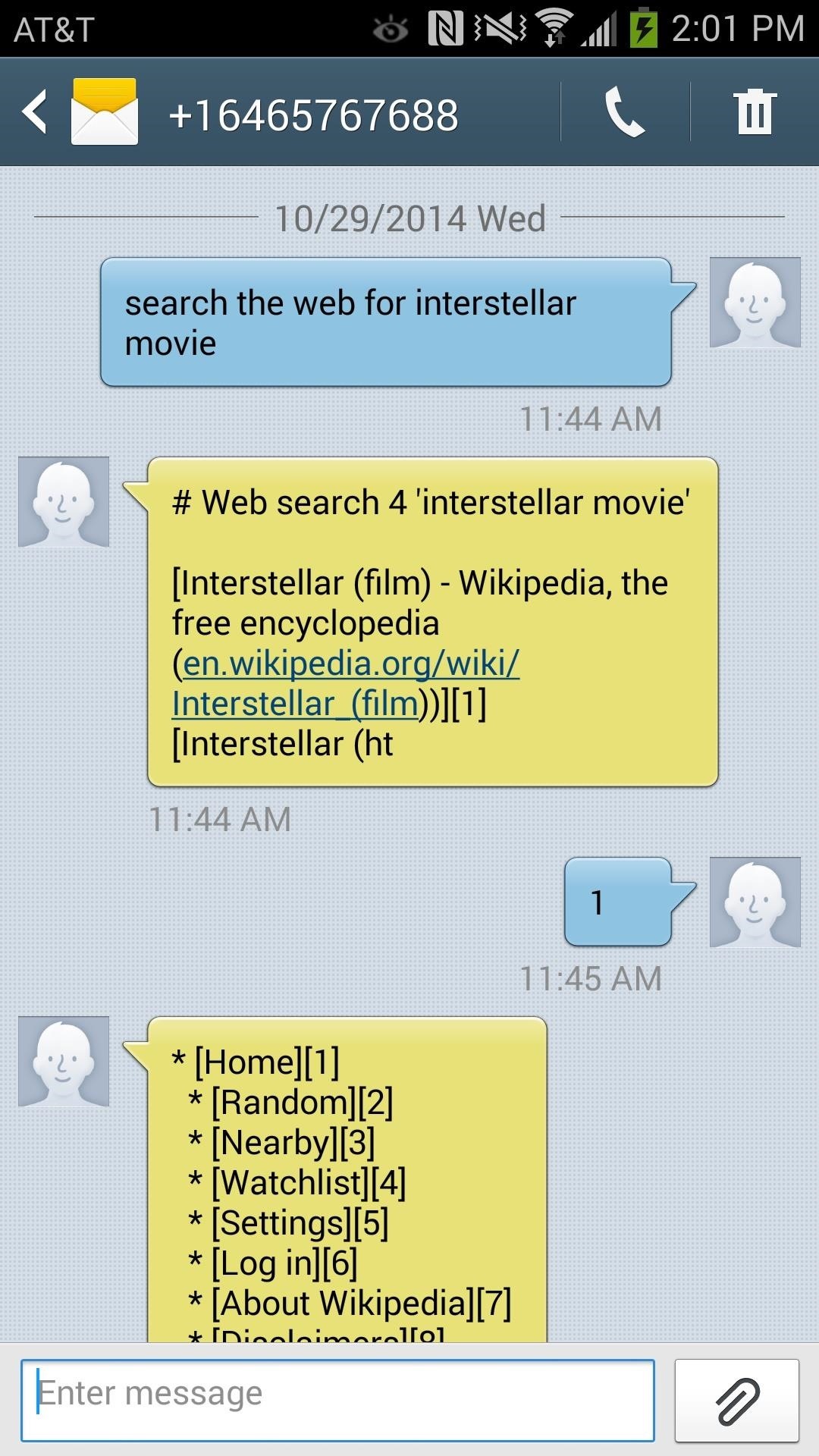
Let's Run Through a Quick Example...Whenever I message "Search the web for Interstellar movie," I receive back the most popular web search first, which just happens to be the Wikipedia page for Interstellar.Since that's what I wanted to read, I texted back "1", which is the page's corresponding number, which sent me back the first portion of text from the Wikipedia page.To receive more texts from the Wikipedia entry, I texted "4 more" to receive four more text messages, which began to summarize the movie. If you forget what you're currently reading, text "Where am I?" to find out. Numbers corresponding a certain area of the site will be in brackets next to the option. Sure, it isn't the prettiest thing in the world, but it does offer something that is rarely ever seen on any other applications. Being able to browse the web without using any actual data is pretty amazing in itself, so in case you're ever stuck with shitty service or just want to try this feature out, you should definitely text Astrobot.What do you find most useful about this program? What situations would you text Astrobot in? Let us know below, and as always, make sure to follow us over on Facebook and Twitter.
I proudly present my first Xposed module: True Silent Mode for Lollipop This Xposed module will restore the good old silent mode from Kitkat in Lollipop. The missing silent mode has been one of the most discussed issues after the release of Android 5.0.
Lollipop Silent Mode Makes Alarm Silent Too - Android Forums
It's always great to discover another John Edgar Park tutorial on the Adafruit Learning System. In his latest tute, John shows how he used Adafruit's Flexible Silicone Neon-Like LED Strips and a Circuit Python-powered microcontroller (the Metro MO Express) to create very convincing-looking LED "neon" signs.
SunLED: signs led
AD
You can now play Snake while watching the video. This trick only works in YouTube's new player, which is only available for videos that don't include annotations or ads. It's limited to the videos played on YouTube's site and it doesn't work for embedded videos. Here's an example of video you can use to play Snake.
YouTube Easter Egg: Play "Snake" Game While Watching a Video
Are you having problems charging your phone? Do you have to wiggle the cable or get it placed just right before it starts charging? Instead of paying for an expensive "repair" or replacement, you
How to Fix Fast Charging Issues with Samsung Phones
How To: Erase Data from Your iPad, iPhone, or iPod touch How To: Update Your iPad, iPhone, or iPod Touch to iOS 8 How To: Use Redsn0w 0.9.6b4 to jailbreak an iPhone, iPad or iPod Touch (iOS 4.2.1/4.2) How To: Jailbreak iOS 7 on Your iPad, iPhone, or iPod Touch Using evasi0n7
What IP Certification Really Means. The IP certification guideline has been defined by the IEC 60529 standard which provides an Ingress Protection a.k.a IP rating to all consumer devices for their dust and water-resistance capabilities. The '6' in the IP67 rating of the iPhone XR denotes its dust-resistance capabilities, while the '7
Google Pixel 3 and Pixel 3 XL: frequently asked questions
How To: Make App Shortcuts on Your Galaxy Note 2's Lock Screen Adapt to Your Routine News: 5 Great Lock Screens That Put Your Android's Default to Shame How To: Add Custom Widgets to the Lock Screen on Android Lollipop
How To: Circumvent an internet proxy or browser filters How To: Access MySpace and Facebook at school How To: Bypass WebSense at school using http tunnel How To: Use a proxy to access websites blocked in your part of the world
How To Circumvent an Internet Proxy - The Venus Project
Who Needs Clowns? 3D Printer Lets You Print Inflatable Rubber
Notes for GMail is a user-friendly extension for Chrome that allows you to annotate your emails by using sticky notes within your Gmail. Although these notes are private by default, you can instantly share them on Facebook or Twitter whenever needed.
FREE: Digital Sticky Notes for Gmail Emails | cloudHQ Blog
Mobile Apps Use your phone's camera to solve equations with PhotoMath. With PhotoMath, you can use your phone to scan an equation and immediately receive the answer.
Mathway on the App Store - iTunes - Apple
Watch Out Facebook & Twitter: Google's Stepping Up Their Live-Streaming Game News: Facebook Is Going All in on Live Video Streaming on Your Phone How To: Live Stream Fortnite Battle Royale Gameplay from Your iPhone to Twitch
How to Watch the 2016 Super Bowl 50 Live Stream from Anywhere


0 comments:
Post a Comment