How To: Know When Apple Batteries Need to Be Serviced or Replaced
Not all batteries are created equal, but one thing's for sure—they all lose capacity over time. Thankfully, the advanced lithium-ion batteries in your MacBook and iPhone are meant to last for several years before they begin to lose their overall charge capacity.Of course, that's under ideal conditions. Everything from an overload of apps running to excessive use and high temperatures can play a part in speeding up the deterioration of your battery—until one day when it stops working, accepting a charge, or holding juice.Instead of letting it get to that point, it's a smart idea to keep track of the battery on your MacBook and your iPhone so you know when it's nearing replacement time, rather than when it's too late.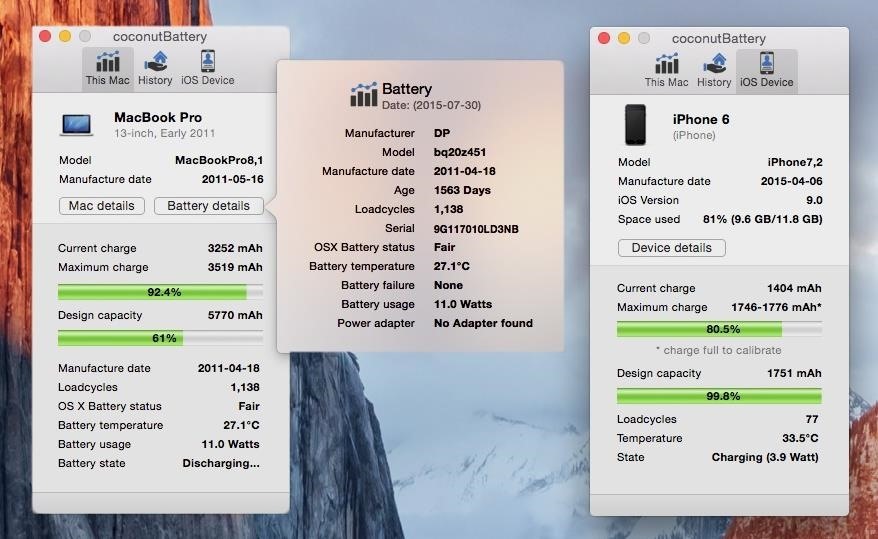
Monitor Your Battery's Health with coconutBatterycoconutBattery, from developer Chris Sinai, is like a medical chart for your MacBook and iPhone, providing current health information about your battery and more, including:Model, OS version, and manufacture date Space used Current and maximum charge levels Design capacity Loadcycles Temperature Charge state While all of the information that appears in coconutBattery has a variance of usefulness, the one piece of information that we'll be focusing on are "loadcycles," also known as charge cycles.
Your Laptop's Charge CyclesAs you use your MacBook, your battery goes through charge cycles, which are a way to measure its lifespan. A single charge cycle consists of using 100% of your battery's power, which can be done in a single sitting or throughout several days.If you only use 75% of the battery one day, charge it back to 100% and then use another 25% the next day, it took two days for you to go through one complete charge cycle. So how many charge cycles can a MacBook go through before the battery is affected?Apple uses lithium-ion batteries for their products, and on this page they mention that the MacBook, MacBook Pro, and MacBook Air batteries are designed to deliver between 300 and 1,000 charge cycles before falling to 80% of their original capacity (in ideal conditions), depending on the date that the laptop was manufactured. As you can see below, my MacBook Pro (13-inch) from early 2011 has 1,138 charge cycles (loadcycles), 138 over the maximum cycle count according to Apple. And indeed, it has affected my battery, as the design capacity is now at 61%, meaning that it holds 61% of the charge it initially carried when I first purchased it.Using the "battery details" section, I can check out more information, such as the status of my battery (which is currently "fair"), its age (1,563 days), and how many failures my battery has (luckily, none). If coconutBattery is telling you that you have a bad battery status or several battery failures, you should take your laptop to Apple to get it checked out, so that you can know whether or not to replace the battery and prevent further damage to your computer because of a faulty battery.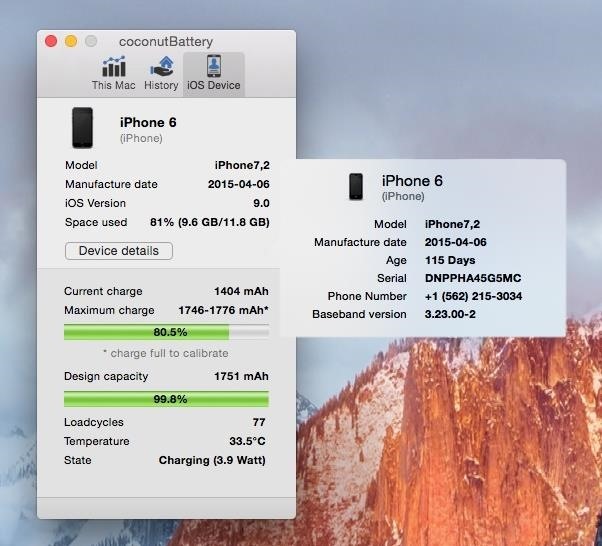
Your iPhone's Charge CyclesYou can also use coconutBattery to check out the amount of charge cycles on your iPhone, which generally requires anywhere between 300 to 500 cycles in order for the battery to diminish down to 80% of its full capacity, in ideal conditions.Since my iPhone 6 is only a few months old (115 days to be exact), the charge cycle is relatively low (77) and my design capacity is at 99.8%, which is ideal. With coconutBattery, I'll be able to keep track of my iPhone's battery in the following months, checking out the design capacity and charge cycle to make sure that my battery is in tip-top shape.Once I notice that my design capacity isn't as high as it used to be, I'll look into taking the iPhone into the Apple Store and getting the battery (or entire phone) replaced thanks to AppleCare (or your insurance).
Tips to Prolonging Your Battery's HealthWhile batteries will diminish over time, Apple has several tips which you can use on both your Macbook and iPhone in order to maximize your battery's lifespan.Minimize charge cycles by using your device while charged. Update to the latest operating system as they often include features that save energy, thus helping your battery out. Try to avoid exposing your device to extreme temperatures—the ideal temperatures are anywhere between 62° to 72°F (16° to 22°C). Remove the case from your device while charging as certain cases can incubate immense heat, negatively impacting the battery. Keep your device charged at 50% if you plan on turning it off and storing it for a long period of time, like for a vacation. If you store a device when the battery is depleted, it can fall into a deep discharge state, which won't allow you to charge it. On the other hand, if you store it fully charged,the battery could lose capacity, causing it to have a shorter battery life. Also, if you're using iOS 9, make sure to take advantage of Low Power Mode to get up to 3 hours more battery power every day. For more tips on getting more out of your iPhone battery, check out our full guide here.Follow Apple Hacks over on Facebook and Twitter, or Gadget Hacks over on Facebook, Google+, and Twitter, for more Apple tips.
I assure you, Siri, it's nothing personal. Mobile Leer en español Get rid of Siri App Suggestions on your iPhone's lock screen. I assure you, Siri, it's nothing personal.
How to Disable Lock Screen Security While in Trusted
Have a load of games you want to play, but don't want to be seen in public playing on your old school Nintendo DS system? Play them on your Samsung Galaxy Note 2! Now, I've already covered how to play N64, GBA, and SNES games on your Galaxy Note 2, so it only makes sense to continue my gaming series with the Nintendo DS portable console.
Play N64 (Nintendo 64) Games on Your Samsung Galaxy Note 2
When Google finally gave us a dark theme for YouTube, it was a bit disappointing. They didn't use a pure black background, reducing some of the battery savings you'd get with an OLED panel. But with the help of another app, we can fix this, and not only get a real dark mode, but other colors as well
How to Get an Automatic Light & Dark Theme on Android
The new iOS 11 update provides an easy software-based solution to shut down your iPhone in case the power button, officially known as the Sleep/Wake button on all iPhone models except the iPhone X, goes bonkers. In addition to this, there's also a hidden setting that lets you instantly restart the
How To Restart An iPhone Without The Power Button [iOS 11]
How to Change Your Boot Animation [HTC One] Full Tutorial:
Finally you can check your offline enabled documents by clicking the Gear icon and from the drop down menu choosing "View offline Docs" To access your Google Drive Docs for edit in offline go to Chrome New tab when there is no internet connection and click on the Google Drive web app. Update: Enable Google Docs Offline Edit Mode
How Do I View and Edit Google Drive Documents Offline?
Apple's new iOS 13 software was unveiled at WWDC 2019 yesterday and now Apple has released iOS 13 beta 1 to developers. Apple has also released their first beat of iPadOS to developers as well
iOS 8.1.1 Beta 1 Released to Developers
osxdaily.com/2014/11/03/ios-8-1-1-beta-1-released-to-developers/
Apple has released the first beta of iOS 8.1.1 to those participating in the iOS Developer program. The update arrives as build 12B432 and is said to include multiple bug fixes, as well as performance improvements for the iPad 2 and iPhone 4S. Being a minor release, it is unlikely that iOS 8.1.1 will include any new features.
The iPhone X lock screen has two default buttons, one is Camera and other is flashlight. Is there any way to remove/customize the flashlight shortcut? I could not find any solution for it anywhere.
How to Remove Widgets from Your iPhone's Lock Screen « iOS
Google Assistant's Fantastic Beasts Voice Commands Turn Your
A step by step guide to creating and installing your own custom boot animations on Android. Head over to
How to Increase Performance for Individual Apps on Your
If you have a USB cable that fits your phone, attach that, and your phone will detect any images and download them, via the media section on your old phone, onto your laptop. Then it should store them on a file, which you can transfer over to your pictures folder.
You can share photos, videos, albums, and movies with anyone, even if they don't use the Google Photos app. In a shared album, each person can add photos and videos until the album reaches 20,000 total items. Note: If you have a large album, some features may not be available. After you share, you can stop them from seeing the album.


0 comments:
Post a Comment