How To: Add Fade-Ins, Fade-Outs & Fade-Through Transitions to iMovie Projects on Your iPhone
By default, iMovie for iPhone adds a dissolve (also called a crossfade) in between all of the video clips in your movie project's timeline, which is an effect that transitions gradually from the end of one clip to the beginning of another. However, iMovie does not add any beginning transitions to your first video clip or ending transitions to your last video clip. But that doesn't mean you can't.While films can start or end abruptly with no transition, many fade in from black to the first shot in the video and fade to black on the last image. It's similar to a dissolve, but instead of transitioning between two different video clips, it's just a transition from one clip to a blank screen, usually black.Don't Miss: How to Create a New Movie Project in iMovie for iPhone Apple's iMovie makes it easy to add these beginning and ending transitions to your movie project. Also, unlike other video editors such as Adobe Premiere Clip, you can add fades-throughs in between video clips. These transitions will fade the first clip out to black or white, then fade in from black or white to the next clip in the timeline.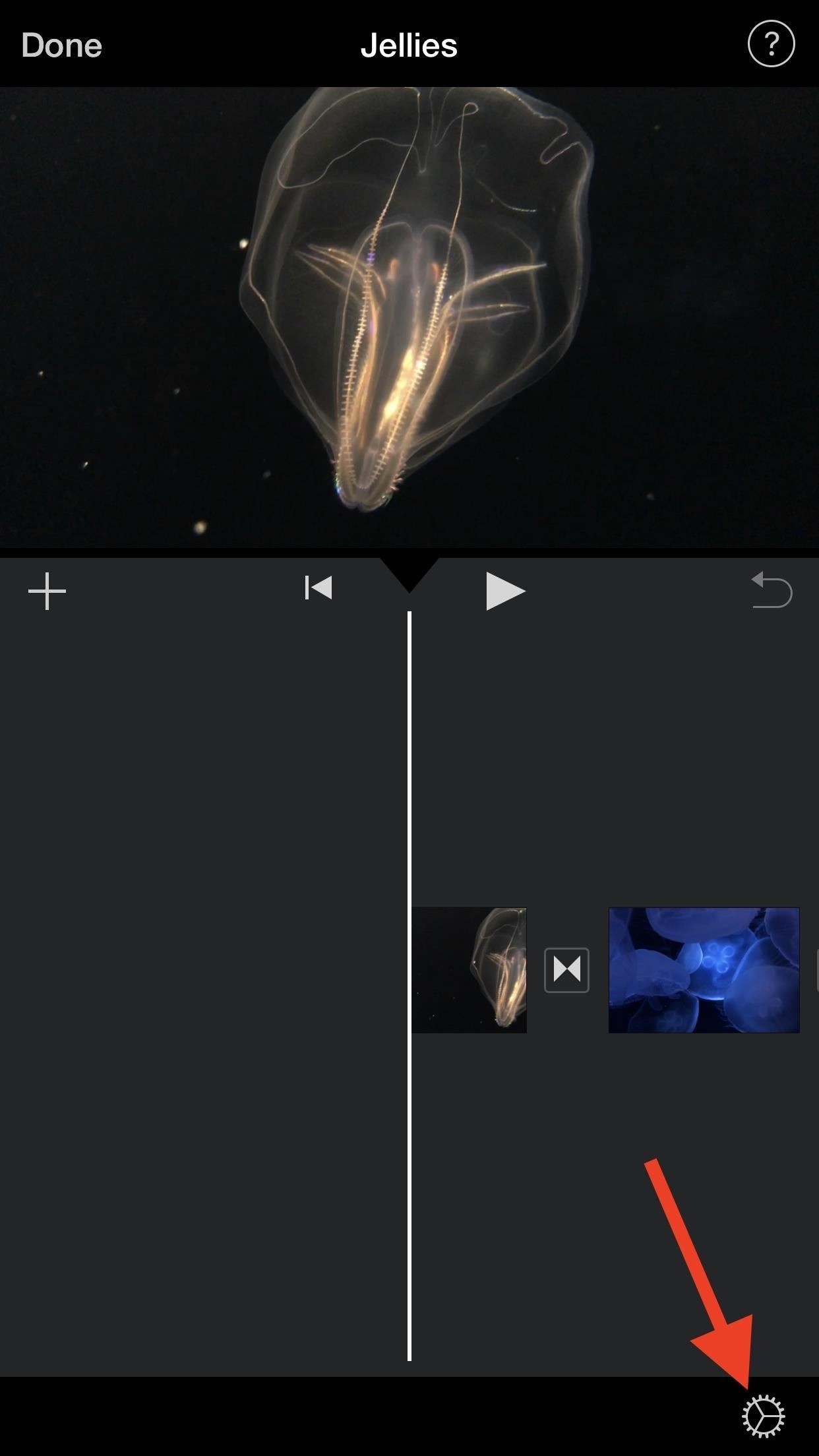
How to Add Fade-Ins & Fade-Outs to Your Movie ProjectFirst, let's cover the most straightforward option: adding a fade in from black or fade out to black for your entire movie project. In your movie project, tap on the cog then toggle on either "Fade in from black" or "Fade out to black." You can also select both if you want. Tap "Done" to finish up. Below, you can see a few examples of a short movie project without the fade-ins and fade-outs (left side) and with them applied (right side). Unfortunately, the effect happens quickly, and there's no way to control the speed of the fade-in or fade-out transition like you can in apps such as Videoleap. Don't Miss: How to Add More Photos to Your iMovie Project on iPhone
How to Add Fade-Throughs in Between Video ClipsWhile dissolves (crossfades) are suitable for indicating a short amount of time has passed in between clips, fade-throughs are useful for when a more significant amount of time has passed or for transitions in between acts. Really, you can use either of these for any reason you think is cool and looks good, so play around and see what works best.Since iMovie automatically adds a dissolve transition in between every video clip you add to the timeline, all you have to do is tap on the transition you want to change, then select "Fade" from the list of effects.One tap on "Fade" (the first dot highlighted on the icon) will make the clips fade through black, i.e., make the first clip fade to black and the next clip fade in from black. Two taps on the "Fade" button (the second dot highlighted) will make it white instead of black. While in this menu, you can change the duration of the transition from the default one second to 0.5, 1.5, or 2 seconds. Half of it will apply to the end of the first clip, and the other half will apply to the beginning of the second clip.Below, you can see a black fade-through applied in between two video clips (on the left side) and a white fade-through instead (right side). They have two very different outcomes.Additionally, the "Fade" transition comes equipped with its own "Hollywood-style sound effect," as Apple calls it, which can be activated from the inspector at the bottom when the transition is highlighted — just make sure the speaker icon looks like it's playing audio. It's not the best sound in the world, but it's there if you want. While Apple does include fade options in iMovie, you can't have a lot of control over them. For total customization of transitions, Videoleap is an excellent app to check out.This article was produced during Gadget Hacks' special coverage on smartphone-based video creator tips for filming and editing. Check out the whole Videography series.Don't Miss: How to Add More Videos to Your Movie Project in iMovie for iPhoneFollow Gadget Hacks on Pinterest, Reddit, Twitter, YouTube, and Flipboard Sign up for Gadget Hacks' daily newsletter or weekly Android and iOS updates Follow WonderHowTo on Facebook, Twitter, Pinterest, and Flipboard
Cover photo, screenshots, and GIFs by Justin Meyers/Gadget Hacks
You can use most QR-code apps for reading bar codes, too, which can be convenient for in-store price checks. Scanning a product's bar code with RedLaser will bring up an item description, as
How to use a QR code barcode reader with a mobile phone - YouTube
Apple first added the "Do Not Track" option to Safari in iOS 7, which sent a request to site owners and advertisers to not track your browsing activity. By tracking your activity, those third-parties could tailor content to you that you're more likely to interact with.
Apple to remove Do Not Track option from Safari in iOS and
Over 4 Million Snapchat Accounts Have Been Compromised—Is
How to Use Wii U Pro Controller on Iphone Ipad and Ipod Tech Muse. a suggested video will automatically play next. Up next 10 Video Game Controller Facts You Probably Didn't Know
Use your Smartphone as Wii-like Motion Controller to Play
techawakening.org/use-smartphone-as-motion-controller-to-play-browser-games/1602/
Find out how to use your iPhone and Android phone as Wii-like motion controller to play browser based games with Brass Monkey, video game console.
Get the Wii U Experience with the Smartphone You Already Have
Go to Settings, and then tap Personalize. Under Sound, choose different sounds for your ringtone, system notification, and alarm. Go to the Messages, Mail, and Calendar apps to choose sounds for new messages, email, and event reminders respectively.
Well, the method is a bit elaborated and maybe a bit unorthodox, to begin with, but it works. Sadly, it works only for the numerical password. Open RAR File without Password with RAR Password Recovery (Best Method) If using Notepad to open password protected RAR file seems too complicated, you can always use a professional, RAR Password
How to Remove Password from RAR File without Software
In this video from rscp1050 we learn how to SSH into a jailbroken ipod touch or iphone. First go into Cydia and search for SSH. How To: SSH into an iPod Touch 2G
iPod Touch Jailbreaking Info: How to SSH
Search the world's information, including webpages, images, videos and more. Google has many special features to help you find exactly what you're looking for.
How to master Google Photos - The Verge
Apple is expected to unveil iPhone 6s and iPhone 6s Plus on Wednesday, September 9, with a possible release date of September 18. If you intend to the buy iPhone 6s or iPhone 6s Plus then here's how to find out your upgrade eligibility status for Sprint, AT&T, Verizon or T-Mobile.
Are you eligible for an iPhone 6 upgrade? Here is how to find out
Phones Why you might want to disable iOS 10's lock screen widgets. The new lock-screen widgets in iOS 10 are undoubtedly convenient but they can open your iPhone to prying eyes.
How to Stop Suggested Apps Appearing on Lock Screen of iPhone
osxdaily.com/2015/04/18/turn-off-suggested-apps-ios/
Whether it's to keep things uncluttered on the locked screen of a device, because you don't use the feature, or because you don't want to have the location usage potentially impacting battery life, you can easily turn off suggested apps in iOS. This will completely stop them from appearing on the lock screen of your iOS device.
iPhone alerts, badges, and banners—what's the difference?
It only takes a minute to steal a U.S. Election! So, vote for your new president, and everybody else's new president by hacking away that Diebold ETS voting machine.
How to Hack a Diebold electronic voting machine « Hacks, Mods
Root Nexus 6P Android 8.0 OPR5 Details: This update only brings a newer security patch with some bug fixes however, you can read about the changes of Android 8.0 Oreo right below. Android 8.0 Oreo brings several new features to the Android platform. Unfortunately, Nexus 6 has been dropped from official support by Google.
How to root Android 8.0 Oreo with SuperSU zip or Magisk


0 comments:
Post a Comment