How To: Speed Up Browsing in Google Chrome with Kernel Adiutor
The Google Chrome browser does mostly everything well and integrates nicely with other Google services, but it's not exactly renowned for speed. With a rooted device and the aid of an app called Kernel Adiutor, however, you can make Chrome as nimble as some of the fastest browsers on the market.With root access, Kernel Adiutor can modify how your device handles TCP Congestion, which can significantly improve browsing speed, especially for secure websites. This is because the handling of TCP congestion is one of the primary causes for browser lag. So below, I'll show you how to quickly modify the pertinent settings in Kernel Adiutor, then change a specific Chrome flag to further increase browsing speed for certain scenarios.Don't Miss:10 Speed Hacks That'll Make Chrome Blazing Fast on Your Computer
Requirementsrooted Android device Android 4.0.3 or higher Google Chrome installed
Step 1: Install Kernel AdiutorFirst up, you'll need to install Kernel Adiutor — and no, that's not misspelled, Adiutor is Latin for "Helper." So to get started, head to the link below and install the app on your device.Install Kernel Adiutor for free from the Google Play Store After installation, there's no real setup. The only thing you'll need to do in order to use the app is tap "Grant" on the Superuser request, so make sure to take care of that when prompted.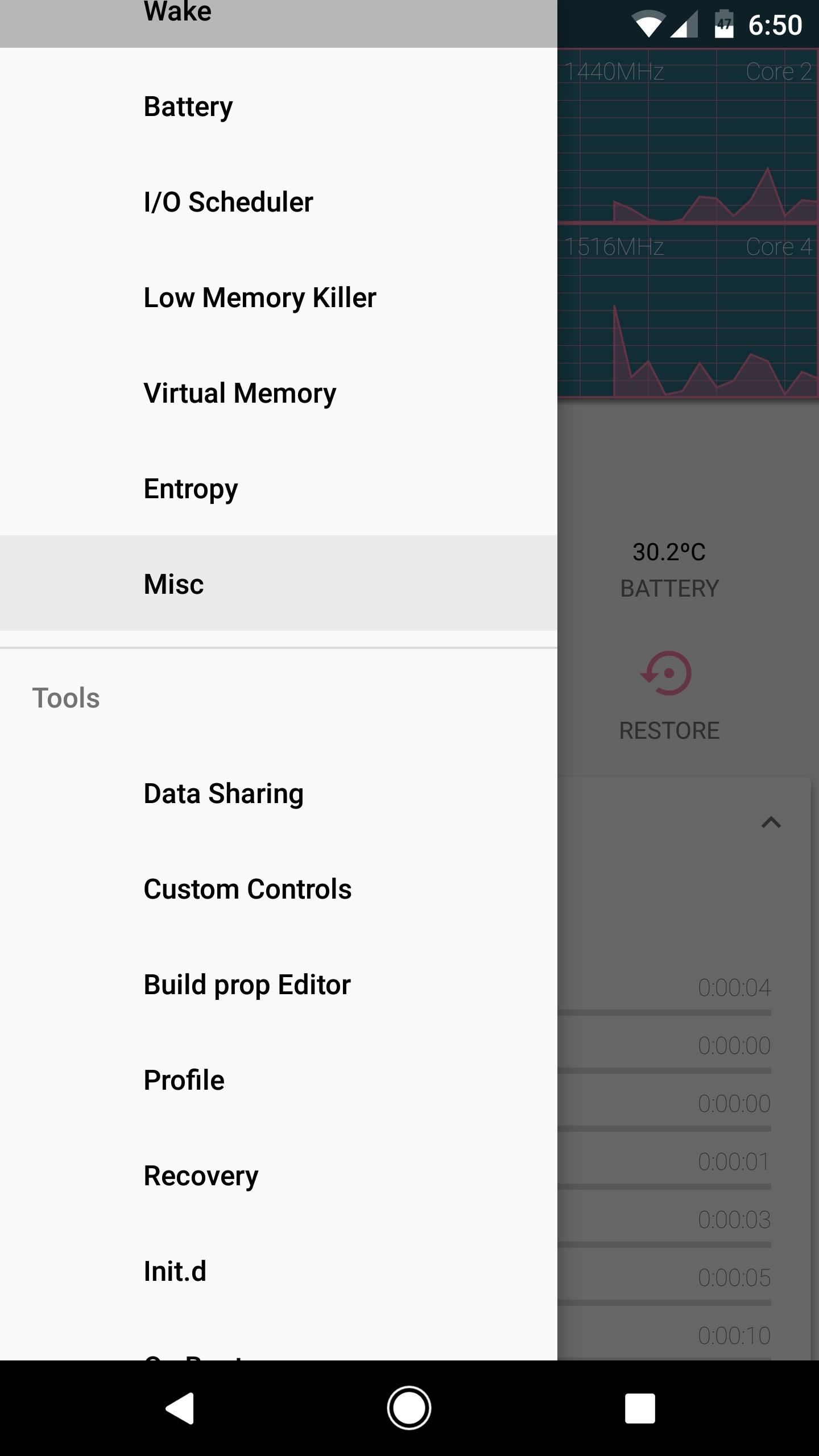
Step 2: Change the TCP Congestion SettingsOnce inside the app, you'll be taken to the main dashboard that provides a readout for processor usage. The information is useful and you will surely find several modifiable settings, should you go exploring. However, our focus will be strictly on improving networking processes.To modify the network settings, head to the side navigation menu, then scroll down a bit and tap the "Misc" link. From here, make sure the "Apply on boot" switch is enabled at the top of the screen. After that, tap "TCP Congestion Algorithm," then choose "cubic" from the list.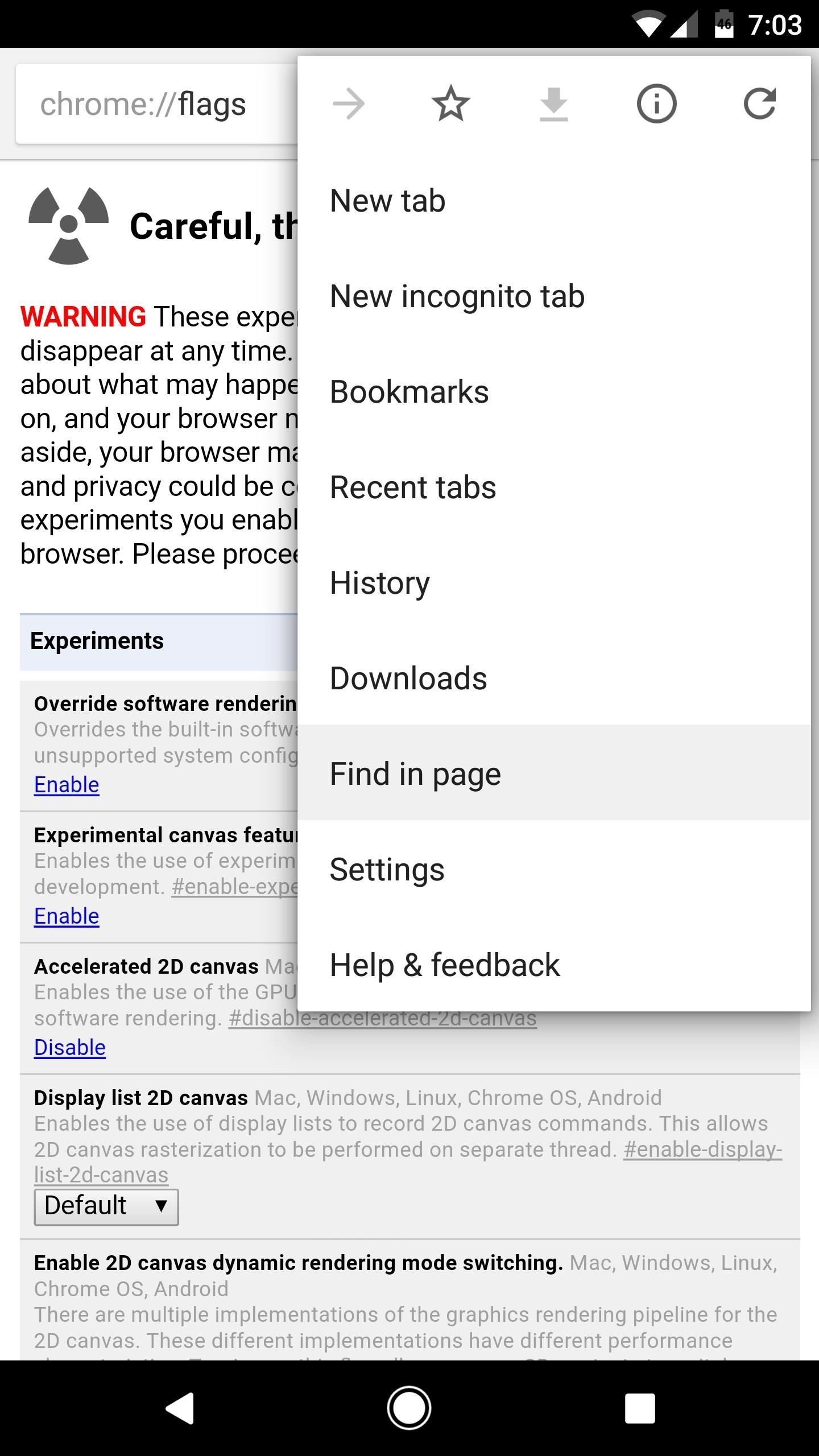
Step 3: Modify the TCP Setting in Chrome FlagsNow open Chrome and type chrome://flags into the address bar, then hit enter on your keyboard. After that, tap the three-dot menu button and choose "Find in page," then search for "TCP Fast Open." From here, tap the "Enable" link directly beneath the highlighted setting, then press the "Relaunch Chrome" button that will appear at the bottom of the screen. Once you've done that, you'll be all set to go. At this point, all of your browsers should move noticeably faster, but when you're navigating through secure sites on Chrome, you should notice a fair amount of improvement on most devices. Has this trick improved your browsing experience in Chrome? Let us know in the comment section below.Follow Gadget Hacks on Facebook, Twitter, Google+, and YouTube Follow Android Hacks on Facebook, Twitter, and Pinterest Follow WonderHowTo on Facebook, Twitter, Pinterest, and Google+
Cover image and screenshots by Dallas Thomas/Gadget Hacks
How to turn your road trip into the ultimate scavenger hunt Selfie stick and other tech gadgets you should pack for your next vacation. Road trip scavenger hunt items: Footwear News BGR
Solitaire Treasure Hunt - Home | Facebook
In iOS 12, this functionality also appears when sending a quick-reply message, and it works the same way. Don't Miss: The Top 10 New Features in iOS 12's Messages App for iPhone; Whenever you receive a text notification on your lock screen, press it using 3D Touch (or just tap it on an iPhone SE or 5S) to fast reply.
How to Secretly Send Text Messages in Class or at Work
Yes, there's a way for you to get translations of foreign language websites on your iPhone using the built-in Safari app. Problem is, it's not super obvious. Actually, you'd never know the option was there if someone didn't tell you. But with a little setup on your part, you can have Safari
How can Firefox convert a webpage in a foreign language into
News: Every App Icon Change Apple Made on Your Home Screen in iOS 11 How To: Move Multiple Home Screen Apps at Once How To: This Mod Gives You Custom Icon Packs & More on the Pixel Launcher How To: Get Your Regular Dock Icons Back on Android Pie's Multitasking Screen
There's nothing worse than when you come up with a brilliant idea while you're busy with other things and then promptly forget it. Whether it's the perfect ending for your novel or a comeback you should've said during that argument with your roommate last week, it's always annoying.
How to Make a Solar-Powered Fan Hat - Gadget Hacks
How To: Save Custom Shooting Presets in Filmic Pro So You Don't Have to Adjust Settings Later for Similar Shots How To: Play 'The Sims Mobile' on Your iPhone or Android Right Now How To: The Safest Way to Disable ALL Bloatware on Your Galaxy S10
How to Delete All Your Personal Settings in I-Cockpit « Car
How to make a homemade anti-gravity toy - Is it real??? Zeeshan Shafiq. Anti-Gravity Water Amazing Magnetic anti gravity Toy - levitron casero - Duration:
How to make a homemade anti gravity toy - YouTube
How to Disable the Camera Access from the Lock screen in iOS 11 or Earlier To prevent Camera access from the Lockscreen of your iPhone, make sure you have enabled Restrictions on your device . Step #1.
iOS 12 prevents screenshots and Lock screen camera access
News: iOS 11.4.1 Beta 4 Released for iPhones, Includes Only 'Bug Fixes' & Unknown Improvements News: Apple's iOS 12.1.3 Public Beta 2 for iPhone Released to Software Testers News: Apple Releases iOS 12.1 Beta 1 to Public Software Testers, Reintroduces Group FaceTime to iPhones
Apple Releases iOS 12.3 Beta 5 for iPhone to Developers
If you've ever attempted to remove Cydia apps from your iPhone or iPod Touch using the traditional long-touch method, you will have quickly discovered the Cydia-distributed applications have no 'X' to delete them. Watch this short video to understand the correct way to remove Cydia apps.
Cydelete- Delete Cydia Application Right Off SpringBoard on
Need the video embed code to get your YouTube videos to automatically start playing? In this video, Mark Porter Live shares step-by-step instructions on how to get your embedded YouTube videos to
How to Autoplay Embedded YouTube Videos on your page
How to Install Facebook Lite App on Your Mobile Phone 2019
The beta firmware for OnePlus devices lets you record calls from the stock Oxygen OS dialer, but this feature is never included in official updates. This is likely due to legal issues with recording calls in some jurisdictions, but thankfully, there's a way to get this feature without having to run beta software.
16 tips for shooting better video on Android | AndroidPIT


0 comments:
Post a Comment